Global Information Assurance Certification Paper - GIAC Certifications
←
→
Page content transcription
If your browser does not render page correctly, please read the page content below
Global Information Assurance Certification Paper

                           Copyright SANS Institute
                           Author Retains Full Rights
  This paper is taken from the GIAC directory of certified professionals. Reposting is not permited without express written permission.

Interested in learning more?
Check out the list of upcoming events offering
"Security Essentials Bootcamp Style (Security 401)"
at http://www.giac.org/registration/gsec
A Practical Social Media Incident Runbook
                            GIAC (GSEC) Gold Certification

                         Author: Trenton Bond, trent.bond@gmail.com

                                 Advisor: Dr. Hamed Khiabani

                                           Abstract
Enterprise business strategy often includes the use of third party social media services
such as Facebook, Twitter, LinkedIn, and Youtube to establish brand reputation, relay
information, and solicit customers. These social media services now represent new security
risks for organizations and a valuable target for attackers. Responsible organizations use
pre-established incident handling procedures for data breaches, phishing attacks, and
DDOS attacks but may not have a social media incident runbook. Each of the six phases of
the incident handling process can be analyzed from the perspective of a social media
security incident and used to construct a runbook. Like other security incident runbooks,
when a social media incident runbook has been specifically tailored to the organization's
environment it will be a critical guide to deal with future social media security incidents.
A Practical Social Media Incident Runbook            2

1. Introduction
        In the course of a few short years, social media has clearly become a valuable marketing
and communication tool in business strategies. Tina McCorkindale, Ph.D. Assistant Professor
from Department of Communication at Appalachian State University, recently studied the
strategic use of social media among Fortune 250 companies and "found that 91% of the companies
utilized at least one social media platform. YouTube was the most commonly adopted social media
service followed by Twitter then Facebook." Perhaps even more compelling is that more than 80%
of small to midsized businesses intend to increase social media use in 2013 (Pick, 2013).

        This growing social media landscape represents a relatively new cyber battleground for
attackers and organizations. Nearly everyday it seems there are new reports of well-known brands
and organizations that have fallen victim to a social media account compromise. Some of these
incidents have had seemingly mammoth  repercussions  such  as  when  the  Associated  Press’  Twitter
account was compromised on April 23, 2013. An attacker was able to gain control of the account
and tweet that there had been explosions in the White House and that U.S. President Barack
Obama had been injured. Of course the claim was quickly identified as false, but not before the US
Stock Market “fell  about  1  percent  …  briefly  wiping  out  $136  billion  in  value”  (Lee, 2013). Other
social media compromises appear to be less impactful but still embarrassing for the businesses
involved. For example, the Burger King Twitter account was compromised on Monday February
18, 2013 followed the next day by a compromise of the US car brand Jeep. This led to a
lighthearted tweet  by  Jeep  to  Burger  King  saying,  “Let  us  know  if  you  want  to  grab  a  burger  and
swap stories – we’ll  drive” (@Jeep February 19, 2013).

        In the latest revision of the Computer Security Incident Handling Guide the U.S. National
Institute of Standards and Technology (NIST) suggests that  “containment strategies vary based on
the type of incident. For example, the strategy for containing an email-borne malware infection is
quite different from that of a network-based DDoS attack. Organizations should create separate
containment strategies for each major incident type, with criteria documented clearly to facilitate
decision-making”  (Cichonski, 2012). As recommended by NIST, most organizations likely have
specifically-designed containment strategies, or runbooks, for assisting with certain incident types
like DDOS attacks, phishing attacks, and malware infections. However, does the organization
have a social media incident runbook to successfully guide the business through a high stakes

Trenton Bond, trent.bond@gmail.com
A Practical Social Media Incident Runbook 3
social media account compromise?
When the six phases of the security incident handling process are analyzed from the
perspective of a social media account attack, they can facilitate a practical social media incident
runbook (Skoudis, 2008):
Preparation
Identification
Containment
Eradication
Recovery
Lessons Learned
The following analysis and sample runbook is meant to be a customizable framework for security
incident handlers. The documented strategies will assist organizations who are preparing for a
potential social media security incident and may provide containment ideas for organizations
already dealing with an active incident.
2. Preparation Phase
For many organizations, the management and operations of enterprise social media
accounts are handled outside the IT division in departments such as public relations or human
resources. This means information about what social media services are subscribed to, who
manages them, and how they are managed can be largely unknown and undocumented. This
common situation potentially makes preparation the single most important aspect of a social media
incident runbook. For example, if an organization's Twitter account credentials are compromised,
the incident handler would need to answer expeditiously where the same username and password
are used. What other enterprise social media presence could also be compromised? Who is the
administrator and are the devices they use the source of the compromise? How should the
organization respond? "Incident response always begins with the steps taken to protect the
organization's information resources before an incident takes place" (Lucas, 2004). Answering as
many of these questions upfront before an incident can significantly decrease frustration for the
organization and shorten the time attackers have to further cause damage to the brand or business
reputation. Key preparation tasks for a social media incident runbook include:
Trenton Bond, trent.bond@gmail.com
A Practical Social Media Incident Runbook 4
Inventory Authorized Social Media Services
Inventory Administrator Contact Information
Inventory Administrator Authorized Devices
Document Account Management Processes and Practices
Document Incident Response Team Contacts
Prepare Incident Notification
2.1. Service, Contacts, and Device Inventories
The initial inventories of social media services (see Table 1), administrator contact
information (see Table 2), and administrator authorized devices (see Table 3) are the first critical
elements of the preparation phase of the runbook. Enterprises most commonly utilize social media
services are Twitter, Facebook, and Youtube. However, consider looking beyond these well
known services for other social media sites such as Linkedin, Pinterest, blogs, etc. to include in the
service inventory. Likewise, the administrator inventory should include not just the administrator
but also any moderators who may also have access to the account. Finally, the authorized device
inventory should include hardware and software used by the administrators (or moderators) to
access the social media account including laptops, mobile devices, browsers, and third party
applications. The organization (incident handlers in particular) need to clearly understand what
and whom they are protecting as it is impossible to defend the unknown.
Authorized Social Service Support Phone/ Account Username Email Account Used to
Media Service Email Register Service
650-543-4800 smrunbook mary@hi.com
Facebook
abuse@facebook.com
https://support.twitter.co @smrunbook tw@hi.com
Twitter
m/orms/login_problem
Table 1
Trenton Bond, trent.bond@gmail.com
A Practical Social Media Incident Runbook 5
Authorized Social Authorized Admin/ Moderator Notes
Media Service Administrator/ Contact Info
Moderators
Mary (admin) 310-555-5551 Travels
mary@hi.com
Facebook
Jack (moderator) 310-555-5552 Office Downtown
jack@hi.com
Jim (admin) 310-555-5553 Hawaii Time Zone
Twitter
jim@hi.com
Table 2
Authorized Authorized Device Type Device Information Third Party
Administrator/ Applications
Moderators
MacBook Pro OSX 10.8.2 Safari
Serial # AAA-AAAAA
Mary IP Address: 10.1.1.1
(Facebook Admin) MAC Address:
iPhone 5 iOS 6.1.4 Facebook App
310-555-6767
Dell Inspiron Windows 7 IE 9
Jack Serial # AAA-AAAAA Mozilla Firefox
(Facebook Moderator) IP Address: 10.1.1.1 Hootsuite
MAC Address:
MacBook Pro OSX 10.8.2 Safari
Jim Serial # AAA-AAAAB Tweetdeck
(Twitter Admin) IP Address: 10.1.1.2
MAC Address:
Table 3
2.2 Account Management Processes and Practices
Interviewing the social media account administrators during the preparation phase can also
generate helpful information while preparing for and documenting the preparatory elements of an
incident runbook. Below are a few questions to consider and document with regards to account
administration and password management practices:
What is the process used to manage enterprise social media accounts? Can posts or content
changes be made from hotel kiosks or only from approved authorized devices? Besides
administrators, are there others who also have access to the social media accounts?
What third party applications are used to manage social media?
What is the documented process is for password management? Where are passwords
stored, how strong are they, who has access to them, and what email account was used to
setup the social media site? Is the password for the social media account the same as the
Trenton Bond, trent.bond@gmail.com
A Practical Social Media Incident Runbook      6

       administrator’s  corporate  account? Are the passwords for each social media account
       unique?

2.3    Incident Response Team Information

       Besides the contact information for administrators and moderators collected in the general
inventory, the runbook should include a list of other important contacts that may need to be
notified of a social media security incident (see Table 4). For example it may be necessary to
contact the local FBI office, law enforcement offices, public relations, security sponsor,
management, or legal counsel to help respond to the incident.

           Name                     Role                  Phone #s                   Email
 Michael                  CISO                     310-555-1111             mike@hi.com
 Frank                    FBI                      310-555-6666             frank@fbi
 Jerry                    Legal Counsel            310-555-9999             jerry@law.com
 Susan                    Public Relations         310-555-8888             susan@hi.com
Table 4

2.4    Incident Response Notification

       Handlers preparing the incident runbook should be careful to include non-technical
business units during the preparation phase, particularly when tackling incident notification. The
Information Security Management Handbook indicates that "business functions are typically not
accustomed to dealing with computer issues and may be uncomfortable providing input or making
decisions if 'thrown into the fire' during an actual incident" (Tipton, 2003). Most businesses will
want to eventually acknowledge a security incident. The public relations division will likely be
responsible for crafting the notification while legal counsel will be responsible for approving the
notification. Working with these business units to develop and approve an incident response
notification before an actual incident can save valuable time during the pressures of containment
and recovery. Below are a couple of examples of messages shared by Burger King, Jeep, CBS, and
the Associated Press soon after they recovered from Twitter account compromises. They appear to
range from very formal, well thought out responses to less formal, spontaneous responses.

       "It has come to our attention that the Twitter account of the BURGER KING® brand has
       been hacked. We have worked directly with administrators to suspend the account until we
       are able to re-establish our legitimate site and authentic postings. We apologize to our fans
       and followers who have been receiving erroneous tweets about other members of our

Trenton Bond, trent.bond@gmail.com
A Practical Social Media Incident Runbook   7

       industry and additional inappropriate topics."

               — Burger King (@BurgerKing) February 18, 2013

       “Hacking:  Definitely  not  a  #Jeep  thing.  We’re  back  in  the  driver’s  seat!”

               — Jeep (@Jeep) February 19, 2013

       “Our  Twitter  account  was  compromised  earlier  today.  We  are  working  with  Twitter  to
       resolved.”

               — 60 Minutes (@60Minutes) April 20, 2013

       "The @AP Twitter account has been suspended after it was hacked. The tweet about an
       attack on the White House was false."

               — Associated Press (@AP) April 23, 2013

       Regardless of the formality or tone of the incident notification, having a prepared
pre-approved message to publish, reassures social media followers that the enterprise takes
security seriously. Customers can be quickly informed that appropriate actions to remediate the
situation are underway. Additionally and maybe more importantly, preparing this message
beforehand gets the non-technical stake holders thinking about information security and the
potential risks of using social media before there is an actual incident.

3. Identification Phase
       After taking steps to prepare for a social media security incident, the next step in the
incident handling process is to identify a compromise. "The goal of the identification phase is to
gather events, analyze them, and determine whether there is an incident" (Skoudis, 2008). The
nature of current social media services is that there may be little event data available for
identifying events of interest. Traditional log or event data that would normally be analyzed to help
identify an incident is often inaccessible, nonexistent, or limited in detail for social media
customer consumption. However, there are still peripheral indicators or residue that can be used to
quickly and effectively identify a social media security incident.

3.1    Common Indicators of Compromise

       Twitter suggests some simple indications that a customer may use to determine if an

Trenton Bond, trent.bond@gmail.com
A Practical Social Media Incident Runbook 8
account has been compromised (Twitter, 2013):
“Have you:
Noticed unexpected Tweets by your account
Seen unintended direct messages (DMs) sent from your account
Observed other account behaviors you didn't make or approve (like following,
unfollowing, or blocking)
Received a notification from us stating that ‘You recently changed the email address
associated with your Twitter account’ (even though you haven't changed your email
address)”
The spirit of these indicators can be applied to any social media service the enterprise
subscribes to and are essential in an incident handling runbook. The administrator can help the
incident handlers quickly identify arrant, unintended, nefarious social media posts, or comments
that are clearly indications of compromise. For example, the Burger King Twitter account was
used to publish tweets related to a well-known hacktivist group Anonymous while the CBS twitter
attack included tweets with suspicious links. Likewise, the administrator’s inability to login to the
account, detection of unexpected changes to the account profile, or notification that the account
email address has changed are all warning signs. These events alone should provide the handler
with information needed to quickly declare an incident.
3.2 Other Indicators of Compromise
With a little creativity, there are additional triage tasks that can also provide clues and
indications of a social media incident. Take for example social media compromises that were the
result of an intruder obtaining unauthorized access to the account through stolen credentials. How
were they obtained? Did the administrator click on a phishing link and give up their credentials?
Was an authorized device used to administer a social media site compromised? To effectively
tackle the identification phase it is imperative to have the incident runbook look beyond the
obvious indicators and evaluate behaviors associated with the administrators themselves and the
devices they use to access the account. The following account activity, administrator activity, and
device activity reviews should be part of a social media incident runbook.
Trenton Bond, trent.bond@gmail.com
A Practical Social Media Incident Runbook 9
3.2.1 Account Activity Review
Using the inventory of authorized devices established in the preparation phase, review any
available authentication related data for suspicious activity. For example, Facebook provides a list
of recent times the account was accessed with the following steps:
Login to account Account Settings Security Settings Active Sessions
Figure 1
Hovering over the session's location information will even provide the specific IP used to access
the account. Are the IP addresses associated with the organization? Are the timestamps
reasonable? Are the application or device types in line with the established authorized device types
documented in the preparation phase?
3.2.2 Administrator Activity Review
a. Did an account administrator fall victim to a phishing attack? Interview social media site
administrators and the messaging team to identify potentially nefarious emails that the
administrators or moderators may have fallen victim to. If an administrator or moderator
was tricked into giving up their credentials, attackers would easily be able to gain
Trenton Bond, trent.bond@gmail.comA Practical Social Media Incident Runbook 1
0
unchallenged access to the social media account.
b. Did the administrator fall victim to a website drive-by attack? Review administrator’s web
traffic for access attempts to malicious or suspicious URLs. If an administrator or
moderator was tricked into visiting a malicious site that installed malware, attackers could
easily log credentials or steal session tokens to gain unchallenged access to the social
media account.
c. What email account was used to register the social media site? If it was a business account,
review the organization’s authentication activity for the account. Are there suspicious
patterns of failed logins or activity? Attackers could have gained access to the social media
account by simply compromising an associated corporate email account.
3.2.3 Administrator Device Review
a. Are there any anti-virus alerts that would indicate the authorized devices used to make
social media posts have been compromised? Malware could be used to harvest credentials
or session tokens and then used to piggyback on established sessions or quietly log in to the
social media site.
b. Are the operating systems and installed applications for the authorized devices identified in
the preparation phase patched appropriately? An attacker may have taken advantage of an
unpatched system or vulnerable application to gain administrative system privileges and
then steal credentials.
c. Are all the authorized devices inventoried in the preparation phase accounted for? Access
may have been obtained through stolen devices with already established sessions to the
social media site.
4. Containment Phase
After an incident is identified through the triage of the identification phase, containment is
then necessary to limit the damage caused by the attackers. "The goal of the containment phase is
to stop the bleeding" (Skoudis, 2008). Initially, the containment objective of a social media
security incident is to prevent further posts. Subsequently, containing is also about preserving data
related to the attack so the business can pursue legal action or assist federal agencies if necessary.
Trenton Bond, trent.bond@gmail.comA Practical Social Media Incident Runbook 1
1
Finally, the containment phase of a social media incident should include longer-term actions to
regain full control of the service and ensure attackers no longer have access to the social media
account. In conjunction with the technical efforts to “stop the bleeding”, an often overlooked step
of containment is also informing management and the business that there has been an incident.
Together these four key steps are critical to a quick and effective containment strategy and should
be an integral part of a social media incident runbook:
Inform Management
Prevent Further Damage
Preserve Evidence
Implement Longer Term Measures
4.1 Inform Management
When a social media incident has been identified, it is imperative to inform a manager,
sponsor, or business executive identified during the preparation phase. Often, enterprise social
media presence is highly visible and word will travel quickly if the pubic becomes aware of a
compromise. No one wants to be blindsided regarding business incidents that might make the
evening news, least of all executives and management. Therefore, it is imperative for the runbook
to include a task to notify management or a security sponsor when an incident is declared. The
social media incident handler will find more often than not that they will need senior leader
assistance to gather the response team, notify executives, and prepare responses.
4.2 Prevent Further Damage
The information collected during the preparation and identification phases will be vital to
the rapid containment of a social media incident and ultimately preventing further damage. For
instance, if the account administrator is unable to reset the password of a compromised social
media site, the incident handlers will likely need the social media service contact information. The
handler can use this information to request the provider’s help regaining control of the account.
The social media runbook should include the following elements to initially stop the bleeding:
a. If the administrator is unable to login or recover the account password, contact the social
media service provider for assistance using the collected details gathered in the preparation
phase. Insist the account be locked so no further changes or access can be attempted.
Trenton Bond, trent.bond@gmail.comA Practical Social Media Incident Runbook 1
2
b. If the administrator is able to access the account, grab a screenshot of active sessions
(where possible) and end suspicious active sessions. Facebook provides this capability in
the “Active Sessions” feature described in the identification phase above. Suspicious
sessions can be terminated by simply clicking the “End Activity” link (see Figure 2).
Figure 2
c. If possible, disconnect compromised devices used to access the social media service from
the network (local network and cellular if using mobile devices).
4.2 Preserve Evidence
Another task in the incident runbook that should not be over looked is that of preserving
evidence of the attack. This information can assist in legal actions or provide local federal agents
with information that may aid in larger criminal investigations. Depending on the size and
publicity of the incident, media outlets may use screenshots in their news articles. This will ensure
that from their perspective historical evidence is preserved. However, incident handlers will not
rely solely on the media community to document the incident. Instead, they will ensure
preservation of details through tasks outlined in the runbook such as the following:
4.2.1 Screenshots of Account Settings and Activity
Where possible take screenshots of account settings, profiles, notification settings,
password settings, activity logs, and lists of third party applications used to access the social media
account (see Figures 3-5).
Trenton Bond, trent.bond@gmail.comA Practical Social Media Incident Runbook 1
3
Figure 3
Figure 4
Figure 5
4.2.2 Timeline of Posts
Capture a sound timeline of account posts that are relevant to the incident. Some social
Trenton Bond, trent.bond@gmail.comA Practical Social Media Incident Runbook 1
4
media services like Facebook provide a built-in “Activity Log” feature (see Figure 6) that allows a
quick review all account posts, photos, likes, comments, etc.
Figure 6
Other social media services, like Twitter, provide a way to request an “Archive” of every tweet
starting at the beginning of the account (see Figure 7).
Figure 7
4.2.3 Forensic Image of Compromised Devices
When devices used by administrators to access the social media account are compromised,
collect a forensic image of the device. This image can be further investigated if necessary in the
eradication phase of incident handling.
4.3 Implement Longer-Term Measures
After steps have been taken to prevent further damage and preserve evidence, measures to
Trenton Bond, trent.bond@gmail.comA Practical Social Media Incident Runbook 1
5
more permanently contain the incident should be addressed in the runbook. For instance,
passwords should be changed; email accounts secured; third party social media management
applications revoked; and vulnerable devices or applications should be patched.
4.3.1 Change Passwords
The single most effective action to regain control of a compromised social media account
is to change the account password. If during the identification phase it was determined that the
account password was easily guessable, it is vital that the incident handler ensure a highly unique,
complex, strong password is chosen. Additionally, the handlers need to ensure the administrator
does not use the same password used for other personal or corporate accounts.
Enable additional login and password reset security features provided by the vendor. For
example, set up Facebook “Login Approvals” (see Figure 8). This feature recognizes authorized
devices and prompts for a code, or second factor, when Facebook does not recognize the device (or
browser). The code is sent via SMS or Facebook application to a mobile device to be used at login.
If an attacker does not have access to a recognized device, they would be prompted for a login code
but would not have it to continue the login.
Figure 8
Some social media providers may even offer features such as “One-Time Passwords” that
could be used until the incident has been fully contained. Facebook offers this service if there is a
mobile device attached to the account. If the mobile device has not been compromised, request
one-time passwords by simply sending “a text message to 32665 with the message otp”
(http://www.facebook.com/help/413023562082171/).
Trenton Bond, trent.bond@gmail.comA Practical Social Media Incident Runbook 1
6
4.3.2 Secure Email Accounts
If the email account used to register for a social media service is compromised, the attacker
can easily circumvent a strong social media password and change it using password recovery
features. Work with the administrator to ensure the email account password used to set up the
social media service has been changed, the email account is not a personal account, the password is
complex, and the password is unique.
4.3.3 Disable or Revoke Third Party Apps
Some social media services such as Twitter and Facebook provide a way to see what third
party applications have access to the social media account. These applications may be vulnerable
to attacks or may handle the account credentials insecurely. Identify each third party application
and disable or revoke. The applications for Facebook are listed in account settings under “Apps”.
They can then be removed by “editing” the application and then clicking on “Remove app” (see
Figure 9). For Twitter, these third party applications are listed under “Apps” in account settings
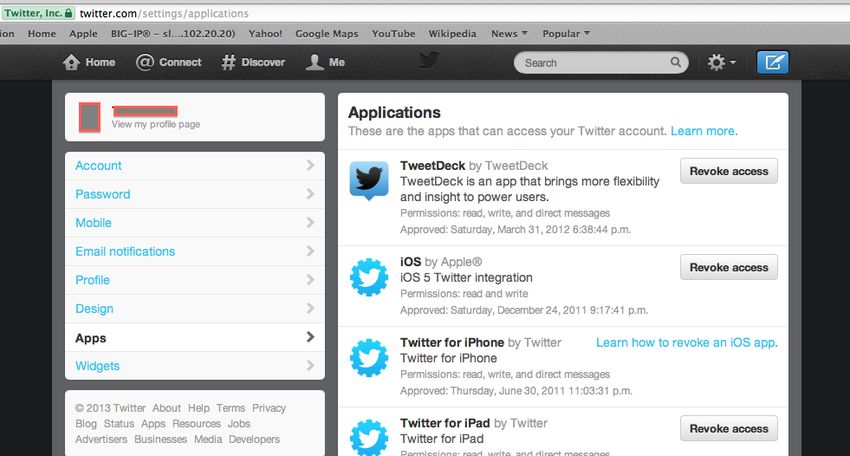
and they can be removed by simply clicking the “Revoke Access” button (see Figure 10).
Figure 9
Trenton Bond, trent.bond@gmail.comA Practical Social Media Incident Runbook 1
7
Figure 10
4.3.4 Secure Devices and Applications
As with other security incidents, the runbook should include specific tasks to review and
patch the operating system of devices used by social media administrators. These tasks should also
review and ensure there is a functioning firewall on authorized devices and that the anti-virus
signatures are up to date. Additionally, there should be a specific task in the runbook to update
potentially vulnerable supporting applications such as Java and Adobe products. Finally and most
important, will be to ensure that the third party applications required to administer the social media
site such as Hootsuite, Tweetdeck, etc. are properly patched and configured.
Incident handlers may find that these four containment steps cannot necessarily be done in
contiguous order and instead may have to be done concurrently depending on the situation. No
matter the order, the important objectives of the containment phase are to “stop the bleeding”,
communicate to management there has been a social media incident, and preserve evidence where
possible.
5. Eradication Phase
Once initial triage has been performed and the “bleeding has stopped”, the cleanup begins.
"The goal of the eradication phase is to get rid of the attacker’s artifacts" (Skoudis, 2008). This
phase of the incident handling process can be somewhat tricky when dealing with a social media
compromise. A traditional deep forensic investigation to identify related residue may not be
possible. However, there are a few obvious tasks in a social media incident runbook that should be
included such as the removal of unwanted posts and malware from infected administrator devices.
In addition, the runbook should also cover the elimination of the more subtle artifacts such as
inappropriate comments made on other sites or tasteless photo uploads. Moreover, any additional
Trenton Bond, trent.bond@gmail.comA Practical Social Media Incident Runbook 1
8
defenses to improve technical security, processes, or technology should be reflected in the runbook
during the eradication phase.
Start the eradication phase by cleaning up unwanted artifacts of the attack in the social
media account including tweets, posts, uploaded videos, etc. For Twitter related incidents this can
be done by going to the account profile, highlighting the tweet in question and then deleting it (see
Figure 11). Unfortunately, for now it is not possible to delete others’ retweets or to delete tweets in
bulk.
Figure 11
With Facebook, status posts can be removed by logging in and navigating to the account profile.
Review the account timeline and find the posts that need to be removed (see Figure 12). Then click
“delete”.
Figure 12
Care should be taken by incident handlers to be thorough during the eradication phase. Not
only should obvious residue be sifted out but also the more subtle artifacts such as comments,
photo uploads, and follows should be examined. An unidentified or overlooked inappropriate
Trenton Bond, trent.bond@gmail.comA Practical Social Media Incident Runbook 1
9
image or a highly charged political comment could lead to further embarrassment for the
organization after an incident. In the social media incident runbook, include specific tasks to
review all uploaded images, comments made from the account, as well as accounts being followed.
Remember that removing all social media artifacts related to the incident is likely not
practical. If the media picked up on the compromise or others reposted the attackers residue, the
incident handlers will have to do their best to remove residue from the account. However it may
not be possible to remove other posts, comments, etc. about the incident.
Besides cleaning up the social media account residue, runbook tasks should also include
the removal of unwanted items from the administrator’s corporate account and authorized devices.
For example, any malicious or suspicious emails such as phishing emails that may have been
instruments that led to the social media incident should be deleted. Additionally, include tasks to
identify and filter nefarious web links that may have been sent during the attack. This will ensure
they are not accidently used again or maliciously sent to another administrator.
Defense improvements should further be added while eradicating artifacts. If
administrators were tricked into clicking links or installing malware, additional steps to sanitize all
compromised devices are also required. Incident handlers should consider, rather than trying to
dissect the forensic image to identify every attack artifact, to instead re-image the infected devices
and apply hardened configuration baselines. Moreover, the anti-virus solution applied to
administrator devices should be reviewed to ensure signatures are updated regularly. Lastly, scan
the administrators’ devices and loaded applications for vulnerabilities or misconfigurations that
can be taken advantage of.
Less obvious tasks that may help improve defenses:
a. Have the social media administrators create and use a separate corporate email account
specific for the use of social media administration.
b. Encourage the corporate messaging team to dial up the scoring of email phishing detection
for social media related email accounts. This may increase the number of detected false
positives but it will also help prevent phishing attacks that can lead to future compromises.
c. Have the social media admins set an account security question (where possible). If given
the opportunity to create a unique question, assist the admins with selecting a good
Trenton Bond, trent.bond@gmail.comA Practical Social Media Incident Runbook 2
0
question and answer that cannot be easily guessed or brute-forced. For example, Google
provides this feature under “Account”, then “Security”, then “Your recovery options”, and
finally, “Security question”. After clicking “edit”, the user can write a unique question (see
Figure 13).
Figure 13
6. Recovery Phase
The objective of the recovery phase is to get back to normal operations where the social
media administrators and moderators are posting and using the service again. Although measures
have been implemented to contain the incident, improve defenses, and remove residue of the
attack; specific measures should be taken by the incident handlers to carefully monitor the service
as it is brought back online. “It is here that you ensure the incident did not permanently affect
elements of the [social media service], and everything is as it was previous to the incident”
(Kleiman, 2011).
Perhaps the first task to tackle during the recovery phase is for the administrator or
moderators to post the pre-arranged incident notification approved during the preparation phase.
Once the initial recovery message has been published, the third party applications that are typically
used by the administrators can also be slowly re-enabled.
Though it’s largely the administrators and moderators working to reestablish normalcy
Trenton Bond, trent.bond@gmail.comA Practical Social Media Incident Runbook 2
1
during the recovery phase, the role of the incident handlers is to ensure the services, technologies,
and processes are monitored carefully. This monitoring can be achieved through both active and
passive runbook monitoring tasks.
6.1 Active Monitoring
Social media account activity such as posts, video uploads, comments, and follows can
usually be monitored with built-in social media service features or simple tools such as Tweetdeck
and Twilert. There are also commercial solutions such as DataSift that can provide a single filtered
feed of all enterprise related social media content which can be easily monitored.
While actively monitoring during the recovery phase, incident handlers are constantly
looking for attempts to re-compromise the social media account, the administrator, or technology
used by the administrator. Handlers should partner with the social media administrators to watch
for changes to the account settings, account logins from unauthorized devices, and suspicious
content. Consider including in the social media incident runbook specific tasks to enable available
social media “notification” alerts that can assist with monitoring, such as:
6.1.1 Account Change Notifications
Many of the suggested social media security features implemented during containment and
eradication phases also provide a form of notification that will be important to monitor as part of
the recovery phase. Besides these basic security notifications, consider turning on other
notifications such as Facebook’s “App requests and activity” feature to help with monitoring. This
can be enabled by going to “Account Settings”, then “Notification Settings”, then selecting the
notification method, and ultimately selecting the third party applications to receive notifications
about (see Figure 14).
Trenton Bond, trent.bond@gmail.comA Practical Social Media Incident Runbook 2
2
Figure 14
6.1.2 Login Notifications
As an example of login notifications, with Facebook, the administrator can enable these by
going to “Account Settings”, then “Security Settings”, then “Login Notifications”, and finally
choosing the notification method (see Figure 15).
Figure 15
6.1.3 Post or Upload Notifications
From a separate social media account, follow the organization’s social media account and
Trenton Bond, trent.bond@gmail.comA Practical Social Media Incident Runbook 2
3
turn on post notifications for any new activity. Additionally, sometimes there are other helpful
tools such as “YouTube Subscription Monitor” which is a Chrome plugin and can alert the incident
handlers when there is a new video upload.
Figure 16
6.2 Passive Monitoring
Runbook monitoring actions that may be more passive in nature should also be
incorporated. For example the enterprise anti-virus solution should be closely watched with
regards to the administrators authorized devices. The incident handlers may also want to keep
watch over popular password hash dumping grounds like “pastebin” for newly compromised
accounts that may include enterprise social media administrators. Include tasks to monitor
peripheral tools like web content monitoring to validate there are no longer attempts to known
malicious sites. Finally, handlers should also keep an eye out for any third party application
security updates that may need to be applied to prevent a re-compromise during the recovery
phase.
7. Lessons Learned Phase
After a reasonable recovery period, incident handlers will know whether or not the
organization has successfully recovered from a social media incident. Though incident handlers
and the business may be tempted to call the incident handling complete after the recovery phase,
there is still one crucial phase to accomplish, the lessons learned phase. The goal of the lessons
Trenton Bond, trent.bond@gmail.comA Practical Social Media Incident Runbook 2
4
learned phase is to document what happened and look at how operations and capabilities can be
improved (Skoudis, 2008). In his book “Corporate Management, Governance, and Ethics Best
Practices”, Vallabhaneni suggested that the lessons learned phase of an incident should also be
used to “identify systemic security weaknesses and deficiencies in policies and procedures.
(Vallabhaneni, 2008). The incident runbook would not be complete without specific tasks to pull
the response team together (including the non-technical business units). The team should take the
time to review the details of the incident itself, technical capabilities, and applicable processes.
The following are examples of runbook tasks to help ensure the lessons learned phase is
productive.
7.1 Review Incident Details
Schedule a meeting with the response team, taking special care to invite the non-technical
business units to ensure everyone understands and knows the details of what happened. As a team
answer the following questions:
What was the social media security incident?
Why was the social media service compromised?
How was the social media service compromised?
What measures or controls may have helped prevent the compromise?
Is there technology that can be used to help enforce security measures and controls?
7.2 Improve Processes
In a separate meeting with the response team, review business processes related to the
social media administrators and the technology they use. Make recommendations for governance
improvements such as:
1. Establish policies about whom, when, and from what device official social business
media posts can be made.
2. Establish documented processes to add or remove social media service administrators
and then document procedures for updating the list of authorized devices.
3. Establish documented policies, processes, and procedures to manage all official social
Trenton Bond, trent.bond@gmail.comA Practical Social Media Incident Runbook 2
5
media account passwords. Policies should include the required interval for change,
who can know the passwords, how they will be stored, and what to do with the
passwords when administrators are terminated or change roles.
4. Establish a process to review operational social media processes and the security
incident runbook every six months.
5. Establish regular OS patching and application patching processes for authorized
administrator devices and third party applications used to manage the social media
service.
6. Establish processes to review and implement new security features offered by the
social media service provider every few months.
7. Establish background check processes for administrators and moderators.
8. Conclusion
Social media is becoming a vital vector for enterprises and organizations to conduct
business, build their brands, and provide information. As with most technology, this new business
medium comes with growing cyber risks and responsible stakeholders are taking measures to
protect their brands and reputation. Part of protecting a business’s social media presence is with
thoughtful and careful planning before an incident occurs. This includes pre-arranged incident
handling procedures and responses such as a social media incident runbook. Applying the six
proven phases of security incident handling from the perspective of a social media incident is an
excellent guide to developing a custom incident runbook for every business with a social media
presence (see sample runbook in Appendix A). When tailored specifically for the enterprise, these
practical incident runbooks are a critical guide to handle future social media security incidents.
Trenton Bond, trent.bond@gmail.comA Practical Social Media Incident Runbook 2
6
9. References
Cichonski, Paul & Millar, Tom & Grance, Tim & Scarfone, Karen (2013). Computer Security
Incident Handling Guide. Retrieved May 26, 2013 from the National Institute of Standards
and Technology website:
http://csrc.nist.gov/publications/nistpubs/800-61rev2/SP800-61rev2.pdf
Kleiman, Dave (2011). The Official CHFI Study Guide (Exam 312-49): for Computer Hacking
Forensic Investigator. Burlington, MA: Syngress
Lee, Edmund (2013). Associated Press Twitter Account Hacked in Market-Moving Attack.
Retrived May 26, 2013, from Bloomberg website: http://www.bloomberg.com
Lucas, Julie & Moeller, Brian (2004). The Effective Incident Response Team. Boston, MA:
Addison-Wesley Professional
McCorkindale, Tina (2013). A Benchmark Analysis of the Strategic Use of Social Media for
Fortune’s Most Admired U.S. Companies on Facebook, Twitter and YouTube. Retrieved
May 26, 2013, from Public Relations Society of America website: http://www.prsa.org/
Pick, Tom (2013). 102 Compelling Social Media and Online Marketing Stats and Facts for 2012
(and 2013). Retrieved May 26, 2013, from the Business 2 Community website:
http://www.business2community.com
Skoudis, Ed (2008). SANS Security 504: Hacker Techniques, Exploits and Incident Handling.
SANS course
Tipton, Harold F. & Krause, Micki (2003). Information Security Management Handbook, Fourth
Edition. Boca Raton, FL: Auerbach Publications
Twitter (2013). My Account Has Been Compromised. Retrieved from Twitter support website:
https://support.twitter.com/articles/31796-my-account-has-been-compromised
Vallabhaneni, S.Rao (2008). Corporate Management, Governance, and Ethics Best Practices.
Hoboken, New Jersey: John Wiley and Sons
Trenton Bond, trent.bond@gmail.comA Practical Social Media Incident Runbook 2
7
10. Appendices
Sample Social Media Incident Runbook
Preparation Tasks
1. Document social media sites, administrator contact information, and authorized devices used
by administrators. Also document incident response team contacts and their information.
Enterprise Social Media Accounts
Authorized Social Service Support Account Username Email Account Used
Media Service Phone/ Email to Register Service
Social Media Account Administrators (and Moderators)
Authorized Social Authorized Admin/ Moderator Notes
Media Service Administrator/ Contact Info
Moderators
Authorized Devices used by Administrators
Authorized Authorized Device Device Information Applications
Administrator/ Type
Moderators
Incident Response Team
Name Responsibility Phone Email
Business Executive over
Social Media
Security Sponsor (CISO,
ISO, etc.)
Public Relations
Local FBI Office
Legal Counsel
Trenton Bond, trent.bond@gmail.comA Practical Social Media Incident Runbook 2
8
2. Interview administrators and moderators regarding social media management and practices.
a. What is the process used to manage the social media technology? Can posts or content
changes be made from hotel kiosks or only from approved devices? Are there moderators
who also have access to the social media accounts?
b. What third party applications are used to manage the social media sites?
c. What is the process for managing the account password of each social media site?
i. Are they complex?
ii. Are they safely stored?
iii. Are they changed regularly?
iv. Who knows them?
3. Work with public relations and legal counsel to establish a pre-arranged Social Media Incident
Notification Message.
Example ---
“It has come to our attention that our account has been compromised. We are working
directly with administrators to re-establish control. We apologize to our followers who
have received erroneous or inappropriate messages.”
Prepared Date: 5-17-2013
Executive Approval: 5-18-2013
Identification Tasks
1. Identify common indicators of compromise.
a. Look for unexpected posts, tweets, video uploads, etc.
b. Review available account activity for unexpected photo uploads, following, unfollowing,
blocking, etc.
c. Review available account notifications for email changes, profile changes, etc.
2. Identify other indicators of compromise.
a. Account Assessment
Review available social media “Active Sessions” for suspicious location, IP address, or
Trenton Bond, trent.bond@gmail.comA Practical Social Media Incident Runbook 2
9
device type.
b. Administrator Assessment
i. Review corporate email filtering solutions for indications the social media
administrator may have fallen victim to phishing attack.
ii. Review corporate web content filtering solutions for indications the social
media administrator may have fallen victim to a malicious website drive-by.
iii. Review corporate authentication directory log data for indications that the
social media administrator’s account may have been brute forced.
c. Administrator Device Review
i. Review corporate anti-virus solutions for events or alerts tied to administrator
authorized device(s).
ii. Review the operating system and application patch levels for indications that
administrator authorized device(s) are vulnerable.
iii. Ensure all authorized devices are accounted for.
Containment Tasks
1. Inform management and business of social media incident.
2. Prevent Further Damage:
a. Request the assistance of the social media service provider to prevent additional changes.
b. End suspicious active sessions (where possible).
c. Disconnect compromised administrator compromised devices from the networks.
3. Preserve Evidence
a. Screenshot account settings and activity logs such as:
i. Profile settings
ii. Notification settings
iii. Password settings
iv. Third party app settings
b. Document an account activity timeline, including:
i. Posts
ii. Photos
Trenton Bond, trent.bond@gmail.comA Practical Social Media Incident Runbook 3
0
iii. "Comments"
iv. Likes, follows, unfollows
c. Secure a forensic image of any compromised authorized devices.
4. Longer Term Measures
a. Change Passwords (this may be necessary even in the short term)
Change social media account password
- Complex
- Unique
- Strong
b. Enable additional login and password reset features (where possible).
i. Enable two-factor authentication (where possible).
ii. Use one time passwords (where possible) such as Facebook "One Time
Passwords"
iii. Enable email verification for password resets
c. Secure Email Accounts associated with Social Media account.
Change email account passwords and ensure they are:
- Complex
- Unique
- Strong
d. Disable or remove third party applications used to manage the social media account.
e. Secure devices and applications used to manage the account.
i. Patch and harden the operating systems of authorized devices.
ii. Patch applications like Hootsuite and Tweetdeck used to manage social media
accounts.
iii. Patch and harden other applications on administrator devices such as Java and
Adobe products.
Eradication Tasks
1. Clean up unwanted attack artifacts from the social media account including:
a. Obvious - posts/tweets/videos
Trenton Bond, trent.bond@gmail.comA Practical Social Media Incident Runbook 3
1
b. More subtle - photos, comments, follows, etc.
2. Clean up unwanted attack artifacts from administrator corporate accounts
Remove malicious emails from admins account - phishing attacks, malicious links, etc.
3. Further improve defenses:
a. Re-image compromised devices with hardened baseline configuration.
b. Install and update AV solution.
c. Vulnerability scan authorized devices to ensure there no obvious weaknesses.
d. Setup a separate email account specific to the social media service.
e. Dial up email phishing detection to identify and quarantine suspicious emails targeted at
social media administrators.
f. Set account security questions (where possible).
Recovery Tasks
1. Post the pre-arranged incident notification.
2. Active Monitoring:
a. Setup and monitor social media account change notifications (where possible).
b. Setup and monitor account login notifications.
c. Setup and monitor account post/upload notifications.
3. Passive Monitoring:
a. Monitor corporate solution for anti-virus alerts or events on devices used by social
media administrators.
b. Monitor and search common password (and password hashes) dumping grounds like
“pastebin” for credentials related to the social media account.
c. Monitor web-filtering tools for attempts to access malicious/nefarious URIs and
domains.
d. Monitor for security updates to third party applications used access the social media
account.
Lessons Learned Tasks
Trenton Bond, trent.bond@gmail.comA Practical Social Media Incident Runbook 3
2
1. Review incident details with administrators and the incident response team and answer the
following questions:
- What was the social media security incident?
- Why was the social media service compromised?
- How was the social media service compromised?
- What measures or controls may have helped prevent the compromise?
- Is there technology that can be used to help enforce security measures and controls?
2. Review business processes related to the social media administrators and the technology they
use.
- Establish policies about whom, when, and from what device official social business media
posts can be made.
- Establish documented processes to add or remove social media service administrators and
then document procedures for updating the list of authorized devices.
- Establish documented policies, processes, and procedures to manage all official social
media account passwords. Policies should include the required interval for change, who
can know the passwords, how they are to be stored, and what to do with the passwords
when administrator’s are terminated or change roles.
- Establish a process to review operational social media processes and the security incident
runbook every 6 months.
- Establish regular OS patching and application patching processes for authorized
administrator devices and third party applications used to manage the social media service.
- Establish processes to review and implement new security features offered by the social
media service provider every few months.
- Establish background check processes for administrators and moderators.
Trenton Bond, trent.bond@gmail.comLast Updated: January 1st, 2021
Upcoming Training
Amazon Web Services (AWS) SEC401 Seattle, WA Jan 04, 2021 - Jan 09, 2021 CyberCon
SANS Security East 2021 , Jan 11, 2021 - Jan 16, 2021 CyberCon
SANS Security Fundamentals 2021 , Netherlands Jan 18, 2021 - Jan 29, 2021 CyberCon
Cyber Threat Intelligence Summit & Training 2021 Virtual - US Eastern, Jan 21, 2021 - Feb 01, 2021 CyberCon
SANS Cyber Security West: Feb 2021 , Feb 01, 2021 - Feb 06, 2021 CyberCon
Open-Source Intelligence Summit & Training 2021 Virtual - US Eastern, Feb 08, 2021 - Feb 23, 2021 CyberCon
SANS Essentials Australia 2021 - Live Online , Australia Feb 15, 2021 - Feb 20, 2021 CyberCon
SANS Essentials Australia 2021 Melbourne, Australia Feb 15, 2021 - Feb 20, 2021 Live Event
SANS London February 2021 , United Kingdom Feb 22, 2021 - Feb 27, 2021 CyberCon
SANS Secure Japan 2021 , Japan Feb 22, 2021 - Mar 13, 2021 CyberCon
SANS Scottsdale: Virtual Edition 2021 , Feb 22, 2021 - Feb 27, 2021 CyberCon
SANS Cyber Security East: March 2021 , Mar 01, 2021 - Mar 06, 2021 CyberCon
SANS Secure Asia Pacific 2021 Singapore, Singapore Mar 08, 2021 - Mar 20, 2021 Live Event
SANS Secure Asia Pacific 2021 , Singapore Mar 08, 2021 - Mar 20, 2021 CyberCon
SANS Cyber Security West: March 2021 , Mar 15, 2021 - Mar 20, 2021 CyberCon
SANS Riyadh March 2021 , Kingdom Of Saudi Mar 20, 2021 - Apr 01, 2021 CyberCon
Arabia
SANS Secure Australia 2021 Canberra, Australia Mar 22, 2021 - Mar 27, 2021 Live Event
SANS Secure Australia 2021 Live Online , Australia Mar 22, 2021 - Mar 27, 2021 CyberCon
SANS 2021 , Mar 22, 2021 - Mar 27, 2021 CyberCon
SANS Munich March 2021 , Germany Mar 22, 2021 - Mar 27, 2021 CyberCon
SANS Cyber Security Mountain: April 2021 , Apr 05, 2021 - Apr 10, 2021 CyberCon
SANS London April 2021 , United Kingdom Apr 12, 2021 - Apr 17, 2021 CyberCon
SANS Autumn Australia 2021 - Live Online , Australia Apr 12, 2021 - Apr 17, 2021 CyberCon
SANS Autumn Australia 2021 Sydney, Australia Apr 12, 2021 - Apr 17, 2021 Live Event
SANS SEC401 (In Spanish) April 2021 , Spain Apr 12, 2021 - Apr 23, 2021 CyberCon
SANS Cyber Security East: April 2021 , Apr 12, 2021 - Apr 17, 2021 CyberCon
SANS Secure India 2021 , Singapore Apr 19, 2021 - Apr 24, 2021 CyberCon
SANS Baltimore Spring: Virtual Edition 2021 , Apr 26, 2021 - May 01, 2021 CyberCon
SANS Cyber Security Central: May 2021 , May 03, 2021 - May 08, 2021 CyberCon
SANS Security West 2021 , May 10, 2021 - May 15, 2021 CyberCon
SANS In French May 2021 , France May 31, 2021 - Jun 05, 2021 CyberConYou can also read


