ECE 1778 - Creative Applications for Mobile Devices
←
→
Page content transcription
If your browser does not render page correctly, please read the page content below
ECE 1778 – Creative Applications for Mobile Devices
                                  January 2019
                         Programming Assignment P3

    Increased Database Complexity, Database Query, Multi-User Interaction

The goal of this assignment is to augment the photo sharing application from Assignment
2. You will leverage the shared Firebase database to allow for data sharing and interaction
between users, and (optionally) be introduced to other useful Firebase features that you
may want to use in your project. This Assignment directly builds on Assignment P2; the
first sections of the document give a complete specification of the software and indicates
what has not changed from P2 and what has been expanded or added. Please note that if
you missed significant functionality from P2 you will need to implement it in order to
do achieve a good grade for this assignment.

1      Assignment Specification
      NOTE: before starting this assignment, please review ‘Braiden Brousseau’s Guide To
      Quality Apps’ that was part of Assignment P1. Your assignment should obey those
      guidelines, as part of the grade will be assigned for fulfilling those requirements.

This assignment will add the following features to the app from P2:
   • Add a user caption and auto generated hashtags to a photo before posting.
   • Delete a post after it has been uploaded.
   • View a feed of ALL posts from any user OR view a feed of only posts created by
       the current user.
   • Any user can attach a comment to any post which will be visible to everyone.

This assignment has the same three Pages as in P2 (Sign In, Registration
and Profile/User’s Feed) and two new pages, Photo Caption, and Comments.

1.1     Application Feature Specification

The PhotoSharing app should have the following features, building on those created in
assignment P2:

1. Sign-in Page: the same as P2
   a. The App should launch to this page if a user is not logged in; otherwise it should
      launch to Profile Page.
   b. The “Log In” button should attempt to authenticate a user’s given email and
      password. If login succeeds, the “Profile Page” should be loaded, but if it fails, it
      should give an appropriate message on the sign-in page.
   c. The “Sign Up” button should take you to the “Registration Page” as in P1.

                                             1
2. Registration Page: the same as from P2
a. Prompts the user for all the same data as in P1 (display picture, email, password,
username, bio). A Firebase User should be created for the given email and password
(using Firebase Authentication).
b. The display picture taken by the user should be saved in Firebase Storage.
c. The user’s username, bio, and a reference to the location of the display picture in
storage (a URL or a path within the storage bucket) should be saved as a document
within Firebase Cloud Firestore. All of these documents should be saved within a
collection called ‘users’ in the Firestore database.
d. Once the above steps are completed, the user should be taken to the “Profile Page”
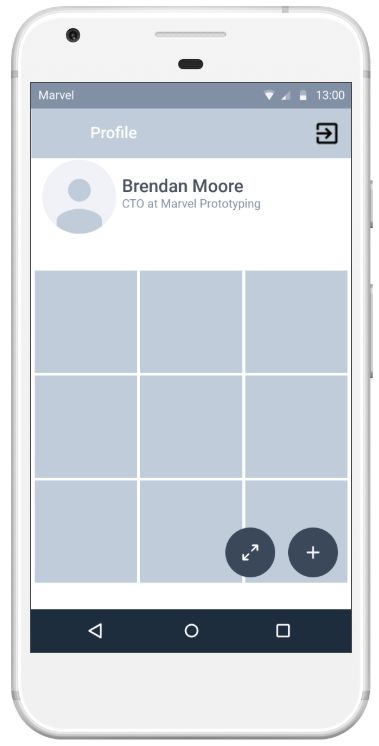
3. Profile/Feed Page: expanded from P2
a. Same: The top of the page still displays the user’s display picture, user name, and
bio, as in P2.
b. Same: Beneath the display picture, name, and bio, the profile page will display a
scrolling list, 3 columns wide, of thumbnails of all of photos that have been ‘posted’
to the service by the currently logged in user. Clicking on a thumbnail displays
photo in full screen. Photos should be listed in chronological order, from newest to
oldest.
c. Changed: Somewhere on the Profile Page there should be a button to launch the
camera so that a photo can be taken. Once taken, the app should launch the photo
caption page (see page #4 below) rather than automatically uploading the post and
returning to the profile feed page as was the case with P2.
d. Same: Somewhere on the Profile Page there should be a button to log out the user
and return them to the Sign-in Page.
e. New: After clicking on an image in the feed, the app should launch the Comments
Page for that post (see #5 below).
f. New: Somewhere on the profile page there should be the ability to toggle between
‘profile feed’ mode and ‘global feed’ mode.
i. ‘Profile feed’ mode displays a 3xN grid of pictures created by the current user
below the display pic name, and bio of the user (just like in P2)
ii. Global feed mode displays a 1xN list of ALL posts by any user. When in this
‘global’ mode the user’s profile information is not visible
iii. NOTE: you can optionally make ‘global feed’ mode an entirely separate page
but ether way there should be roughly 90% code reuse between the two modes.
4. Photo Caption: New Page
a. After taking a new picture with the camera intent the app should return to this new
page to finalize the post before uploading (rather than automatically uploading and
returning to the profile feed page as was the case with P2)
b. This page should display the picture that will be posted, and allow the user to add
a text-based caption that will be associated with the photo (and saved in the firebase
database)
c. From this page the user should have the ability to accept and upload the post, or to
cancel and go back to the Feed page without posting.
2d. Include button that will auto generate hashtags based on a pretrained image
classification neural network provided by google though the firebase MLKit. Add
a hashtag for every class label with a confidence above 0.7 (See below for more
about MLkit)
5. Comments Page: New
a. This page should be launched when a user taps on a photo thumbnail in either the
user’s feed or the global feed.
b. The top of the page should show the picture of the post that is being commented on
as well as the caption that goes with it.
c. It should contain a list of all comments associated with this post in chronological
order (oldest at the top), with no nesting of replies.
d. Somewhere on the page should include the ability to enter a comment and a button
to post the new comment, after which that comment should be added to the
displayed list and saved to the firebase backend.
e. Each comment layout should include the public username of the account it was
posted from as well as the comment itself.
f. If the owner of the post being viewed is the currently authenticated user then this
page will allow that user to delete the post (with all associated captions, and
comments) and return to the Profile/Global Feed Page. This option should not be
available if the current user is not the owner of the post.
3An example of the all pages of the app are shown below. Note that these are only
suggestions for how you may choose to lay out and style the app features/elements
specified above. You can find an example video of the app working here:
https://drive.google.com/file/d/1pMK9svMTQk2qrh6rgpcS1X2TSsVMymNk/view?usp=sharing
41.2 Additional Application Behavior:
In addition to all the behavior specified above, the application should also behave in the
following ways:
1. Uninstalling and reinstalling the app (or clearing the app’s data) should not delete
any data from the cloud storage “backend”. If a user were to delete and reinstall the
app and then log back in to their account, the app should display all their original
data on the Profile page (i.e., display picture, username, bio, and photos). This will
be tested.
2. The app should support multiple users. For example, a user should be able to
register an account and upload photos to that account (“account 1”). Afterwards, if
they were to logout and register a new account (“account 2”), account 1’s data
should still persist and should be accessible if the user logs out of account 2 and
logs back in to account 1. This will be tested.
3. New: In P3 we have added additional fields and document types to the firebase
backend (post captions, comments etc). It is recommended that you delete all of the
data from firebase and google cloud storage and configure your backend as
specified in the next section before submitting this assignment. This way when the
TAs mark the app we don’t, for example, select a photo that was posted during P2
and your app crashes because it expects to find a caption field in the firebase
document which doesn’t exist.
1.3 Backend Configuration for Marking:
In addition to creating the app you are required to populate your backend database before
submitting to accelerate the marking processes. Before submitting P3 please ensure your
backend has the following data.
1. preregistered user #1
a. email: bob@gmail.com
b. password: 12345678
c. has uploaded a profile display picture during account registration
d. has set a one sentence profile description during account registration
e. public display/username: Bob
2. preregistered user #2
a. email: alice@gmail.com
b. password: 12345678
c. has uploaded a profile display picture during account registration
d. has set a one sentence profile description during account registration
e. public display/username: Alice
Each of the two accounts should have 4 posts, each post should have 1-3 comments
52 References and Documentation
2.1 Firestore Composite Queries
Firestore does not natively support composite queries without some configuration.
Composite queries are any query with more than one constraint on a different field, for
example:
Return all post documents owned by X AND less than Y days old.
Depending on how you organized your firebase database you may need to use composite
queries in your app. To do this you will need to specify in the Firebase console what
specific composite query you want to use so that firebase can create an index for this query.
You should read about queries here
Android https://firebase.google.com/docs/firestore/query-data/queries
iOS: https://firebase.google.com/docs/firestore/query-data/queries
Fortunately, Google makes creating a composite index very easy to do. If you attempt to
perform a composite query for which there is not an index, the error message that will be
returned in the query failed callback will tell you the index doesn’t exist and give you a
link to launch the firebase console and add it! Once added it will take a few minutes to
create, after which you will always be able to perform that compound query any point in
the future!
2.2 Firebase Machine Learning Integration MLKit
Firebase has many more features than have been used in these assignments which are very
powerful and may be useful in your project, such as web hosting, cloud computing, cloud
messaging (push notifications), and machine learning inference.
The machine learning toolkit, for example, supports multiple pre-trained models such as
text recognition, face detection and image labelling as well the ability to load custom
trained models.
You can read about the ML Kit here
https://firebase.google.com/docs/ml-kit/
To get some familiarity with this, as required in specification 4(d) above, you are to use a
pretrained image labeling model to automatically add hashtags to a user’s post. Each image
label that returns a confidence at or above 0.7 should be added to the existing post caption.
6You should read about image labeling here
iOS https://firebase.google.com/docs/ml-kit/ios/label-images
Android https://firebase.google.com/docs/ml-kit/android/label-images
Although you may think this is quite difficult, using ML Kit it should take about 30
minutes!
3 Grading and Submitting
Important Note on Marking:
• 8/10 marks are assigned to meeting the above specifications.
• 2/10 will be based on the quality of the User Interface and User Experience.
• Please refer to Braiden Brousseau’s guide to quality apps to understand the
guidelines for good quality user interface and user experience.
Due: Tuesday February 19th, at 6pm, marked out of 10, 0.5 marks off every hour late.
Submit your zip file through the Quercus Assignment P3 page in this course.
1. Android developers: a zip file containing your final Android application file (.apk);
use your student number as the filename. Also submit the complete Android Studio
project directory in a separate zip file.
2. iOS developers: you must submit the complete project directory, including source,
in a zip file. Use your student number as the filename. Please do your development
on the 10.1 version of the SDK, and make sure that you haven’t included any files
by reference.
Please test your submitted zip file before submission.
7You can also read


