OUTCOMES OPERATIONAL MANUAL - 2022 A REFERENCE TOOL FOR PENNSYLVANIA TRAUMA PERFORMANCE IMPROVEMENT
←
→
Page content transcription
If your browser does not render page correctly, please read the page content below
A REFERENCE TOOL FOR PENNSYLVANIA
                                                            TRAUMA PERFORMANCE IMPROVEMENT

                       OUTCOMES
                 OPERATIONAL
                    MANUAL
                                           2022

April 2022   Grey Highlighted area = addition or revision
OUTCOMES OPERATIONAL MANUAL

Contents
Preface .................................................................................................................................................................................... 4
PATIENT SELECTION CRITERIA FOR INCLUSION IN OUTCOMES .............................................................................................. 5
OPENING A RECORD................................................................................................................................................................ 5
PA V5 OUTCOMES ELEMENTS ................................................................................................................................................. 6
Section 1: Patient Summary Tab ............................................................................................................................................. 6
   Patient Information Tab ...................................................................................................................................................... 6
   Response Times Tab............................................................................................................................................................ 8
   Procedures Tab ................................................................................................................................................................... 8
   Diagnosis Tab ...................................................................................................................................................................... 9
Section 2 – PIPS Tab .............................................................................................................................................................. 10
   Objective Summary and Identified Events Tab ................................................................................................................. 10
       Identified Events/Outliers Subtab................................................................................................................................. 10
       Patient Info and Prehospital Subtab ............................................................................................................................. 10
       ED/Resus Subtab ........................................................................................................................................................... 10
       ICU/OR Subtab .............................................................................................................................................................. 10
       Floor-Ward/Discharge Subtab ...................................................................................................................................... 10
   Outcomes Module Tab...................................................................................................................................................... 11
       Case Management Sub-tab ........................................................................................................................................... 11
       Meetings Sub-tab .......................................................................................................................................................... 12
       Tracked Events Sub-tab................................................................................................................................................. 14
       Taxonomy...................................................................................................................................................................... 14
       Event Information Window – Assessment/Review Tab................................................................................................ 15
       •       Occurrence Date: .................................................................................................................................................. 15
Menu Options: ...................................................................................................................................................................... 17
       •       Related Provider/Practitioner: .............................................................................................................................. 17
       The degrees of harm and the definitions:..................................................................................................................... 18
For example, during surgery the patient’s bowel is nicked with the scalpel. This is immediately identified, repaired and
the surgery is completed without further incidence. Prophylactic antibiotics ordered due to this event. The patient’s
course of care unchanged. The event occurred, reached the patient, required short term additional intervention, but did
not result in poor patient outcome. ..................................................................................................................................... 18
For example, during surgery the patient’s bowel is nicked with the scalpel. It is not identified during surgery. Post-
operatively the patient develops septicemia and requires return to the OR to repair the perforation. The event reached
the patient, resulted in a decline in the patient’s condition, requires an intervention, additional monitoring, treatment,
and possible increased hospital length of stay. .................................................................................................................... 18
For example, during surgery the patient’s bowel is perforated, requiring temporary colostomy and subsequent major
surgeries and readmissions. The event reached the patient and resulted in a decline in patient’s condition, required
 April 2022    Grey Highlighted area = addition or revision
                                                                                                                                                                                            1
OUTCOMES OPERATIONAL MANUAL
multiple interventions, additional monitoring, treatment, increased hospital length of stay, and additional hospital
admissions............................................................................................................................................................................. 18
For example, during surgery the patient’s bowel is perforated resulting in exsanguination. Efforts at resuscitation are
unsuccessful and the patient dies. The event reached the patient and directly resulted in the patient’s death. ............... 19
Note that in patients that died, each tracked events should not have Death listed as the impact. Determine the impact of
each tracked event on the patient. There may be tracked events that did not change the course of the patient’s
condition and care (none or minimal impact). In contrast, there may be tracked events that directly resulted in the
patient’s death, and these tracked events should have Death listed in the impact section. ............................................... 19
The extent of harm and the definitions: ............................................................................................................................... 19
Temporary ............................................................................................................................................................................. 19
harm that eventually resolves and does not become permanent ....................................................................................... 19
Permanent ............................................................................................................................................................................ 19
Physical.................................................................................................................................................................................. 19
Menu Options & Definitions: ................................................................................................................................................ 19
Psychological ......................................................................................................................................................................... 19
The mental or emotional (psychological) outcome or effects of this specific event to the patient. Related to the Degree
of Harm. ................................................................................................................................................................................ 19
Menu Options & Definitions: ................................................................................................................................................ 19
Social - ................................................................................................................................................................................... 20
Economic -............................................................................................................................................................................. 20
Legal ...................................................................................................................................................................................... 20
Type....................................................................................................................................................................................... 21
Factors:.................................................................................................................................................................................. 21
Menu Options & Definitions: ............................................................................................................................................ 25
Outcome Summary Sub-tab .......................................................................................................................................... 29
Referrals Sub-tab........................................................................................................................................................... 32
Re-Evaluation Sub-tab................................................................................................................................................... 34
Appendix A: Tracked Events Menu & Definitions ................................................................................................................. 35
Opportunities for Improvement Menu ............................................................................................................................. 35
Opportunities for Improvement Definitions: .................................................................................................................... 36
Hospital Events Menu ....................................................................................................................................................... 40
Hospital Events Definitions ............................................................................................................................................... 42
NONE ............................................................................................................................................................................. 42
PULMONARY ................................................................................................................................................................. 42
CARDIOVASCULAR......................................................................................................................................................... 43
HEMATOLOGIC/COAGULOPATHY ................................................................................................................................. 44
April 2022 Grey Highlighted area = addition or revision
2OUTCOMES OPERATIONAL MANUAL
RENAL ............................................................................................................................................................................ 44
INFECTION/SEPSIS ......................................................................................................................................................... 45
AIRWAY MANAGEMENT ............................................................................................................................................... 45
GASTROINTESTINAL ...................................................................................................................................................... 45
NEUROLOGIC ................................................................................................................................................................. 45
PROCEDURE RELATED ................................................................................................................................................... 45
DECUBITUS .................................................................................................................................................................... 46
HYPOTHERMIA .............................................................................................................................................................. 46
POST-OPERATIVE HEMORRHAGE.................................................................................................................................. 46
PHARMACOLOGY .......................................................................................................................................................... 46
BURNS ........................................................................................................................................................................... 46
NTDS HOSPITAL EVENTS ............................................................................................................................................... 47
Pre-Existing Conditions Menu ........................................................................................................................................... 57
Pre-Existing Condition Definitions: ................................................................................................................................... 57
Process/System Issues Definitions ................................................................................................................................ 66
Appendix B: Definitions of Factors – Human/Practitioners .................................................................................................. 74
Appendix C: Calculation of RTS ............................................................................................................................................. 75
Appendix D: AIS and ISS ........................................................................................................................................................ 76
Abbreviated Injury Score (AIS) Classifications .............................................................................................................. 76
AIS-2005 (Update 208) Body Regions ........................................................................................................................... 76
Injury Severity Score (ISS) Calculation .......................................................................................................................... 76
Appendix E: Caveats to Using Pa v5 Outcomes .................................................................................................................... 77
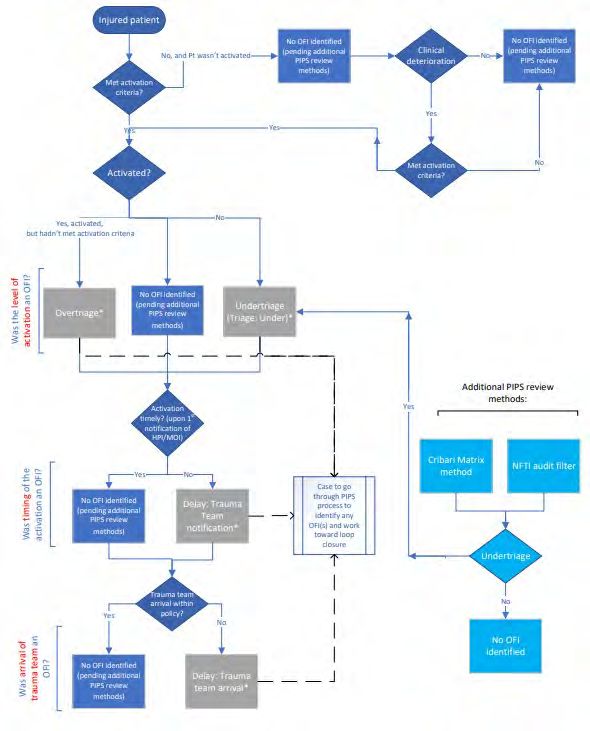
Appendix F: Algorithm for PIPS Triage Review ..................................................................................................................... 78
April 2022 Grey Highlighted area = addition or revision
3OUTCOMES OPERATIONAL MANUAL
Preface
This operations manual is intended to be a tool to orient new users of the Pennsylvania Outcomes registry and to be a
reference tool for the more experienced user.
An ad Hoc Performance Improvement Standardization Committee was formed in 2006 and tasked with standardizing
data entry and the process used to classify deaths and complications. The standardization was implemented in POPIMS
(Performance Improvement software previously utilized in Pennsylvania) and later transitioned into use in PA v5
Outcomes software.
The Performance Improvement software:
• Identifies and focuses on outcomes in injured patients
• Identifies factors that impact patient outcomes
• Facilitates data entry and the ability to share outcome data with other trauma centers to improve care
• Improves the presentation of Performance Improvement in the site survey process
• Assists with inter rater reliability among participating centers
• Identifies death rates, based on classification status, for specific injury complexes to reduce morbidity and
mortality
• Aggregates data in reports for continued monitoring and tracking of events.
• Assists in determining events that require follow-up and/or re-evaluation
• Assists in identifying priority events
We recognize the continued effort of the Pennsylvania Accredited Trauma Centers to collect accurate and complete
data. We welcome any questions or comments to this document.
April 2022 Grey Highlighted area = addition or revision
4PATIENT SELECTION CRITERIA FOR INCLUSION IN OUTCOMES
All trauma cases entered into the Trauma Registry software are populated into the PA v5 Outcomes (Outcomes)
software. Inclusion into the Trauma Registry comprises, at a minimum, those that meet the Pennsylvania Trauma
Outcome Study (PTOS) Patient Inclusion Criteria. See the current PTOS Operational Manual for the Data Base Collection
System (PTOS Manual) for the inclusion criteria. Including all patients in the Trauma Registry into the Outcomes
software ensures that when a user generates a report, the denominator, or ‘N’, is available for the calculations. The
required elements to be completed are listed below and require responses in the Outcomes software.
It is recommended that patients meeting the following criteria be reviewed. At minimum, consider reviewing negative
outcomes.
Death Including dead on arrival (DOA), deaths in the ED and deaths during any portion of the hospital
stay. DOA is not formally defined within the Trauma Registry. Signs of Life element is used in the
trauma registry for specific audit filter inclusion/exclusion. For example, patients arriving with
CPR in progress without return of a pulse are recorded as no signs of life.
Hospital Events As defined by the PTOS Manual (See Appendix A for definitions)
Process/System Issues Audit Filters as defined by the PTOS Manual (See Appendix A for definitions)
Opportunities for Deviations in care as defined in PTOS Manual (Appendix A)
Improvement
User Defined Issues Defined by the institution as being a deviation in care or another quality parameter (such as
tracking new protocol) to assist in identifying ongoing care related issues
OPENING A RECORD
In the opening screen, click on Manager Records to open the Trauma Record Manager. The patients automatically listed
in the Trauma Record Manager are those with an arrival date within the last 1 year. Highlight a record or multiple
records from the list and select an action button for that record: Edit, View, Delete or Print. Can also double click on a
record to Edit it. To display patients of a certain criteria click the [Search] button. The [Search] button allows for
searches based on trauma number, arrival date range, discharge date range, name, record status, linkage number,
medical record number or account number. The Advanced Search tab allows for a search based on PTOS inclusion,
flagged status, hospital event, tracked event, meeting time, meeting name, meeting date, loop closure status, loop
closure dates, and via a query from Report Writer. Once you have entered your search criteria and in the ‘Search Trauma
screen, you have the ability to change the size of this selection box. Use the mouse and place the cursor on the corner of
the box. By dragging the cursor, you can increase and decrease the size of this box to your specifications. The changes
made will be saved for future use.
April 2022 Grey Highlighted area = addition or revisionOUTCOMES OPERATIONAL MANUAL
PA V5 OUTCOMES ELEMENTS
Once a record is open the following elements will be displayed.
Section 1: Patient Summary Tab
Data in the tabs in this section are automatically downloaded from the data in the Trauma Registry, EXCEPT the Massive
Transfusion Protocol documentation in the Procedure tab in this section. Refer to the current PTOS Manual for
additional details and definitions related to each Registry element. The information within this tab is refreshed each
time you run the Interface. If you want to maintain any special information that should not be written over during a
rerun of the interface, put it in the Outcomes Module tab in the Case Management section under the PIPS tab. Also,
elements in yellow are the data points to be submitted as part of the Central Site Submission to the PTSF Outcomes
Central Site.
Patient Information Tab
• Submission Deadline
• Audit Log: POP OUT the Audit Log identifies when the interface with Collector was initially created and when
users enter data into Pa v5 Outcomes. It will track the date the record was initially created, initially closed, and
the last modification made in Pa v5 Outcomes. Each will list the date and time, user, and facility. The second
tab provides an audit of transfers. It will track the status of transferring the Pa v5 Outcomes record to the
Central Site, the first transfer and the last transfer.
• Facility: Four-digit number assigned by the Pennsylvania Trauma Outcome Study to each participating hospital.
• Linkage #: The linkage number may be used to identify a patient if the medical record number is changed or
deleted. This is an optional element defined by each facility.
• PTOS Patient: Is the patient a PTOS patient? Yes or No
• PTOS Trauma Registry Status: Active or Closed. This is the status of the record as it exists in the PTOS Registry.
This must be a closed status in order to close it in Pa v5 Outcomes.
• Trauma #: Eight-digit number assigned by the hospital submitting the data form for each qualifying patient. The
first four digits will represent the current year (year of ED admission) with the remaining digits determined by
consecutive sequence numbering.
• Medical Record #: The number assigned by the hospital for the patients’ medical record.
• Abstractor: The abstractor text will be imported from the trauma Registry “Misc.” tab.
• Patient Name: Patient’s Name – Last, First, Middle initial, and Suffix
• Date of Birth: MM/DD/YYYY format
• Age: The age of the patient in one of the following: Year, Months, Days or Estimated in years
• Gender: Male, Female, Non-binary
• Injury: Date in MM/DD/YYY format, and Time in HH:MM
• Primary Mechanism: Mechanism of Injury appropriate for this patient’s cause of injury/accident. Refer to the
current ICD-10 Coding Manual.
• Cause of Injury: The abstractor text of the cause of injury.
• Injury Type: The force causing the injury: Blunt, Penetrating, Burn, Skin. If there are two causes of injury, the
mechanism of injury which caused the more severe injury is displayed. Example: patient was assaulted with fists
(blunt) and stabbed (penetrating) resulting in a concussion and laceration of the lungs. Record as penetrating.
• Scene EMS: Scene provider EMS affiliate number and name, and PCR number
April 2022 Grey Highlighted area = addition or revision
6OUTCOMES OPERATIONAL MANUAL
• Transport EMS: Transport provider EMS affiliate number and name, and PCR number
• Referring Facility: Referral facility number and name
• Referring Facility LOS: In days, hours and minutes in HH:MM format
• Referral Facility EMS: Interhospital EMS affiliate number and name, and PCR number
• ED/Hospital:
o Arrival: Date in MM/DD/YYY format, and Time in HH:MM
o ED Discharge Time: Date in MM/DD/YYYY, and Time in HH:MM that the patient was discharged from
the ED. This is the date/time the patient is physically transported from the ED to their final post-ED
destination.
If patient was a direct admission, EDA date and time are entered here.
o Post ED Destination: The location the patient went to after the ED
o Initial Level of Alert: First Level, Second Level, Third Level, Consult, Unknown or blank if no alert called
o Admitting Service: The service that admitted the patient
o Trauma Alert Change:
o 1 – Upgraded
o 2 – Downgraded
o 3 – No change
o ? - Unknown
blank if no alert
o Admitting Physician: Attending who admitted the patient. The physician code assigned per institution
o Revised Level of Alert: First Level, Second Level, Third Level, Consult, Unknown, or blank if no alert
called or no change
o Trauma Attending: Attending who evaluated the patient in the ED. The physician code assigned per
institution
• Initial Assessment
o Intubated:
1. 1 = Patient has an artificial airway when initial respiratory rate was assessed (nasotracheal,
endotracheal, EOA, Cricothyroidotomy, needle or surgical).
2. 2 = Patient does not have an artificial airway when initial respiratory rate was assessed
o Respiratory Rate Controlled: Yes or No (when initial respiratory rate was assessed)
o Supplementation Oxygen: Yes or No
o O2 Sat: Admitting vital signs (within 30 minutes) for oxygen saturation
o Unassisted Respiratory Rate/Minute: Admitting vital signs (within 30 minutes) for respiratory rate that
was unassisted (when initial respiratory rate was assessed)
o Pulse: Admitting vital signs (within 30 minutes) for pulse
o SBP: Admitting vital signs (within 30 minutes) for systolic blood pressure
o Glasgow Coma Score: Admitting vital signs (within 30 minutes) for Glasgow coma score
1. Eye: Glasgow coma score for eye opening, 1-4
2. Verbal: Glasgow coma score for verbal response, 1-5
3. Motor: Glasgow coma score for motor movement, 1-6
4. Total: total eye, verbal and motor score, 3-15
o GCS Qualifiers: Identifies treatments given to the patient or condition that may affect the first
assessment of GCS.
1. Paralyzed: Due to chemical paralysis, Yes or No
2. Intubated: Yes or No
3. Sedated: Due to chemical sedation, Yes or Nor
April 2022 Grey Highlighted area = addition or revision
7OUTCOMES OPERATIONAL MANUAL
4. Eye Obstruction: Yes or No
o RTS: Revised Trauma Score is automatically calculated from the admitting Glasgow Coma Score, Systolic
Blood Pressure and Respiratory Rate.
o GCS 40: POP OUT If checked, click on the GCS 40 button, which will display a pop out window with Eye,
Verbal, and Motor score utilizing the GCS 40 tool
• Discharge Status: Alive or Dead
• Discharge/Death: Date in MM/DD/YYY format, and Time in HH:MM
• Total Days:
o Hospital
o ICU
o Step Down
o Ventilator
• Discharge to: Location of discharge destination. Also includes comments documented by the abstractor about
the patient’s destination or discharge.
• Discharge to Facility: Number and name of facility
• Reason for Transfer Out: The primary reason for transfer out. If “Other” selected, text field with abstractor note
will show
• Mode of Transfer Out: The method of transfer out. If “Other” selected, text field with abstractor note will show
Response Times Tab
• Called, Arrived, PGY, Provider ID, Phone Consult, Responded, Elapsed Time (EDA to Arrived)
o Emergency Medicine Physician
o Emergency Medicine Resident
o Attending Trauma Surgeon
o Senior Trauma Resident
o Junior Trauma Resident
o Attending Neurosurgeon
o Neurosurgical Resident
o Attending Orthopaedic Surgeon
o Orthopaedic Resident
o Attending Anesthesiologist
o Anesthesiology Resident
o CRNA
o Others Called to ED: as entered into the trauma Registry
Procedures Tab
• Procedures: A complete list of procedures including the location (i.e., ED, ICU, or OR procedures), date, time,
Operation number, ICD-10 code, and description, and performing service and Provider ID.
• Was intravenous antibiotic therapy administered within 24 hours after the first hospital encounter: Yes or No
• Antibiotic Therapy Administered: Date in MM/DD/YYY format, and Time in HH:MM
• Massive Transfusion Protocol:
o MTP Initiated: Yes or No, from COLLECTOR
o Location: Department or setting the MTP was initiated. This field needs completed in Pa v5 Outcomes.
Record ED, OR, ICU, etc.
April 2022 Grey Highlighted area = addition or revision
8OUTCOMES OPERATIONAL MANUAL
oInitiated: When the MTP was ordered or activated. This field needs completed in Pa v5 Outcomes.
Record date in MM/DD/YYY format, and time in HH:MM
o Administered: Timing of when the first blood products were started for MTP. This field needs completed
in Pa v5 Outcomes. Record date in MM/DD/YYY format, and time in HH:MM
• Blood Product Transfusion (within first 4 hours after ED/hospital arrival): Volume (CCs/mLs)
o Packed Red Blood Cells
o Whole Blood
o Plasma
o Platelets
o Cryoprecipitate
Diagnosis Tab
• Anatomical Diagnoses: See PTOS Manual for further explanation.
• AIS Version: AIS 2005 (Current version in use)
• ISS: Injury Severity Score (ISS) is automatically calculated in the Trauma Registry if diagnosis codes are entered.
• TRISS: combines RTS, ISS, patient age and type of injury (blunt or penetrating) to calculate P(s).
• Burn: Total Burn Surface Area calculations based on diagnoses entered into the trauma Registry.
o 2nd
o 3rd
o Total
o P(s)
o Alt P(s)
*The burn tabs are retired in PTOS for 2022. Fields apply to records prior to 1/1/2022.
• Narrative: The abstractors text of the patient’s diagnosis imported from the trauma Registry. May need to scroll
down to see the full list
• ICD-10: Injury diagnosis code assigned. ICD-10-CM is based on the International Classification of Diseases, which
is published by the World Health Organization (WHO) and which uses unique alphanumeric codes to identify
injury. The code and description are displayed
• PREDOT: The Abbreviated Injury Scale (AIS) code for the injury diagnosis
• AIS Severity: Abbreviated Injury Scale (AIS) assigns the severity of each injury code. A minor injury is assigned 1,
highest severity is 6, which is considered Maximal (currently untreatable).
• ISS Body Region: Injury Severity Score Body Region indicates the ISS location of injury (1-6), not the AIS body
regions (1-9).
April 2022 Grey Highlighted area = addition or revision
9OUTCOMES OPERATIONAL MANUAL
Section 2 – PIPS Tab
Data in this section is geared toward the Performance Improvement aspect of a trauma program. It assists in
systematically documenting the PI activities in the performance improvement process.
There are two tabs within the PIPS tab: The Objective Summary and Identified Events tab and the Outcomes Module tab.
Each include multiple sub-tabs.
Objective Summary and Identified Events Tab
Identified Events/Outliers Subtab
List of events identified in the Trauma Registry. The list displays all hospital events, PTSF audit filters, and pre-
existing conditions. Each event includes the occurrence date as entered in the Trauma Registry, and if the event
has been triggered in the Tracked Events section in the Outcomes Module tab. A trigger status of Yes is included
in the tracked events, and a trigger status of No is not included in the tracked events. Deaths are the only event
from the Trauma Registry that creates a tracked event without requiring you to trigger it.
Clicking the [Auto Trigger] button results in a pop out window that displays all the events triggered by the
Trauma Registry. Click on the checkboxes of each item you want added to the tracked events section and
selecting [OK]. Not all events auto triggered from the Trauma Registry require review through the PI process.
For example, pre-existing conditions do not require being triggered into the tracked events. Deaths, Hospital
Events and Audit Filters should be triggered into the tracked events and taken through the PI process.
Patient Info and Prehospital Subtab
A narrative of the patient’s information and prehospital phase of care automatically generated from the Trauma
Registry data. The narratives can be copied for use within other sections of Pa v5 Outcomes, or other
documents.
ED/Resus Subtab
A narrative of ED/resuscitative phase of care, ED procedures and consults automatically generated from the
Trauma Registry data. The narratives can be copied for use within other sections of Pa v5 Outcomes, or other
documents.
ICU/OR Subtab
A narrative of ICU procedures, Step-Down procedures and OR procedures automatically generated from the
Trauma Registry data. The narratives can be copied for use within other sections of Pa v5 Outcomes, or other
documents.
Floor-Ward/Discharge Subtab
A narrative of Floor-Ward procedures, other procedures and discharge automatically generated from the
Trauma Registry data. The narratives can be copied for use within other sections of Pa v5 Outcomes, or other
documents.
April 2022 Grey Highlighted area = addition or revision
10OUTCOMES OPERATIONAL MANUAL
Outcomes Module Tab
Case Management Sub-tab
In this section you will document case management information. You can run a spell check for the memo fields
by either selecting it in a dropdown menu under Record, or via F7.
• Flag Record: This allows users to track, identify, and/or target cases currently being worked on. The
‘Flag Record’ field was implemented with a user defined menu that will hold up to nine unique menu
choices or types of flags. The following generic menu choices were added as a starting point. These
menu choices can be changed/edited by in the user Admin module to meet the needs at each facility.
Instructions on editing the menu options is in the Pa v5 Outcomes Registry Users Guide available on the
PTSF Central Site Portal Support section.
o 1, Follow-Up
o 2, Re-evaluation
o 3, For Next Review
• Case Summary: This field is automatically pre-filled with scripted data provided by the Trauma Registry.
This information can be edited and will remain when you run the Collector interface. Clicking the [Case
Summary] button will enlarge the memo field in a pop out window with increased text size. Clicking the
[Generate] button will regenerate/reset the case summary from the Trauma Registry. Manual edits will
be removed. A pop out window will remind you that regenerating the case summary will override the
manual edits and require confirmation to prevent accidental edits.
• Case Management: This section can be used to enter daily hospital notes for day-to-day case
management of the patient. Clicking on the [Case Management] button will enlarge the comment box
in a pop out window with increased text size. Within this pop out window, you can run a spell check (in
a dropdown menu under Record, or via F7).
1. Notes could be formatted as follows:
Date – Location in Hospital – Comments.
2. For example:
01/15/14 – ICU – pulmonary consult
• Objective Summary: Clicking the [Generate] button will create a document outside of Pa v5 Outcomes
that can be saved or printed for use. The document will include a summary of information from the
Patient Info and Prehospital sub-tab, ED/Resus sub-tab, ICU/OR subtab, and Floor-Ward/Discharge
subtab from the Objective Summary and Identified Events tab.
• Case Printout: Clicking the [Generate] button will create a document outside of Pa v5 Outcomes that
can be saved or printed for use. The document includes information from the sub-tabs within the
Outcomes Module tab.
April 2022 Grey Highlighted area = addition or revision
11OUTCOMES OPERATIONAL MANUAL
Meetings Sub-tab
This section is the preferred location for documenting all pertinent meeting notes and discussion, as well as
attaching documents to this PI record. The Meetings section can record up to ten separate meeting discussions
per patient to document a meeting click the [Add] button. This will result in a pop out window with the
following fields.
• Meeting Type: Choose the type of meeting from the menu options.
14. Trauma Morbidity and Mortality
15. Trauma Multidisciplinary Peer Review
16. Trauma Conference
17. Trauma Systems Committee
18. Hospital Quality PIPS Committee
19. Medical Staff Peer Review
20. Other Department M and M
21. Grand Rounds
22. External Review
23. Other
• Meeting Name: Enter/Select the title of the meeting from the menu. The meeting name menu is
initially blank and needs to be customized to be specific to your hospital. Edit via the Admin module,
details for instructions in the Pa v5 Outcomes Registry Users Guide available on the PTSF Central Site
Portal Support section.
• Meeting Date: Enter the date of the meeting/review by month, day and year. When you enter a t in the
date field, the field will auto fill with the current date.
• Related Issues: The name of a tracked event will be displayed here if you have linked the specific
tracked event. To link a meeting, you must go to the specific tracked event window and place the
meeting name and date into the Meetings/Reviewed By section. It will then automatically link into the
meeting section. A tracked event can be linked to more than one meeting.
• Attendees: Enter the attendees for the specific meeting. Click the [Attendees] button to pop out an
enlarged memo field. The committee members can be entered as the default list for the Attendee
section. To create a default list with the current names in the Attendees section click the [Set Default]
button. To populate the Attendees section with the previously set default committee member click the
[Load Default] button. If you would prefer to track attendees via paper sign in sheets, indicate this by
entering “Please see attendance sheet” in the Attendees Section.
• Discussion: Enter in the proceedings of the meeting, including pertinent findings regarding issues
surrounding the case. Information should reflect a robust discussion of the participants and the
conclusions made with respect to categorization of the determination and acceptability status. If Pre-
Existing Conditions (PEC’s) played a role in the care of the patient, they can be mentioned here after the
other issues have been identified and addressed. This data, along with the factors, should be included in
the discussion and used to arrive at a determination status. Click the [Discussion] button to pop out an
enlarged memo field.
The Tertiary Review Meeting process should involve identification of all injuries, and the severity
whether or not standards of care were followed, whether or not there was provider error; and for
deaths – what was the probability of survival based on TRISS methodology. It is imperative that when
April 2022 Grey Highlighted area = addition or revision
12OUTCOMES OPERATIONAL MANUAL
considering this process, all factors, i.e. error in management, error in technique, delayed diagnoses,
missed diagnoses, deviation from protocol, deviation from standard of care, equipment failure,
mortality – anatomical diagnoses, mortality – survival probability and pre-existing conditions are
evaluated.
Based on this process, decisions should be made on all deaths, hospital events, UDI and OFI as to their
determination. That is – was the event believed to be an Unanticipated Event with Opportunity for
Improvement, Event with Opportunity for Improvement, Event without Opportunity for Improvement or
Undetermined Opportunity for Improvement. Unanticipated Event with Opportunity for Improvement
and Event with Opportunity for Improvement will require outcome results and resolution. Patients who
have withdrawal of support will be included in the analysis of determination. In such cases, the care of
the patient up until the time that support was withdrawn should be evaluated as to whether or not
standard protocols were followed and whether provision of care was appropriate. These factors, along
with the analysis of injury and TRISS methodology, will then be used to assign determination.
• Template Letter: If you would like to generate the meeting notes using one of Pa v5 Outcome’s
templates, select the folder icon. A menu will display all of the meeting template files (if the template
files are not displayed, refer to the Pa v5 Outcomes User Guide for details in accessing template files).
Choose the file named SampleRequestForReviewIncludingMeeting.doc. Click the [Generate] button to
open the document outside Pa v5 Outcomes.
The Related Documents section allows you to attachment of up to 20 external documents.
• If you would like to save a Word document, a PowerPoint presentation, or a scanned document, emails
etc., you can do so by using this section. It is suggested to attach documents related PI activities such as
email exchanges, reviews by others, corrective action material and evidence of completion, and charts
and graphs used for tracking data. Attaching these documents will be helpful in locating them when
preparing PI folders for site survey. These documents can be printed and included in the PI folders for
the site surveyors.
o Note for attachments: when printing the PI record, the attached documents do not automatically print,
they must be opened and printed individually. The attached documents also do not transmit to the
central site; only the title of the attached documents is transmitted to the central site.
• To attach a document, click the [New Link] button and in the pop out window click the folder icon to
select a file from your computer. You can browse to where you have your document saved and open the
file you want to save. When you want to retrieve the document, click the [Open Link] to open the
document that you have saved.
April 2022 Grey Highlighted area = addition or revision
13OUTCOMES OPERATIONAL MANUAL
Tracked Events Sub-tab
This section is where event information and all PI activities for the event are documented. Event information is
repeatable for up to 20 events per patient. Events can be manually entered or auto filled when triggered from
the PTOS Trauma Registry Interface. Deaths are automatically auto filled from COLLECTOR. Events are defined
as Opportunities for Improvement (OFI), User Defined Issues (UDI), Hospital Events, Process/System Issues, Pre-
Existing Conditions and Deaths.
UDI titles for the Event Menu need to be added via the Admin module. Instructions for how to add UDI titles are
in the Pa v5 Outcomes Registry Users Guide available on the PTSF Central Site Portal Support section.
If the trauma program chooses to track complains with protocols, or other center specific quality initiatives in
the tracked events section, select the appropriate OFI or UDI and indicate “No factors identified” in the Factors
section and notate if compliant or non-compliant in the Comments Field. If the protocol was deemed compliant,
can then indicate: “No action items taken” in the Action Section and “Not Applicable” in the Loop Closure Status.
This will assist your Trauma Program in identifying that the tracked event is for tracking purposes, and during
the site survey it will assist the PTSF Surveyors to identify issues vs. non-issues when reviewing for Performance
Improvement related issues.
Each row on this screen will address one issue/event. On this screen, to enter a new tracked event click the
[Add] button and the tracked event pop out window will be displayed. To edit a previously entered tracked
event either highlight the row and click the [Edit] button to display the pop out window for the specific event, or
double click on the row. To delete a previously entered tracked event highlight the row and click the [Delete]
button and answer the question in the pop out box to confirm deletion. To add the events triggered from the
Trauma Registry click the [Auto Trigger] button and check the boxes for each event that should have its own
Event Information window.
Each tracked event window includes 2 tabs, the Assessment/Review tab, and the Actions/Loop Closure tab.
Details of the PI activities for this event will be documented within these 2 tabs.
The [Copy] button allows for copying the current tracked event in its entirety. In a new tracked event, the
[Paste] button allows for pasting an entire tracked event that has been copied. This ability allows for efficient
and timely PI data entry into the software when multiple events are similar. This ability also allows for tracking
the details under multiple event titles.
Taxonomy
The Taxonomy checkbox allows for the option of including additional fields in the tracked event. The Taxonomy
checkbox is automatically checked in Death events. Checking the Taxonomy checkbox opens the following fields
for entry: the domain phase of care, the domain target/goals of care, type, the actions prevention/mitigation,
and the actions scope. These become required fields that are transmitted to the Outcomes Central Site when
submitting patient records that have resulted in death.
April 2022 Grey Highlighted area = addition or revision
14OUTCOMES OPERATIONAL MANUAL
At the bottom of the window, displayed on both tabs, there are a few action buttons:
• Check – Clicking on this button will run a check/validation process on all tracked events to ensure all
required elements are completed and data entered is validated. See the Pa v5 Outcomes Registry User
Guide for details.
• OK – Clicking on this button will save and close the Event Information window.
• Cancel – Clicking on this button will close the Event Information window without saving. A warning pop
up will require the user to confirm cancellation if information in the window was edited.
• - Clicking on this button will add a new tracked event. This allows the user to add a new event
without closing the Event Information window.
• - Clicking on this button will delete the displayed tracked event. A warning pop up will require the
user to confirm deletion of the current event.
• - Clicking on this button will take the user to the first tracked event. A warning pop up will require
the user to confirm if edits to the displayed event should be changed prior to changing events.
• - Clicking on this button will take the user to the previous tracked event. A warning pop up will
require the user to confirm if edits to the displayed event should be changed prior to changing events.
• - Clicking on this button will take the user to the next tracked event. A warning pop up will require
the user to confirm if edits to the displayed event should be changed prior to changing events.
• - Clicking on this button will take the user to the last tracked event. A warning pop up will require the
user to confirm if edits to the displayed event should be changed prior to changing events.
Event Information Window – Assessment/Review Tab
The Assessment/Review tab is dedicated to the recording of the review and analysis steps in the PI process.
Enter the identified event and domain during the event identification step. Complete the review and drilldown
of this specific event. The comment field can be utilized to document details of the drilldown of this review.
Following review of the event complete the analysis by recording and assigning the factors that contributed to
this specific event and the level of impact this event had on the patient.
• Event: The title of the specific event to track and collect detailed information about. When entering a
new tracked event, select the most appropriate event title from the menu box. The menu options
include Hospital Events, Process/System Issues, Opportunities for Improvement, Pre-Existing Conditions,
User Defined Issues, and Death. Hospital Events, Process/System Issues and Death should be triggered
by the Interface with the Trauma Registry. If you need to add a Hospital Event, Process/System Issue or
Death that did not trigger from the Trauma Registry it is recommended to enter directly into the Trauma
Registry first to ensure capture in the Registry. Process/System Issues in Pa v5 Outcomes is equivalent to
Audit Filters in the Trauma Registry.
The menu options and definitions are listed in Appendix A.
• Occurrence Date: The date the event took place (occurred) in MM/DD/YYYY format.
• Identified Date: Record the date (mm/dd/yyyy) that the issue was identified by the PI program. For
hospital events identified in COLLECTOR, this date will be automatically brought over by the trauma
registry interface.
April 2022 Grey Highlighted area = addition or revision
15OUTCOMES OPERATIONAL MANUAL
• Source of Information: Select from the menu box the option that most appropriately describes
how/who identified the event.
Menu Options:
1, Case Manager 14, Autopsies
2, Practitioner 15, Hospital Quality Management Department
3, Referrals (written/verbal, emails, hotline) 16, Patient/Family Feedback
4, Identified Post-Discharge 17, Registry Data
5, Risk Management Reports 18, Department Reports
6, EMS (ground/air) 9, Other
7, Transfer Center /, Not Applicable
8, AM Report ?, Unknown
10, Patient Rounds
11, Concurrent Abstraction (registry)
12, Concurrent Review (TPM, PIC)
13, Conferences (peer review quality conference, education conferences)
• Hospital Incidence ID: Can enter the hospital incidence number if applicable.
• Domain: The Domain section of the Event Information screen captures information about the
characteristics surrounding the event.
o Setting/Location - The location where the event occurred. Only 1 location is required but users
can select up to 2 locations for a single event. The 2nd location response box can be left blank if
non-applicable.
Enter 2 locations in situations that include more than 1 location type. For example, the event
occurs while a patient is being transported from 1 location to another, therefore both locations
would be entered. Another example is an event that occurs during portable radiology within a
patient care department, therefore Radiology and the patient care department are both
entered. The setting/location is included in PI events to allow for the trauma program to track
through reports the setting/location where events occur to determine if there are trends that
need to be addressed.
Menu Options:
2, ED
3, OR
4, ICU
6, Med/Surge Floor
5, Step Down Unit
10, Radiology
18, Nuclear Medicine
9, Burn Unit
19, PMR
20, Minor Surgery Unit
11, PACU
47, Postmortem
90, EMS (optional)
91, Referring Facility (optional)
12, Special Procedure Unit
April 2022 Grey Highlighted area = addition or revision
16OUTCOMES OPERATIONAL MANUAL
21, Angiography
22, Pediatric Unit (in-house)
/, Not Applicable
?, Unknown
o Service/Staff - The hospital resource (service or staff) who was active and/or responsible for the
event when it occurred. Only 1 service/staff is required but users are able to select up to 2
instances of Service/Staff for a single event. The 2nd service/staff response box can be left blank
if non-applicable. The service/staff is included in PI events to allow for the trauma program to
track the service ad staff that are involved in events to determine if there are trends that need
to be addressed.
Menu Options:
1, Trauma 21, GI 41, Physiatry
2, Neurosurgery 22, Home Health 42, Physical Therapy
3, Orthopedics 23, Hospitalist 43, Plastic Surgery
4, General Surgery 24, Infectious Disease 44, Psychiatry
5, Pediatric Surgery 25, Internal Medicine 45, Pulmonary
6, Cardiothoracic Surgery 26, Laboratory 46, Radiology
7, Burn Services 27, Nephrology 47, Rehab
8, Emergency Medicine 28, Neurology 48, Respiratory Therapist
9, Pediatrics 29, Nurse Practitioner 49, Social Services
10, Anesthesiology 30, Nursing 50, Social Worker
11, Cardiology 31, Nutrition 51, Speech Therapy
12, Chaplain 32, Ob-Gyn 52, Thoracic Surgery
13, Child Protective Team 33, Occupational Therapy 53, Trauma Resus Nurse
14, Critical Care 34, Oncology 54, Triage Nurse
15, Discharge Planner 35, Ophthalmology 55, Vascular Surgery
16, Documentation Recorder 36, Oral Surgery 98, Other Surgical
17, Drug/Alcohol Counselor 37, Oromaxillo Facial Service 99, Other Non-Surgical
18, EMT 38, Ortho-Spine /, Not Applicable
19, ENT 39, Palliative Care ?, Unknown
20, Family Medicine 40, Pharmacy
o Phase of Care - The period of time or stage along the continuum of care in which the event
occurred. This field is available for a response when the Taxonomy checkbox is checked.
Menu Options:
1, Evaluation 2, Resuscitation 3, Operative
4, Critical Care 5, Recovery 6, Rehabilitation
/, Not Applicable ?, Unknown
o Target/Goal of Care - The result (target or goal) toward which treatment and care efforts were
focused when the event occurred. This field is available for a response when the Taxonomy
checkbox is checked.
Menu Options:
1, Therapeutic 2, Diagnostic 3, Rehabilitative
4, Preventative 5, Palliative 6, Research
7, Cosmetic 8, Other /, Not Applicable
?, Unknown
• Related Provider/Practitioner: This is an optional field that allows for attaching involved
provider/practitioners name with the event. Users will be able to select up to 3 providers/practitioners
April 2022 Grey Highlighted area = addition or revision
17OUTCOMES OPERATIONAL MANUAL
for a single event. The related provider/practitioner field is included in PI events to allow for the trauma
program to track the providers and practitioners involved in events, through reports, to determine if
there are trends that need to be addressed. Entering providers/practitioners in tracked events can be
utilized for credentialing and performance improvement purposes. Reports can be created in Report
Writer with the Provider/Practitioner within a report or as a query. The menu options need to be
entered by the trauma program in the v5 Admin Module.
• See the Pa v5 Outcomes Registry Users Guide for details on how to create hospital specific menu
options. The trauma program can choose to add all physicians, advanced practitioners, nurses, and EMS
agencies into the menu options as desired.
• Impact: The Impact section of the Event Information window captures information about the amount of
effect this specific issue/event had on the patient. The effect of the event is also referred to as harm to
the patient. After completing the review of the tracked event, the PI program will indicate the impact to
the patient. The impact can be utilized to prioritize (triage) which events to address 1st, 2nd, 3rd, etc.
Events with severe level of harm will be prioritized 1st, while events with no harm/no detectable harm
will be prioritized last. As the number of tracked events within PA v5 Outcomes will increase over time,
the priority order will constantly change.
The degrees of harm and the definitions:
No Harm/No Detectable Harm – due to this specific event the patient did not become symptomatic, or no
symptoms detected, and no additional treatment was required. For example, a patient received intravenous
fluid at a slow rate though it was not ordered. The nurse identifies that there is not an order for the intravenous
fluid and discontinues it. This event occurred, reached the patient, but did not harm the patient, nor require
additional monitoring or treatment.
Minimal – due to this specific event the patient became symptomatic, symptoms are mild, loss of function or
harm is minimal or intermediate but short term, and no or minimal intervention (e.g., extra observation,
investigation, review, or minor treatment) is required.
For example, during surgery the patient’s bowel is nicked with the scalpel. This is immediately
identified, repaired and the surgery is completed without further incidence. Prophylactic antibiotics
ordered due to this event. The patient’s course of care unchanged. The event occurred, reached the
patient, required short term additional intervention, but did not result in poor patient outcome.
Moderate – due to this specific event the patient became symptomatic, requiring intervention (e.g., additional
operative procedure; additional therapeutic treatment), an increased length of stay, or causing permanent or
long-term harm or loss of function.
For example, during surgery the patient’s bowel is nicked with the scalpel. It is not identified during
surgery. Post-operatively the patient develops septicemia and requires return to the OR to repair the
perforation. The event reached the patient, resulted in a decline in the patient’s condition, requires an
intervention, additional monitoring, treatment, and possible increased hospital length of stay.
Severe – due to this specific event the patient became symptomatic, requiring life-saving intervention or major
surgical/medical intervention, shortening life expectancy, or causing major permanent or long-term harm or loss
of function. Due to the possibility of a repeat occurrence, resulting in another Severe impact, events/issues
assigned a severe impact must be prioritized by the PI program.
For example, during surgery the patient’s bowel is perforated, requiring temporary colostomy and
subsequent major surgeries and readmissions. The event reached the patient and resulted in a decline
in patient’s condition, required multiple interventions, additional monitoring, treatment, increased
hospital length of stay, and additional hospital admissions.
April 2022 Grey Highlighted area = addition or revision
18You can also read


