Yahoo! Search Marketing and Microsoft Advertising adCenter Feature Comparison Guide
←
→
Page content transcription
If your browser does not render page correctly, please read the page content below

Yahoo! Search Marketing and Microsoft Advertising adCenter
Feature Comparison Guide
While you are preparing to transition your Yahoo! Search Marketing campaigns to adCenter, use this guide to learn more about the
adCenter features and how they may differ from those you’ve used with Yahoo!. For more details on the transition, please visit the
Yahoo! Transition Center or Microsoft Transition Center.

Account setup and distribution
                                       How it works in adCenter                       Feature snapshot

 Distribution      Ad                  Microsoft adCenter allows you to choose
 Tactic            Distribution        whether you’d like to distribute your ad
                                       groups in the search auction, the content
 (Set at the       (Set at the ad      auction, or both.
 account           group level)
 level)                                If you are importing campaigns from
                                       Yahoo!, the distribution settings will be
                                       maintained in adCenter. For example,
                                       an account with contextual distribution
                                       turned off in Yahoo! Search Marketing
                                       will have content distribution in adCenter
                                       turned off at the ad group level.

                                       In adCenter, serving content ads to partner
                                       sites is automatically turned on when you
                                       create a new campaign or ad group

 Network           Distribution        adCenter doesn’t currently offer search
 Distribution      Controls            ads distribution controls outside the
                                       geographic, demographic, and date and
 (Search Ads)      (Search Ads)        time targeting options.

                                       Coming soon to adCenter – we are
                                       developing search ads distribution
                                       controls that will allow you to choose to
                                       serve your search ads to

                                       • Yahoo! and Microsoft sites (including
                                         Bing), and partner sites,

                                       • or just to Yahoo! and Microsoft sites
                                         (including Bing),

                                       • or just to partner sites.

                                       We are also working to expand the website
                                       exclusion feature that is currently only
                                       available for Content Ads to search ads.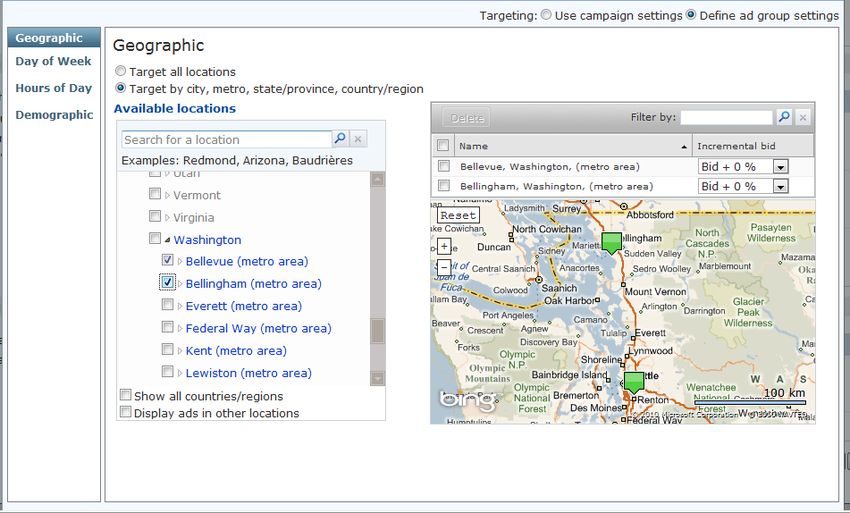
How it works in adCenter                   Feature snapshot

Market        Language         As you transition your Yahoo! account
              and Market       to adCenter, you will be asked to select
(Set at the                    the language and market for your ad
account       (Set at the ad   groups. This is the language in which the
level)        group level)     ads are written in, and the market or set
                               of websites through which the ads are
                               distributed.

                               In adCenter, the United States, English-
                               speaking Canada, and French-speaking
                               Canada are considered three different
                               markets. Your North American market
                               Yahoo! Search Marketing campaigns will
                               default to the English – United States
                               language and market in adCenter.

Blocked       N/A              adCenter does not currently allow
Continents                     you to block distribution in certain
                               continents; rather, it enables you to
(Set at the                    select distribution in the locations that
account                        you want. If you had blocked continents
level)                         in Yahoo! you will need to update
                               these setting in adCenter by targeting
                               customers by geographical location.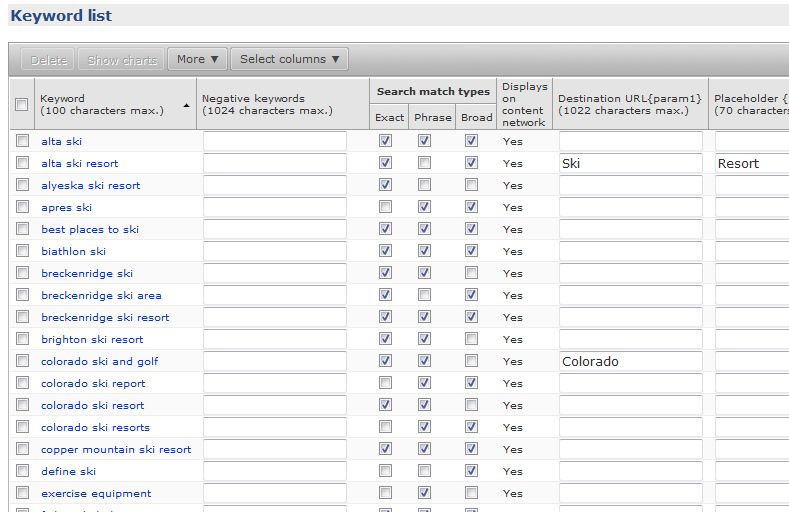
Budgeting and bidding
                              How it works in adCenter                         Feature snapshot

 Daily          Daily         There is no daily spending limit in
 Spending       Budget        adCenter. You can set a daily budget, in
 Limit                        addition to a monthly budget. Please
                (Set at the   note that the daily budget is a target.
 (Set at the    campaign      The actual daily spend could be higher
 account and/   level)        or lower than the daily budget, but
 or campaign                  the monthly spend will not exceed the
 level)                       monthly budget you set.

                              When you transition your campaigns into
                              adCenter, your daily spend limit in Yahoo!
                              will be multiplied out to create a monthly
                              budget, then divided evenly across your
                              campaigns.

                              You have a variety of budgeting options
                              to choose from in adCenter. If you choose
                              to adjust your budget settings, you can
                              also choose to set a monthly budget
                              that can spread out your spend evenly
                              throughout the month. Make sure that
                              you select an appropriate budget for your
                              campaigns, taking care to choose settings
                              that maximize your performance.

                              Be prepared to adjust your budgets for
                              the increase in volume that will result
                              from Yahoo! Search and Bing traffic
                              being combined in a new, unified search
                              marketplace. It may take some time to
                              make sure your budgeting is right on
                              target. Monitor your campaigns closely
                              and use the adCenter reporting tools to
                              help you determine when to shift your
                              strategies.

 Prepay         Pay           In adCenter’s threshold-billing system,
 billing        as you        you will be charged either on your
                receive       monthly billing cycle day or when you
                clicks        reach your billing threshold, whichever
                              comes first. adCenter also has a Bill Me
                              Now option that allows you to charge
                              your Microsoft adCenter account balance
                              immediately to your payment method.

                              You can pay by credit card or debit card.
                              In the U.S., PayPal is also an option. If you
                              paid your Yahoo! account with PayPal and
                              are eligible to do so in adCenter, you must
                              re-enter that information because it will
                              not be carried over as part of the transition.
How it works in adCenter                      Feature snapshot

Minimum          Minimum Bid       Microsoft adCenter requires a minimum
Bid is $0.01     is $0.05          bid of $0.05. If your keyword bids in
                                   Yahoo! are under $0.05, the transition
                                   tool will prompt you for approval to
                                   increase your bids to $0.05. You can also
                                   customize your keyword bids on your
                                   own in adCenter.

                                   To get your ads serving, make sure that
                                   you adjust your bids to help improve your
                                   performance. A higher bid will give you
                                   a greater chance of achieving a favorable
                                   ad position and greater traffic to Bing
                                   and Yahoo! consumers. The higher
                                   bids contribute to the overall quality
                                   and competitiveness of the advertising
                                   marketplace, where ads display in front of
                                   a high quality audience.

Campaign management and targeting
Excluded         Negative          As part of your transition from Yahoo!
Words            Keywords          to adCenter, your excluded keywords
                                   will carry over at the same level, except
(Up to 500       (up to 1,024      account-level excluded words, which will
keywords         characters at     be set to the campaign level in adCenter
each at the      the campaign,     as adCenter does not offer negative
account level,   ad group, and     keywords at the account level.
1,250 at the     keyword levels)
campaign                           Currently, adCenter negative keywords are
level, and                         available at the campaign, ad group, and
500 at the ad                      keyword levels (limit of 1,024 characters).
group level)                       A future upgrade will expand the limits
                                   at the campaign and ad group level to
                                   several thousand negative keywords to
                                   align with industry standards. Negative
                                   keywords set at lower levels override those
                                   at higher levels within a campaign.

Start            Start             Your campaign-level start and end date
and              and               setting in Yahoo! will be applied at the
End Dates        End Dates         adCenter ad group level as part of
                                   your transition.
(Set at the      (Set at the ad
campaign         group level)      In adCenter, one campaign can include ad
level)                             groups with different start and end dates,
                                   making it simple to manage promotional
                                   or seasonal ads within an existing
                                   campaign.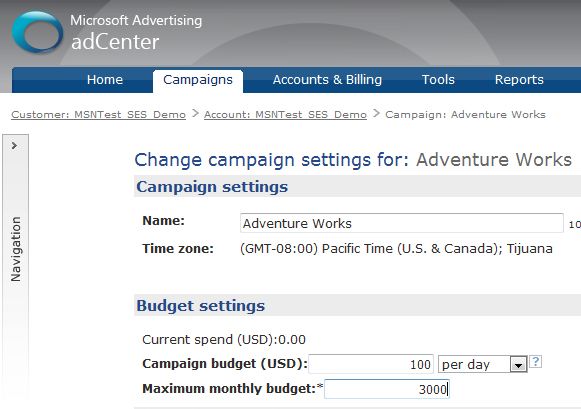
How it works in adCenter                    Feature snapshot

Targeting     Targeting     When you move your campaigns into
                            adCenter, you will need to reset your
(Set at the   (Set at the   campaign targeting with adCenter
campaign      campaign      targeting options. With adCenter, you can
and ad        and ad        zero in on your ideal customers based on
group         group         location and demographics, and you can
level)        level)        focus your efforts on certain days of the
                            week and time of the day. Take control of
                            your geographic targeting by selecting
                            specific countries/regions, states/
                            provinces, metro areas, or cities where
                            your target customers are. adCenter
                            doesn’t offer targeting by postal code.

Male/         Demographic   As you transition your account to
Female Bid    Targeting     adCenter, you will need to reset your
Adjust-                     targeting options.
ments &
Underage                    To avoid displaying ads to a certain age
Blocking                    or gender, you can target other ages and
                            genders you wish to reach. However,
                            there is no option to absolutely block
                            certain groups.

                            You can use adCenter’s age and gender
                            targeting to help increase your ads’
                            exposure to your target customers.

Bid           Incremental   adCenter allows you to place additional
adjustments   bids          bids, called incremental bids, in 10
                            point intervals from zero to 100% on
                            demographic targeting options such
                            as gender. An incremental bid is a
                            percentage increase of the base bid,
                            applied when customers who meet the
                            target criteria click your ad.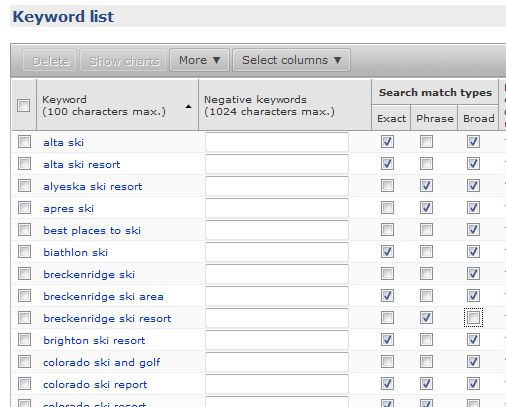
How it works in adCenter                      Feature snapshot

 Ad            Target           When transitioning your Yahoo!
 Scheduling    by Time          campaigns to adCenter, you will need to
               of Day or        reset your targeting options to select the
               Day of Week      time periods within which you wish your
                                ads to display.

                                In adCenter, you have the ability to
                                designate ads to show more frequently to
                                consumers on specific days of the week
                                and times of day. Additionally, you can
                                place an incremental bid on the targeted
                                days and times.

Keywords and ad customization

 Match         Match Types      adCenter offers three search match types.
 Types                          adCenter’s broad match is similar to
               (Broad, phrase   Yahoo!’s advanced match, and adCenter’s
 (Advanced     and exact)       exact match is similar to Yahoo!’s standard
 and                            match. adCenter also offers phrase match.
 standard)                      You can also specify unique bids for each
                                match type.

                                adCenter does not normalize for plural
                                forms, so you must bid separately on
                                these forms. Also, you should add
                                common misspellings for your keyword
                                terms. Use the free tool, Advertising
                                Intelligence, to help expand your keyword
                                lists to help capture more queries by your
                                target consumers.

 Ad Title      Ad Title         adCenter allows ad titles up to 25
 and Short     and Text         characters and ad text up to 70
 Description                    characters, while Yahoo! allows ad titles
                                up to 40 characters and ad text up to
                                70 characters. It is recommended that
                                you shorten your ad title and short
                                description in Yahoo! Search Marketing
                                before you transition to adCenter to
                                help ensure your ad doesn’t receive an
                                editorial disapproval.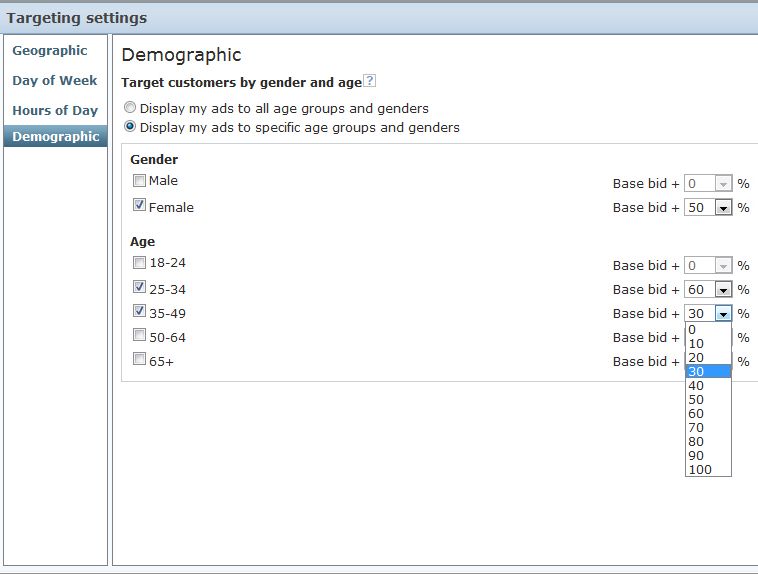
How it works in adCenter                    Feature snapshot

Params   Params         A customized ad is more likely to appeal
         and            to potential customers because it is
         Dynamic Text   more relevant. Using dynamic text can
                        help improve the click-through rate and
                        conversion rate of your ads, and when
                        you use dynamic text as a placeholder,
                        you can quickly update multiple ads
                        simultaneously.

                        You’ll find three types of dynamic text:
                        keyword, which allows you to customize
                        your ad based on search queries;
                        destination URL, which changes the
                        destination URL based on search queries;
                        and placeholders, which enables you to
                        revise multiple ads simultaneously by
                        using placeholders.

                        For placeholders, adCenter offers more
                        param options beyond {keyword},
                        including {keyword:default}.

                        You can also customize your search ads
                        by using text variables. You first create
                        a base ad, and then you indicate which
                        parts of the ad will change, depending on
                        factors such as keyword search queries by
                        potential customers.
Reporting
                         How it works in adCenter                      Feature snapshot

 Tracking   Conversion   adCenter supports more tracking params,
 Params     Tracking     however your tracking must be reset as
                         you transition to adCenter.

                         Conversion tracking is not automatically
                         turned on in adCenter.

                         Any similar tracking implemented in
                         the Yahoo! system will not carry over to
                         adCenter. Your ads may still serve, but you
                         will not be able to retrieve the reporting
                         data you previously could.

                         You can quickly and easily keep tabs
                         on your return on investment (ROI) in
                         your search and content campaigns
                         by implementing the Microsoft
                         adCenter conversion tracking features.
                         Conversion tracking is free and lets you
                         track completed transactions on your
                         website, such as purchases or newsletter
                         registrations—whatever you consider to
                         be a customer conversion.

                         Make sure to enable conversion tracking
                         and make the changes in coding that
                         align your campaigns with the adCenter
                         reporting functionality. Then, after your
                         campaign starts serving, access the
                         conversion data in your adCenter reports.
                         You can measure the specific conversion
                         results for your adCenter campaigns
                         and evaluate the performance and
                         effectiveness of your ad copy,
                         keywords and more.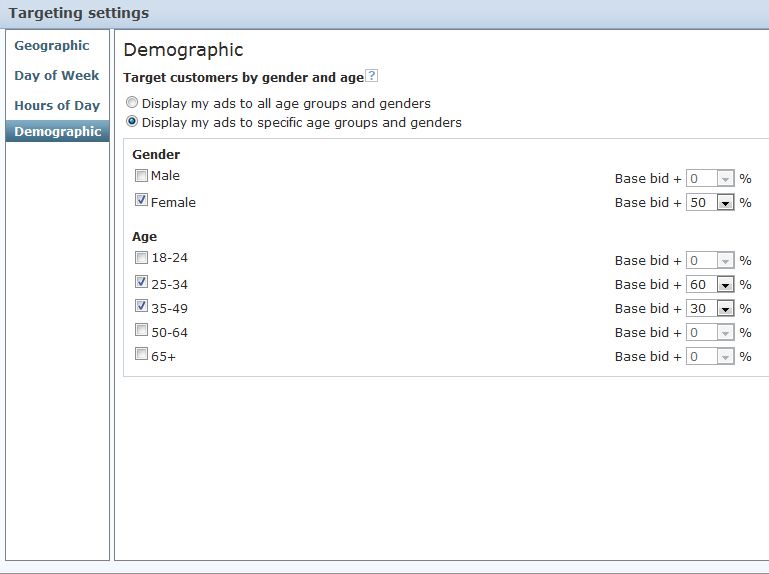

You can also read


