TAXACT SELF-EMPLOYED ONLINE TAX PREPARATION GUIDE
←
→
Page content transcription
If your browser does not render page correctly, please read the page content below
TaxAct Self-Employed
         Online Tax Preparation
                 Guide
    FOR CHILD CARE BUSINESSES

JANUARY 2023

                            DESIGNED AND DEVELOPED BY

                                           CIVITAS STRATEGIES
                              www.csearlystart.com | info@csearlystart.com

© CIVITAS STRATEGIES 2023                                 1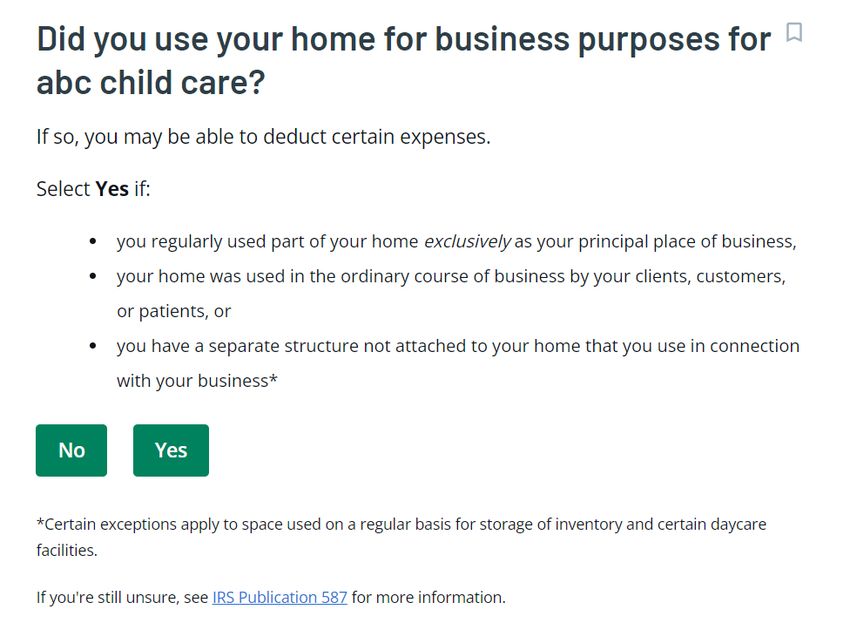
Contents
Why Tax Prep Software is a Good Idea for Child Care Business Owners ................................................... 3
How to Use this Guide .............................................................................................................................. 3
Introduction to TaxAct and Your Tax Filing ........................................................................................... 3
Entering Business Income and Expenses ................................................................................................ 5
   Income ..................................................................................................................................................... 6
   Expenses .................................................................................................................................................. 9
       Expenses (in order of appearance in the software) ..................................................................... 11
Common but often misunderstood expenses ........................................................................................... 18
   Meals ...................................................................................................................................................... 19
   Depreciation ......................................................................................................................................... 21
   Business Use of Home......................................................................................................................... 34
   Business Use of Home - Depreciation ............................................................................................ 444
Some final questions on your business expenses ................................................................................... 455
Ways that you can make your Tax Preparation go smoothly ................................................................. 466

© CIVITAS STRATEGIES 2023                                                                                                            2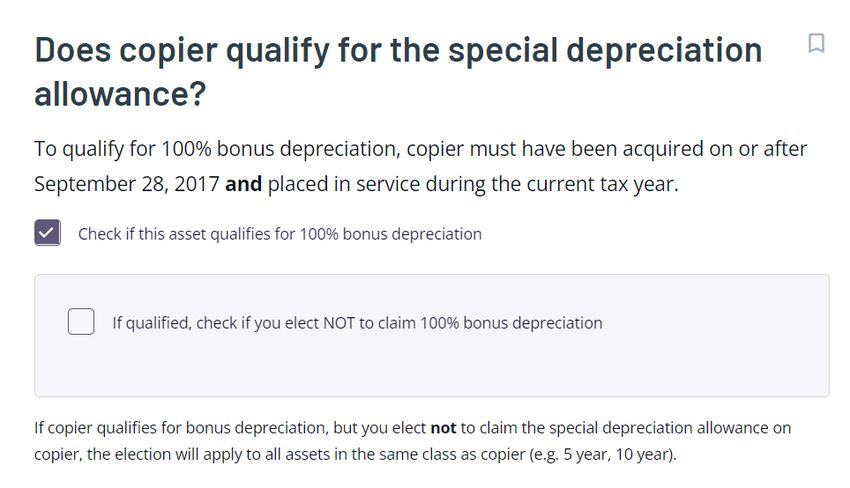
Why Tax Prep Software is a Good Idea for Child Care Business Owners
Many child care business owners can prepare their own taxes. Using tax software is a
great way to save yourself time and money. It also can give you peace of mind since
many calculations are performed for you and there are automated cross-checks to
ensure you are properly accounting for your revenue and expenses. According to the
IRS, filing electronically helps you avoid common and costly errors. Best of all, it puts you
in the driver’s seat of this essential business responsibility-- filing your annual tax return.

How to Use this Guide
You may feel a bit intimidated by the idea of doing your own taxes for your child care
business, but using this guide and other tools built just for you, will prepare you to have
a hassle-free experience that can save you money, ward off the risk of audit, and help
you set goals to improve your business practices and tax preparation for many years to
come. You’ll come out of tax season confident about your filing and your understanding
of it.
This guide is best for self-employed child care business owners. These may include
home-based family child care programs or child care centers that are owned by a sole
proprietor.
It’s best to use this guide as a reference while you’re preparing for and completing your
tax filing. The goal of this guide is to allow you to accurately claim your child care
business revenue and expenses. Completing the data entry that will form your Schedule
C is the focus of this guide. We will not review the tax preparation associated with your
personal (non-business) taxes. Rest assured, using tax software will allow you to ensure
you’re accurately claiming your personal credits and other items!
Note that this guide is not tax, financial advice, nor an endorsement of TaxAct. The
authors are not affiliated with TaxAct.

Introduction to TaxAct and Your Tax Filing
TaxAct offers various versions of its tax product. First, you will need to decide if you
want to prepare your taxes using the online version or a software download. For this
guide, we used the online Self-Employed version of the software. In this version, you
have access to essential forms such as the Schedule C, and the ability to search for
business deductions that you can benefit from. Those features are not available through
the basic package. This product was priced at $109.90. We would recommend that
providers completing their own taxes purchase the All-Inclusive bundle because it will
give you the added protection of full audit representation. All of TaxAct’s online plans

© CIVITAS STRATEGIES 2023                                                     3
come with XpertAssist which gives you individual support from a specialist to answer
questions as you prepare your filing.
As you navigate through the system, understand that the goal is to ensure you have a
fair and accurate return so that you are protected in the event of an audit. The best way
to avoid questions by the IRS is to avoid any issues that increase your chances of an
audit, usually referred to as “red flags.” The most common red flags for child care
businesses are:
   •   Not including all your income on your taxes – such as leaving out a 1099 you
       received from the Wisconsin Early Childhood Association for the REWARD
       stipend, or other taxable income that came to your program through state
       funding, like Child Care Counts payments.
   •   Claiming irrelevant expenses or ones that are unusually high — like a provider who
       claimed $40,000 in cell phone expenses for herself each year.
   •   Taking a very large loss on your business — businesses will take a loss from time
       to time but you want to avoid having losses that are far more than what you
       earned. If you have not turned a profit in three of five consecutive years, you
       could be at risk of being determined to be a “hobby” and not a business by the IRS
       (which will change your ability to deduct expenses greatly).
   •   Claiming 100% use of your vehicle — this is especially true for family child care
       providers. Some of you may have a van or car you use for transportation — that’s
       alright; however, reporting that the vehicle is only used for work (and never for
       personal reasons) can draw attention since it is less common.
To help prepare your taxes with ease, you want to be sure that you have your revenue
and expense records up-to-date and handy. Perhaps you have an accounting system
where this data can be pulled from or you have a recordkeeping system with this
information. You will generally need:
   •   1099 forms
   •   Bank and credit card records
   •   Canceled checks
   •   Year-end or weekly receipts that show what parents paid for child care
   •   Paid receipts or invoices for goods or services that you purchased
   •   Payroll records, if applicable
   •   Mileage records documenting the business use of your vehicle
   •   Time-Space percentage calculation for family child care providers

© CIVITAS STRATEGIES 2023                                                  4
Important considerations when selecting a platform to prepare your taxes :

Civitas Strategies Early Start tested the online, Self-Employed versions of three mainstream
tax preparation software systems: TaxAct, Turbo Tax, and H&R Block. Among all three
software, CSES found TaxAct to be moderately effective in educating the sole proprietor
about the process of preparing their taxes. Home-based family child care providers should also
be mindful that they are expected to apply their own time-space calculation to applicable
expenses when entering them into TaxAct. Additionally, TaxAct does not provide much
education on the calculations that they are performing for certain things like Time-Space
Percentage and depreciation.

Since the paths to depreciate assets in TaxAct’s software are embedded in different sections
of the process, it is very difficult to explain or track how to report depreciable assets for the
layperson.

First Things First
You will need to enter basic demographic information about yourself (and your spouse
and dependents, if you have any):
   •   Name
   •   Social Security Number (SSN)
   •   Date of birth
   •   Marital status
   •   Daytime phone number
   •   Occupation
   •   Other information to help determine your personal tax credits, including if you are
       a U.S. citizen; were a student last year; can be claimed as a dependent on another
       person’s taxes, or have any dependents to claim on your taxes.
   •   And other information to help determine your personal tax credits and liabilities.

Entering Business Income and Expenses
You will be asked to select any income, investments, or expenses you had in the tax year.
This guide will focus on your self-employed income.
You will be prompted to enter basic information about your business (i.e. – name and
address). You’ll also enter your Employee Identification Number, EIN, (if you have one).
If you don’t have an EIN, consider getting one for privacy reasons. But you can only use
an EIN if it was created within the tax year. So, if you created an EIN on January 15,
2023, you could not use it for your 2022 tax return.
You’ll then be asked, “Which of these categories best describes your work?”.

© CIVITAS STRATEGIES 2023                                                          5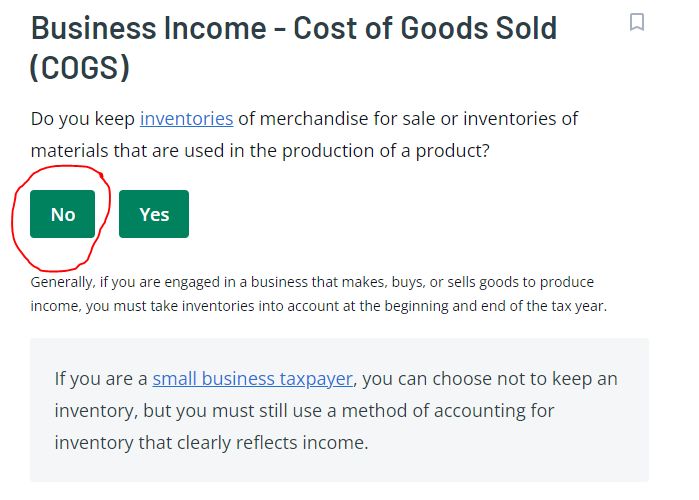
•   Choose “View all categories”.
   •   Then select “Healthcare, Residential or Daycare Services”.
You will then need to select the business activity that best describes your Healthcare,
Residential, or Daycare Services work.
Select “Child day care services”.
This is necessary for the business code 624410 to be automatically applied to your
business type on your Schedule C.

Income
Entering your income is pretty straightforward.
The system will display text boxes with types of income and descriptions of them. It asks
if you received any of the listed income sources for your child care work.
Your revenue should include all the money you took in for your child care business from
all sources, even if you are not issued a 1099. This should include cash and money from
cash apps for your business.
The most common response for child care businesses will be:
   •   Cash/check (not reported on 1099s). This will mainly be the payments that you
       receive from families.

   •   Form 1099 NEC. That stands for nonemployee compensation. Likely you will
       receive a 1099 NEC for other business-related payments received. For instance, if
       you receive subsidies or any other contract payments, and you were issued a
       1099 NEC, you would include those here. This will also include grants and awards
       received, such as the REWARD stipend from the Wisconsin Early Childhood
       Association, or other taxable income that came to your program through state
       funding, like Child Care Counts payments.

       In many states, providers receive a 1099-NEC form for payments received from
       their state’s food program and subsidy payments. Some states might not use the
       1099-NEC and will instead share the same information in a similar way using a
       different document. The IRS prefers for subsidy and food program payments to
       be included in the Other Income section, even if you received a Form 1099-NEC.

   •   Form 1099-K. You will receive a 1099-K if you receive $600 or more in business
       payments received from a card (credit/debit) or third-party network transactions
       (Square, PayPal, Venmo, etc.).
© CIVITAS STRATEGIES 2023                                                6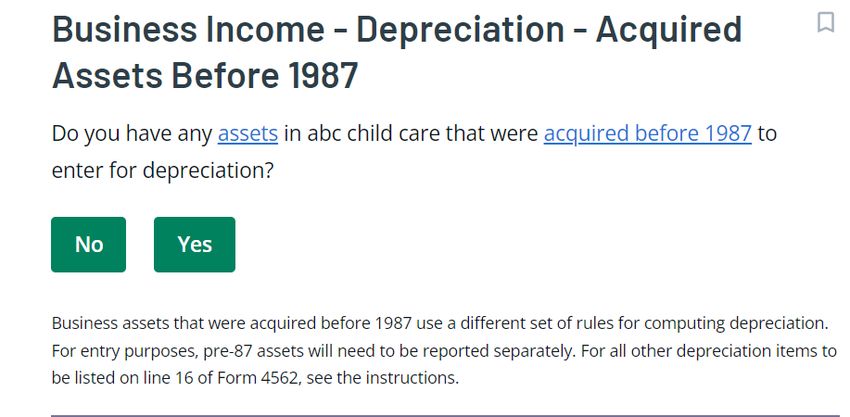
The system also lists Other Income as an option. Typically, this would not be applicable
as it is referring to prizes or awards. However, in the case of child care businesses, the
IRS prefers you to enter your Child and Adult Care Food Program (CACFP) income here
(see note below). Be sure to list any grants or grant-like awards, such as Child Care
Counts, that you received as Form 1099 NEC income. Doing that will be sure that it is
taxed correctly as your self-employed income.

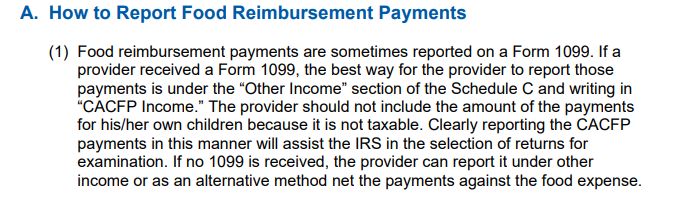
 A note on CACFP income – According to the IRS Child Care Audit Guide, Child Care businesses
 should enter their CACFP revenue as Other Income. This is their preference because it allows
 them to easily spot CACFP revenue.

 Excerpt from the IRS Child Care Audit Guide

You will need to have your Form 1099s handy because you will need to enter the
information contained on each one. You will then need to enter the amount of your
gross receipt into a text box. Your gross receipts are all forms of income that were not
already reported on your 1099s (i.e., cash and check payments from families).
Here are some helpful worksheets that you can use to organize your income so that you
can be confident that you’re entering it correctly into the tax software system. These can
also keep your taxes organized so that you remember what your Schedule C consists of
once it’s generated:

© CIVITAS STRATEGIES 2023                                                   7
1099 Income
 1099 Payer name                              Amount

 Total (add all of the 1099s)

Parent Payments and Fees (including cash)
 Parent                                       Total Amount Paid

 Total (add all of the parent payments)

Other Income (such as CACFP income, grant-like awards, and grants not associated with
a 1099)
 Payer name                         Purpose                Amount

 Total (add all of them together)

© CIVITAS STRATEGIES 2023                                             8
Total Revenue
 Total payment                                Amount

 Total 1099 Payments

 Total Parent Payments

 Total Other Payments

 Total Revenue (add them all up)

After entering your income, you’ll then need to answer a couple of questions about how
your business operates (i.e., was it started in the tax year, and what accounting method
you use).
Method of accounting – This is a required entry on tax filings, businesses must state if
they use the Cash or Accrual accounting method. TaxAct will automatically assign the
Cash Method which is the most common accounting method for small businesses,
including child care businesses. This means that your transactions are accounted for at
the time you receive a payment or when you pay an expense. You can edit to change to
the accrual or another method if it applies but it is uncommon for child care providers.
The system will then ask, “Did you issue a Form 1099 to anyone?”
You should have issued this form if you paid at least $600 for services on behalf of your
business. For instance, if you paid a contractor or substitute $600 or more, you would
issue them a 1099 to document the transaction. This does not include personal
transactions or a Form 1099 issued to you.

Expenses
You want to make sure you have records of your costs, ideally, receipts showing
payment for expenses, but you can also, in most cases, use canceled checks, invoices, or
credit card and bank records. It is critical that any proof of an expense show:
•   That you paid the expense.
•   The amount you paid.
•   The date you paid it.
•   A description of the item purchased or service received.

© CIVITAS STRATEGIES 2023                                                 9
Before you begin to enter your expenses, TaxAct will ask you about your Cost of Goods
Sold (COGS)

According to the IRS Child Care Audit Guide, Cost of Goods sold should rarely, if ever, be
used. This line is for materials used in manufacturing food or products. You are best off
putting your expenses in the appropriate expense category. For example, if you have
diapers as an expense they should be under “supplies” and not Cost of Goods sold.
The system will show you suggested common deductions for small businesses with an
accompanying video. The list is not exhaustive and not specific to child care. Instead, we
recommend you utilize the deduction guidance charts that you find within this guide
which were developed using the Confidence in Quality Tax Prep Rubric©. We
recommend you have this guide handy to cross-reference with the TaxAct categories as
you enter your data.
Here, we will review some of the key deductions that you should be aware of with a
worksheet that you can enter your expenses into before entering them into TaxAct. The
expenses are listed and grouped in the same order that you will see them in TaxAct.
Because TaxAct will first ask you for gross entries for each category, you must have this
information readily available. Additionally, TaxAct does not consistently give examples of

© CIVITAS STRATEGIES 2023                                                 10
what expenses would be deductible for a given category. We strongly recommend that
  you use this worksheet to first enter your data to easily transfer into TaxAct and to
  learn examples of expenses that you can deduct by category.

                    A Note for Home-Based Family Child Care Providers
  TaxAct does not do a good job of guiding providers through the Business Use of Home
  (also referred to as Time-Space Percentage). Business Use of Home is one of the last
  expense entries as you are guided through the expense questionnaire. PLEASE NOTE:
  Many of the expenses that you are first prompted to enter will need to be entered as Business
  Use of Home Expenses and not put in an expense category unless it is a 100% business
  expense, and not shared with personal use.

  Expenses (in order of appearance in the software)
   Category       Description                                                Total Expenses ($)
Vehicle           You will enter a description of your vehicle including
                  the date it was put in service for your business. The
                  system provides a drop-down list of the Asset Type.
                  TaxAct states you should select “Car or Light
                  Truck/SUV” if you plan on using the standard
                  mileage deduction.

                  You’ll need to enter the total miles driven for the
                  car, detailing business vs. personal miles driven. The
                  system works well here because it prompts you to
                  clearly separate business miles driven from personal
                  and performs the standard mileage rate calculation
                  for you. It will also give you an opportunity to
                  maximize this expense by ensuring common fees,
                  like parking, tolls, car loan interest, and car property
                  taxes are entered. They will apply the business use
                  percentage to the car loan interest and car property
                  taxes in the event the vehicle has a mixed-use.

                  Do keep in mind you can track and deduct your
                  mileage for business-related trips even ones that
                  don’t involve the children in your care, such as going
                  to Costco to buy child care supplies or face-to-face
                  child care training. You can also include in this
                  amount your business portion of car loan interest
                  and parking fees and tolls.

  © CIVITAS STRATEGIES 2023                                                     11
For your mileage, make sure you keep track of the
day, purpose, and total miles because you will need
to enter that information for this deduction. It can
be something as simple as:
June 9 – 3.25 miles going to Walmart for supplies
You will note if the vehicle is owned or leased. Next,
you will need to determine if you are using the
standard mileage deduction or actual expenses to
claim your business vehicle expenses. The system
will guide you to the appropriate method based on
whether you own or lease the vehicle and the
methods that you previously used in past tax years.
In general, standard is usually better if you drove a
lot of miles. This will get you the miles driven
multiplied by the IRS mileage reimbursement rate.
The IRS standard mileage rate was $0.56 per mile
from January 1, 2022, to June 30, 2022, and then
increased to $0.585 (that is 58.5 cents) per mile
through December 31, 2022, due to increased fuel
prices. In addition to those standard miles, you can
claim the business portion of car loan interest,
parking fees, and tolls paid. However, if you use
standard mileage, you cannot deduct other costs
associated with your car, including gas,
repairs/maintenance, insurance, depreciation,
license fees, tires, car washes, lease payments,
towing charges, auto club dues, etc.
Actual expenses might get you a bigger tax break if
you had higher repair, gas, and insurance expenses
for the year. With actual expenses, you need to
keep track of all payments associated with the
business use of the vehicle, including car loan
payments. You can also depreciate the vehicle.
While in the standard mileage view you may see a
“ProTip” shared by TaxAct which may be a bit
confusing:
© CIVITAS STRATEGIES 2023 12If you are using standard mileage, you will not be
accounting separately for these vehicle-related
expenses since those are already factored into the
standard mileage rate.
Repair See depreciation.
regulation
elections
Advertising Here you’ll enter costs to promote your business
including online and print ad costs, brochures,
mailers, flyers, business cards, and website costs.
You will also enter contract labor costs associated
with advertising. For example, if you paid a web
designer, you would enter those fees there.
Amounts paid to employees
Pensions and These are contributions to your employees'
profit sharing retirement accounts, not your own. Costs include
SEP IRAs and SIMPLE IRAs. Sole Proprietors will
enter their company retirement in Part II - line 15 of
Form 1040 Schedule 1.
Wages Make sure that the wages you enter are only for W-
2 employees reported to the government. As a sole
proprietor, you cannot pay yourself as an employee.
You can take money out of the business, but your
“pay” is considered the amount on Line 31 (your net
profit or loss) so there’s no need to enter money you
took out for yourself throughout the year here.
Dependent Only enter amounts if you withheld pre-taxed
Care benefits money from an employee’s paycheck to help pay for
the care of a child, spouse, or another dependent
adult who lives in their household.
© CIVITAS STRATEGIES 2023 13Other Do you have a company health or accident
Employee insurance program? This includes programs
benefits associated with your business (not your personal
expense) like accident and health plans, group-term
life insurance, and dependent care assistance
programs. If you offer child care or education
assistance, include that here.
Expenses for your office, repairs and maintenance, and supplies
Office Expense Here’s where you want to include amounts paid for
office supplies (such as ink, toner, paper, staples,
writing utensils, office furnishings, etc.) and postage
as well as your business communication service
costs (such as cell phone service, internet service,
second phone line, fax, and video conferencing
services). It is rare for providers not to have some
expenses in this category.
Home-based family child care providers should be
mindful of how they enter their expenses, however.
If the expenses were 100% business use, then you
can enter the full amount of your expense to
deduct. If the expense were for both personal and
business use, you will need to enter it as a Business
Use of Home Expense.
Repairs and This includes any repairs and maintenance of the
maintenance space your use or your equipment. Repairs and
maintenance are required for you to conserve or
maintain your property – these are repairs that do
not add value to the property.
Home-based family child care providers should not
enter repairs and maintenance expenses here
because they will be reported in the section on the
business use of your home.
Supplies Supplies include items you use with the children
such as art supplies, diapers and wipes, toys,
learning materials, and cleaning supplies.
Home-based family child care providers should be
mindful of how they enter their expenses, however.
If the expenses were 100% business use, then you
© CIVITAS STRATEGIES 2023 14can enter the full amount of your expense to
deduct. If the expense were for both personal and
business use, you will need to enter it as a Business
Use of Home Expense.
Providers may opt to enter expenses for meals
served to children here (this includes meals that you
were reimbursed for by CACFP). Home-based
family child care providers, see guidance on
calculating your meal expenses here.
Expenses for insurance, taxes, and utilities
Insurance This is for insurance other than health. Include your
general liability insurance, commercial property,
fire/theft/flood, and workers' compensation
insurance if you have employees.
Home-based family child care providers should not
include your homeowner’s/renter’s insurance, you
will need to enter it as a Business Use of Home
Expense.
Taxes and You can enter taxes (and local taxes, excluding
Licenses federal taxes) and business license fees here. These
should only be taxes and fees that are 100% related
to your business. For example, your licensing fee
that allows you to operate a home-based family
child care business or a child care business.
Utilities This applies to you if you have a separate office or
other business property that's not part of your
home.
Home-based family child care providers will include
their utility costs in a separate area, Business Use of
Home Expense.
Many providers will have utility costs which include
utilities such as gas, internet, electricity, or water.
This also includes trash collection, pest control
service, and security alarm monitoring service.
© CIVITAS STRATEGIES 2023 15Rent for equipment or other property
Vehicle, This only applies to the rental of business vehicles,
Machinery, and machinery, and equipment such as copiers, office
Equipment furniture, computers, printers, etc.
Rent
Other rent Enter other rent paid, for instance, building or land
rentals. This is rent paid for property used for work
only, not for an office in your home.
If you use your home for business, rental of your
home will be included in the section on Business
Use of Home Expense.
Business Travel If you traveled for work or paid for business travel
expenses for your staff, you will include those costs
here. This does not include expenses for mileage or
local meals but rather if you had to travel for a
conference, training, or business meeting. Include
costs like airfare, hotels, rental cars, taxis, ride-share
services, and baggage fees.
Business Meals See meals.
Legal and Include any fees you paid to a lawyer, accountant, or
Professional tax preparer, for business use only, as well as
Services membership fees for professional memberships like
the National Association of Family Care or the
National Association for the Education of Young
Children.
Interest expenses
Mortgage This is for interest related to a property loan that is
Interest exclusively for your business.
If you use your home for business, your mortgage
interest will be included in the section Business Use
of Home Expense.
Other interest This includes interest you paid directly related to
your business (for home-based family child care
providers, mortgage interest is reported in the
section Business Use of Home Expense).
© CIVITAS STRATEGIES 2023 16Deductible interest can include interest on business
credit cards (not personal ones) and business loans
such as the Economic Injury Disaster Loan or an
SBA 7a loan. This also includes credit card, loan, and
business portion of interest on a vehicle loan.
Contract labor The system asks if you made any payments that
required you to issue a form 1099. If you issued a
form 1099 to someone that you contracted to
perform a service, like cleaning, or a substitute, and
you paid them more than $600, you will enter the
amount paid.
Note – In some cases, child care providers issue
1099 to employees, or helpers and substitutes. If
you issued any 1099, enter it as contract labor but
be mindful that you are classifying your employees
properly. Typically, if you direct how someone
works, they are an employee. For more information
on classifying staff, see When is Someone a
Contractor or an Employee?
Other Enter amounts for all other expenses that do not fall
Expenses into any of the other categories, like CPR/first aid
training and certification, and the business portion
of your tax return software costs.
Typically, there are existing categories for many of
the expenses that providers list in “Other Expenses”.
For example, diapers and wipes are often included in
Other Expenses, but they can also fit under
“Supplies.” In cases where there are a large number
of or a lot of expenses in Other Expenses, the IRS
may do a manual check of your return. Therefore, it
is best to keep this expense category to a minimum
if possible.
Click “add additional other expense” to enter
separate expenses.
Providers may opt to enter expenses for meals
served to children here (this includes meals that you
were reimbursed for by CACFP). Home-based
© CIVITAS STRATEGIES 2023 17family child care providers, see guidance on
calculating your meal expenses here.
Unallowed at- This is for businesses that had net losses in previous
risk losses years. Here is where you will enter unallowed at-risk
losses originating in taxable years ending before
1/1/2018 and after 12/31/2017. This information is
used to calculate your qualified business income
deduction.
Qualified This only applies if you received a Notice 2014-7
Medicaid from the IRS. This is a rare deduction for child care
Waiver businesses.
Payment
Common but often misunderstood expenses
Here we will walk you through three important and often misunderstood expenses for
child care businesses. Properly claiming these deductions can be a significant financial
strategy for your business however you want to be sure that you are calculating these
correctly and have the necessary records on file to back your use of them. They are:
1. Meals
2. The business use of the home (also known as home office)
3. Depreciation/Assets
© CIVITAS STRATEGIES 2023 18Meals
As pictured above, the system provides the following options to enter meal expenses:
• Food or beverages provided by a restaurant: These are your or your staff’s
business meals (i.e. while on business travel, business meetings, or conferences).
For tax years 2021 and 2022, your business meals are 100% deductible if food
and beverages were purchased from a restaurant.
• Other meals expense, subject to DOT limits: This is only for persons subject to
Department of Transportation (DOT) regulations. This does not apply to child
care.
• Other meal expenses, not subject to DOT limits: Here is where the system
suggests you will enter expenses for meals served to children. They even further
provide minimal guidance on child care meal expenses for family child care
providers. We recommend you enter children’s meal expenses under Supplies or
Other Expenses.
Also pictured above is a memo stating “before continuing, you may want to review
special rules from the IRS for:
• How to figure your deduction using the standard meal allowance
• Meal and snack expenses for family daycare providers
• Self-employment per diem rates for meals and incidental expenses
© CIVITAS STRATEGIES 2023 19However, they only link to IRS publications. You must figure out your own meal expense,
including the standard meal allowance for home-based family child care businesses.
Below we share more guidance on how to enter certain meal expenses:
We will primarily focus on the meals served to children. The process for reporting meals
served to children differs for home-based family child care programs vs. child care
centers.
Guidance on deducting expenses for meals served to children
Child Care Centers
Child care centers must report their actual food expenses when claiming the cost of
meals served to children. You must still report the reimbursements received from the
food as income.
For example, if your total food costs for the year were $15,000 and you received
$11,000 as a reimbursement, you will still enter $15,000 as your meals expense and
$11,000 as a revenue line entry labeled “CACFP” or “Food program”.
If you used a food sponsor, you will report your expenses paid and income received from
the sponsor, even if you did not receive a 1099 at the end of the year.
Family Child Care Homes
Only home-based providers are allowed to use the standard meal and snack rates for
reporting their children's meals expense. This makes your recordkeeping easier than
tracking actual expenses.
Tax Year 2022 standard meal and snack rates:
Breakfast Lunch/Supper Snack
Tier 1 $1.40 $2.63 $0.78
Tier 2 $0.51 $1.59 $0.21
According to the IRS Child Care Audit Guide, the allowed rate is based on the Tier I rate
under the CACFP. The provider may use the standard meal and snack rate for a
maximum of one breakfast, one lunch, one dinner, and three snacks per eligible child per
day. There is still a recordkeeping requirement, which includes the name of each eligible
child, dates and hours of attendance in the home-based family child care program, and
the type and quantity of meals and snacks served. This limit is higher than the number of
meals that CACFP reimburses, so it is advantageous for providers to track and claim all the
meals served.
© CIVITAS STRATEGIES 2023 20If using the current standard meal rates for the tax year, when you enter your costs, you
will need to must multiply the total meals and snacks served to children for the year by
these rates and enter the amount into the system.
Total amount to
Total number of
Rate enter into the
meals served
system
Breakfast X =
Lunch/Supper X =
Snack X =
You should use the rates in effect at the start of the tax year. So for 2022, you would
use the 2021-2022 rates since they were in force on January 1, 2022, the start of the
year.
Depreciation
Depreciation is the practice of deducting a large business cost over time rather than in
just one year. This is usually a requirement when you want to deduct certain large
purchases (over $2,500) or an improvement. You can also depreciate your home if you
use your home for business.
Depreciation comes up in a couple of places in TaxAct, first is immediately following the
vehicle expenses questions. You will see this question:
© CIVITAS STRATEGIES 2023 21Naturally, you may think they are referring to car repairs since it follows vehicle expenses, but that is not the case. These are actual rules regarding the treatment of expenses for acquiring, maintaining, or improving the tangible property. The IRS allows taxpayers to treat certain expenses that qualify as assets as an expense instead and fully deduct it rather than depreciating them. Assets are items of value owned by a company. Business assets can be many things such as vehicles, real estate, computers, and furniture. Assets add value to your business and they may be subject to depreciation. Depreciation is the practice of deducting a large business cost over time (over its useful life) rather than in just one year. Not all assets have to be depreciated. Typically, if you made an improvement or made any single purchase of equipment or furniture more than $2,500 you will need to use depreciation calculations. For example, if you purchased three laptops that totaled $4,500, that means each laptop cost $1,500. Each laptop is not over $2,500 and would not be treated as an asset. If you purchased two computers totaling $6,000, that means each laptop cost $3,000 and would be treated as an asset. It may be difficult to check off which election you want to take if you’re not sure what they are and what assets you want to take them for. We recommend that you press the information icon next to each election to learn more about it. Here’s a brief description of each of the most common elections: © CIVITAS STRATEGIES 2023 22
De minimis safe harbor election - If you have assets that cost $2,500 or less, you have
options to treat them as expenses instead of assets and deduct them fully in one year.
Taking advantage of the de minimis safe harbor election can substantially reduce your
business’s income tax burden. If you use this rule, make sure you, or your preparer,
includes a statement reading:
“Section 1.263(a)-3(h) De Minimis Safe Harbor Election
Your name
Your address
EIN or Social Security Number
For the year ending December 31, 20__, I am electing the safe harbor election for small
taxpayers under Treas. Reg. Section 1.263(a)-3(h) for the following: (list your
improvements).”
Capitalize repair and maintenance costs – this refers to straight-line depreciation which
allows you to deduct a portion of the costs of a business asset or improvement each year
until you’ve fully recouped your costs.
Small taxpayer safe harbor election – This is similar to the De minimis safe harbor
election except it’s for building improvements. This election allows you to treat the
improvement as an expense.
After you select your elections, you will continue to go through the other typical
business expense questions.
The next place depreciation shows up is after you’ve entered all your typical business
expenses and you are shown your cash expense summary:

You must click the button that says “depreciation” in order to enter those expenses
subject to depreciation. You will then be asked if you would like to review your expenses

© CIVITAS STRATEGIES 2023                                                  23
to see if you have any eligible for depreciation. Select “Yes” to be taken through the
questionnaire.

Next, you will indicate if any of your business assets were acquired before 1987. In this
example, we will check “No”.

Next, you will enter if you have any carryover Section 179 expenses from previous
years. You can find out by reviewing your Form 4562, line 13 of your last year’s tax
filing. In most cases, you will not have any.

© CIVITAS STRATEGIES 2023                                                  24
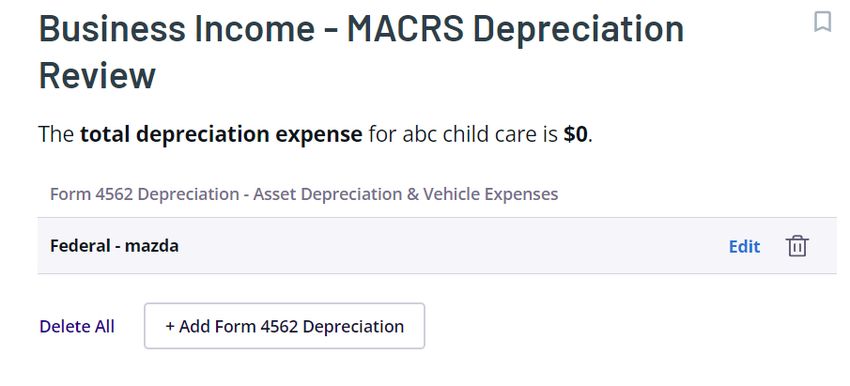
In the next screen, you will see previously eligible depreciation expenses that you were
already prompted to enter into the system populate, such as vehicles.

You will also be able to manually add additional assets by clicking “add”. When you
choose to edit or add additional expenses, you will be given an option of “Quick Entry”
or “Step-by-Step Guidance”. We recommend you select “Step-by-Step Guidance”

© CIVITAS STRATEGIES 2023                                                 25
otherwise you will need to complete a complex tax form manually rather than have the
system guide you through and complete it for you.

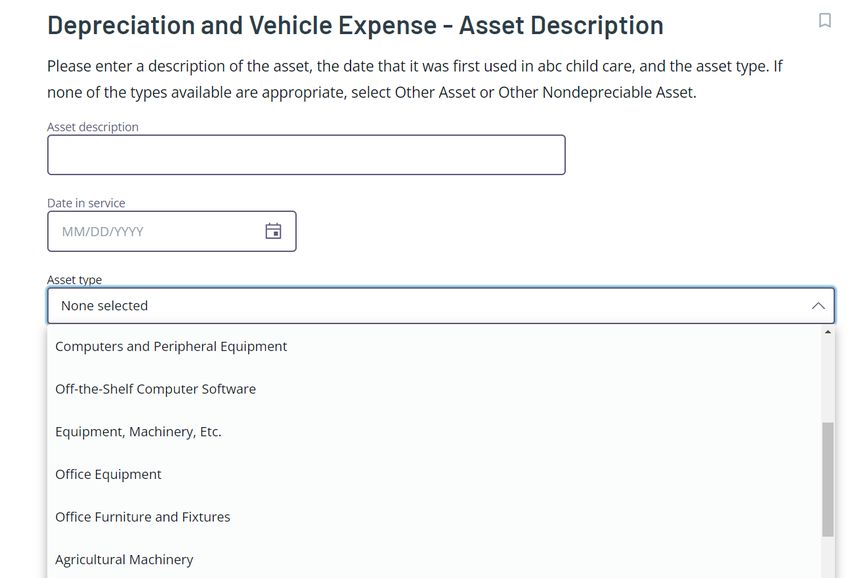
The page heading “Depreciation and Vehicle Expense Asset Description” may be a bit
confusing. Please note that this is not only for vehicles but for all your depreciable
assets. Under “Asset Type” there is a drop-down that lists vehicles but also other items.

Let’s say you purchased a copier for $2,600:

© CIVITAS STRATEGIES 2023                                                  26
You will then be required to select a depreciation method from a drop-down list for your
asset. The system will suggest which depreciation method you choose based on the
asset in question. You are required to select a method however, in a few screens you can
elect to claim 100% bonus depreciation on the asset if it qualifies (it likely does!), and
deduct the full amount in a single year instead.

© CIVITAS STRATEGIES 2023                                                 27
After selecting a depreciation method, you will see the Depreciation-Asset Life screen
displayed. The system will auto-populate an asset life (the useful life of the asset) based
on the description of your asset.

The next field is where you will apply special depreciation if your asset qualifies and you
would like to fully deduct it rather than depreciate it over time. Special depreciation is
also known as bonus depreciation. For 2022, this allows you to deduct 100% of the
depreciation in the year an asset is placed in service. This rule generally applies to
property with 20 years or less useful life (this would not apply to residential or
nonresidential real property because they have more than 20 years of useful life).

© CIVITAS STRATEGIES 2023                                                   28
The next screen will allow you to deduct this asset, or a portion of it, as a Section 179
Expense. If you’ve selected 100% bonus depreciation, there is no need to also apply a
Section 179 expense deduction to it.

Section 179 allows taxpayers to deduct the cost of certain tangible property as an
expense the year it’s placed in service. The property must be used for more than 50% of
your business, so not one that is primarily for personal use. Buildings and land don’t
qualify for Section 179 but building upgrades do. In 2022, you can expense up to $1.08
million of eligible property. This deduction is also limited by your business's net income
for the year – you can’t deduct more money than you made. At that point, you can opt
to take regular depreciation on the remaining assets or use the remaining of your
deduction in the following tax year.

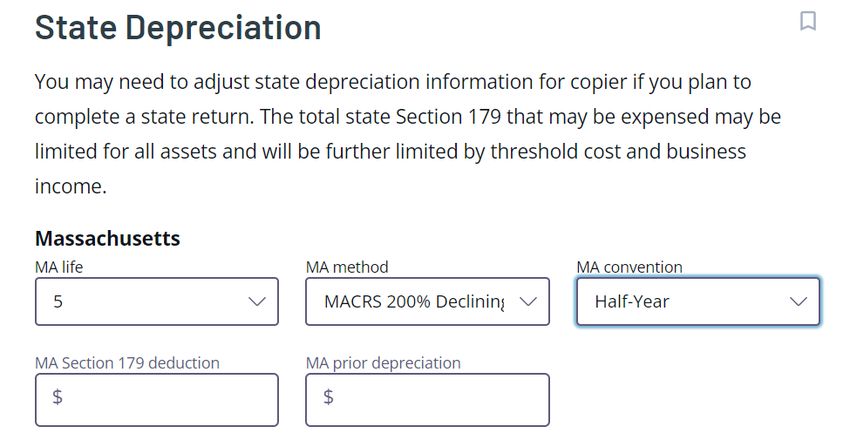
Depending on your state, there may be additional screens on state deprecation laws.
Please note that these will vary.

© CIVITAS STRATEGIES 2023                                                   29
The final question is Depreciation – Other Credits. This is only if you intend to apply for
certain credits for your asset and is usually not applicable. You will also see a credit
labeled “Credit for Employer-Provided Child Care Facilities (Form 8882)”. This is only
applicable to businesses that provide sponsored child care for their employees and is
usually not the child care provider themselves. If a child care business seeks to claim
this tax credit for service offered to its own employees, then at least 30% of enrolled
children must be employees’ dependents. For example, if your child care program has 20
enrolled children, at least six children (30%) must be dependents of your employees for
your business to be eligible to claim the credit.

© CIVITAS STRATEGIES 2023                                                  30
After completing the guided questions, you will be taken to your Depreciation Summary.
As you see in the example below, the copier’s deduction is its full cost of $2,600 because
it’s being treated as an expense due to the election to use bonus depreciation.

Here is a set of simple depreciation worksheets that can help you organize your
expenses and determine whether you are going to depreciate an asset or take the full
deduction in one year:

© CIVITAS STRATEGIES 2023                                                 31
Assets that can be expensed
 Assets are items that have a useful life of more than one year. Typically, assets are subject to
 depreciation however if they are less than $2,500 you can treat them as a deductible expense instead.
 List business assets that cost less than $2,500.
 Item                        Cost                     Quantity                    Total Expense
 Computer                    $2,000                   5                           $10,000

                               Assets subject to Section 179 deduction
 Allowable for tangible personal property (which means office equipment, furniture, vehicles, and most
 other assets that are not buildings) or improvements to your building (including a home used) used for
 business 50% or more of the time. These can cost more than $2,500 per unit. You can use this
 deduction on up to $1.08 million in expenses.
 Item                   Cost                Quantity               Total Expense          Date placed in
                                                                                          service (must
                                                                                          be in the same
                                                                                          tax year as the
                                                                                          deduction)
 Computer               $3,000              5                      $15,000

                                 Assets subject to bonus depreciation
 Allows you to deduct 100% of certain assets in one year without an upper limit on the total amount
 you can deduct. To qualify for Bonus Depreciation, the item needs to have a useful life of 20 years or
 less (so it doesn’t apply to your home) and be used for business 50% or more of the time.
 Item                   Cost                Quantity               Total Expense          Date placed in
                                                                                          service (must
                                                                                          be in the same
                                                                                          tax year as the
                                                                                          deduction)
 Computer               $3,000              5                      $15,000

                         Assets subject to straight line (regular) depreciation
 Allows you to deduct a portion of the costs of a business asset each year until you’ve fully recouped
 your costs. In this calculation, you take the total cost of the item and divide it by the total number of
 years that the IRS says is the life of the item. Below are some common useful life values from the IRS:
 Item                   Useful Life         Date placed in         Cost (basis)           Depreciation
                                            service                                       amount
                                                                                          (cost/useful
                                                                                          life)

© CIVITAS STRATEGIES 2023                                                                 32
Office furniture, 7 years fixtures, and equipment Automobiles 5 years Land 15 years improvements A house or 39 years building used in part or whole for business Next, you will be asked about any amortization expenses for your business. This is extremely rare in child care. If applicable you will need to talk to your financial or tax advisor – this would be a good time to ask a TaxAct specialist for guidance. You will then be asked if you have any allowable depletion deductions for your business. A depletion deduction is taken for the physical reduction of a natural resource, such as mining, quarrying, drilling, or felling. This does not apply to child care businesses. © CIVITAS STRATEGIES 2023 33
Additional screens that you will see are:
Asset Sale - Assets Sold
Did you sell any other assets used in your business that you have not already previously
entered into depreciation? Enter yes or no based on your situation.

Form 4797 - Other Topics
Other information may need to be reported on Form 4797 – Sales of Business Property. It
is unlikely you will have any other information to report here.

Business Use of Home
Keep in mind that you can deduct space in your home used exclusively for your child
care business. This can include a home office, even if it is just part of a larger room or a
storage area where you keep supplies for your business. TaxAct does not do a great job
© CIVITAS STRATEGIES 2023                                                    34
of guiding home-based providers through the Time-Space Calculation. We recommend
that you first calculate your Time-Space Percentage on your own, then enter that data
into TaxAct and ensure they match.
How do I include the costs of my home?
As a home-based family child care provider, if you regularly use your home in your
business and are regulated, you can deduct the cost of your home and other related
expenses.
To prepare for claiming these deductions on your return, whether you rent or own your
home, there are two steps you need to take: 1) determining the space and time used for
care and duties related to your business and 2) determining the allowable expenses
related to providing care in your home.
Let’s go through each one and know there is a table to record your answer below:
Step 1: Calculating the space and time use of your home
Two elements determine how much of your home expenses be deducted – the space
regularly used for care and the amount of time it is used on average. We are going to go
through the calculation, but there is also a spreadsheet you can use to make it even
easier.
Typically, space is measured in the square feet of your home that is used for care and
the total square footage of your home. Regular use includes areas that may be used all
day (such as a play area) but also ones that are regularly used for only part of the day. To
give an idea of an area that is only used part of the day, the IRS guide to auditing child
care providers uses the example of a provider with three children who each nap in
different rooms at quiet time (so they can rest better). Though the other rooms are just
used at nap time, it is a regular use and can be included in your calculation. If a space is
used 3 or more times per week, it could be considered “regularly used for business”. As a
reminder, children do not have to have access to the space in order to count it as regular
use. Areas for child care material storage, a laundry area, and the garage (if it stores a
vehicle used for business, lawn mower, or children’s toys). Garages, whether attached or
detached, should be included in the total square footage calculation.
You can then take the space used in your home for care and divide it by the total square
footage of your home to get a percentage: Space used for care ÷ total square footage of
your home = percentage of your home that you use for child care
For example, a provider uses 500 square feet of her 1,100 square foot home, regularly
for care. If she divides 500 by 1,100, she finds that she gets .454, or 45.4% of her home
is used regularly for care.

© CIVITAS STRATEGIES 2023                                                   35
Time is the total number of hours you used your home on average. This includes not
only the time that you are caring for children, but also the time you used the space for
cleaning, cooking, and preparing for the care of your children. You can also include the
time when your business was closed but you were preparing to open. For example, let’s
say your business is open and provides care for children 10 hours a day typically. During
the hours that you are closed, you clean and set up for two hours a day. Combined, this
would give you 12 hours a day that you were using your home. Then let’s say you were
closed for four weeks but did 10 hours of work during this time to maintain the space
and prepare for re-opening. Your total hours would be:
12 hours a day x 5 days a week x 48 weeks +10 hours when you were closed = 2,890
hours.
You can create a percentage of the business use of your home by dividing your total
hours used for care by 8,760 (the total hours in a year).
For example, our provider above uses her home for care 2,890 hours a year. When you
divide 2,890 by 8,760 you find that .329 or 32.9% of the time, her home is used for
business.
Calculating space and time for the percentage of your home expenses that are
deductible is done by multiplying the percentage of space used in your home by the
percentage of time it is used.
In our examples above, the provider is using 45.4% of her home for care that is provided
36.5% of the year. If she multiplies 45.4% times 32.9% she gets 14.9%. So, she can
deduct 14.9% of her home expenses.
We also have a spreadsheet that can make these calculations easier.
Business Use of Your Home: Calculating Space & Time
 How much space (in square feet) do you exclusively use for
 your child care business? Exclusive use areas are only used
 for child care business purposes and no personal purposes
 whatsoever. If no exclusive use, enter 0.
 How much space (in square feet) do you regularly use for
 your child care business? Regular use areas are shared for
 both personal and child care business purposes.

 What is the total square footage of your home? Include
 square footage of your basement, garage, porch, and deck in
 addition to the interior of your home. Do not count patios or
 yard space, or outdoor play areas.

© CIVITAS STRATEGIES 2023                                                 36
Exclusively used space percentage - Divide space used
 exclusively by the total square feet in your home for a
 percentage

 Regularly used space percentage - Divide space used
 regularly by the total square feet in your home for a
 percentage

 Total time, in hours, spent a year for care. This can include
 activities such as bookkeeping and paying bills, planning
 lessons/activities, purchasing supplies online, communicating
 with families, any online trainings, and cleaning. Keep track of
 these other non-direct child care tasks for your records. The
 best way to figure out your total time is to multiply the
 average number of hours you work each week and multiply it
 by the number of weeks you provide care during the year.
 Exclude any days you were closed and did not perform any
 business activities. For YoungStar, you must track your time
 for one full month in the first six months and one full month
 in the last six months, then extrapolate from there.

 Total hours in a year                                              8,760

 Divide the time spent for care by the total number of hours in
 a year to create a percentage.

 Multiply your regularly used space percentage by the time
 percentage
 If you have no exclusively used space, this is your Time-Space
 Percentage. You’ll use this percentage to deduct your
 business use of home expenses for your in-home family child
 care services.
 If you have exclusively used spaces: Add to your regularly
 used Time-Space Percentage your exclusively used space
 percentage.
 It will be: Space percentage (%) of exclusive use area +
 (regular use space percentage (%) * time percentage (%)).

 This will weigh your exclusively use areas higher in your
 Time-Space Percentage. This is your Time-Space Percentage.
 You’ll use this percentage to deduct your business use of
 home expenses for your in-home family child care services.

© CIVITAS STRATEGIES 2023                                                   37
Example: Business Use of Your Home

 How much space (in square feet) do you exclusively use for         200
 your child care business? Exclusive use areas are only used
 for child care business purposes and no personal purposes
 whatsoever. If no exclusive use, enter 0.

 How much space (in square feet) do you regularly use for           500
 your child care business? Regular use areas are shared for
 both personal and child care business purposes.

 What is the total square footage of your home? Include             1800
 square footage of your basement, garage, porch, and deck in
 addition to the interior of your home. Do not count patios or
 yard space, even outdoor play areas.

 Exclusively used space percentage - Divide space used              11.1%
 exclusively by the total square feet in your home for a
 percentage

 Regularly used space percentage - Divide space used                27.78%
 regularly by the total square feet in your home for a
 percentage

 Total time, in hours, spent a year for care. This can include      2,250
 activities such as bookkeeping and paying bills, planning
 lessons/activities, purchasing supplies online, communicating
 with families, any online trainings, and cleaning. Keep track of
 these other non-direct child care tasks for your records. The
 best way to figure out your total time is to multiply the
 average number of hours you work each week and multiply it
 by the number of weeks you provide care during the year.
 Exclude any days you were closed and did not perform any
 business activities. For YoungStar, you must track your time
 for one full month in the first six months and one full month
 in the last six months, then extrapolate from there.

 Total hours in a year                                              8,760

 Divide the time spent for care by the total number of hours in     25.68%
 a year to create a percentage.

 Multiply your regularly used space percentage by the time          27.78% * 25.68% =
 percentage
                                                                    7.14%

© CIVITAS STRATEGIES 2023                                                    38
If you have no exclusively used space, this is your Time-Space
Percentage. You’ll use this percentage to deduct your
business use of home expenses for your in-home child care
services.
If you have exclusively used spaces: Add to your regularly 11.1% + (27.78% *
used Time-Space Percentage your exclusively used space 25.68%) =
percentage.
18.24%
It will be: Space percentage (%) of exclusive use area +
(regular use space percentage (%) * time percentage (%)).
This will weigh your exclusively use areas higher in your
Time-Space Percentage. This is your Time-Space Percentage.
You’ll use this percentage to deduct your business use of
home expenses for your in-home family child care services.
Understanding and completing the above exercise will make it easier for you to respond
to the prompts in this section of the software.
Keep track of the hours you work when children are not present by noting the time you
spend preparing your space for children, cleaning, doing administrative tasks, responding
to families, etc. The sample log below shows how you can track the number of hours
you work in your home and shows how you calculated the number which can help you in
case of an audit.
Date Time spent on Task description Total time
task
Returning phone calls from prospective
9/25/22 5:30-6:00pm .5
families
9/26/22 – Food prep and set up play space 1.5 * 5
6:30-8:00am
9/30/2022 (reoccurring Monday – Friday) = 7.5
Menu planning, filing portfolio entries,
9/28/2022 5:30-6:30pm 1
prepare billing statements
9/29/2022 7:00-8:00pm Attend online training 1
Total number of hours for week 10
© CIVITAS STRATEGIES 2023 39After indicating that you use your home for business, you will need to state the method that you want to use to compute your deduction. The options are the Regular Method or the Simplified Option. The simplified home office deduction is a maximum of $1,500. For many child care providers, the simplified method represents less than their real costs so they should use the Regular Method (also known as the actual expenses method) to determine their home office deduction. © CIVITAS STRATEGIES 2023 40
You will then see the Business Use of Home – Daycare screen which asks:
Was any portion of your home used as a daycare facility? Select “Yes” if you are a home-
based family child care provider.

Next, you will need to state just how was your home used for both personal and
business purposes.

Business Use of Home - Personal Use
Is the portion used for daycare used:
    o Exclusively for daycare only (exclusively used 100%, rare)
    o Daycare areas are available for personal use (regular use spaces with no
        exclusively used spaces – common)
    o Part of your home is exclusively used for daycare only and other parts are used
        for both daycare and personal use (common)

Next will be the beginning of performing your Time-Space Percentage (%) calculation:

© CIVITAS STRATEGIES 2023                                                41
Next, you will enter the time that you spent performing child care or other duties related to your child care business. In our example, we will use 250 (number of days used for a program open 5 days a week for 50 weeks) x 10 (number of hours used per day, including administrative time) = 2,500 hours a year. © CIVITAS STRATEGIES 2023 42
The next question is asked in order to prorate your business use of home if necessary. If
you started or stopped using your home for your child care business during the tax year,
you will need to indicate that. This will impact your Time-Space Percentage.

You will be asked if you sold a home that was partially used for business and if you have
more than one place of business. Select yes or no based on your situation.

Business Use of Home - Home Sale
Did you sell a home in 2022 that had been used partially for business?

Business Use of Home - More Than One Place of Business
Do you have more than one place of business?

Next, you will begin listing home expenses associated with your child care business. You
will be asked to enter Direct and Indirect costs. Unless the expense is related to 100%
exclusively used business space, you will enter your costs as Indirect.
TaxAct gives a good explanation of the differences in these costs:

© CIVITAS STRATEGIES 2023                                                 43
You can also read


