SAP SuccessFactors Platform 1H 2021 - Hanau, June 2021 - i/Con ...
←
→
Page content transcription
If your browser does not render page correctly, please read the page content below

SAP SuccessFactors
Platform 1H 2021
Hanau, June 2021
Delta Changes 2021/H1
Platform

                        SAP Product Feedback Survey in Page Header

                        Manage Data Storage

                        Email Notifications for Admin Alerts 2.0

                        Center of Capabilities

                        Configuration Center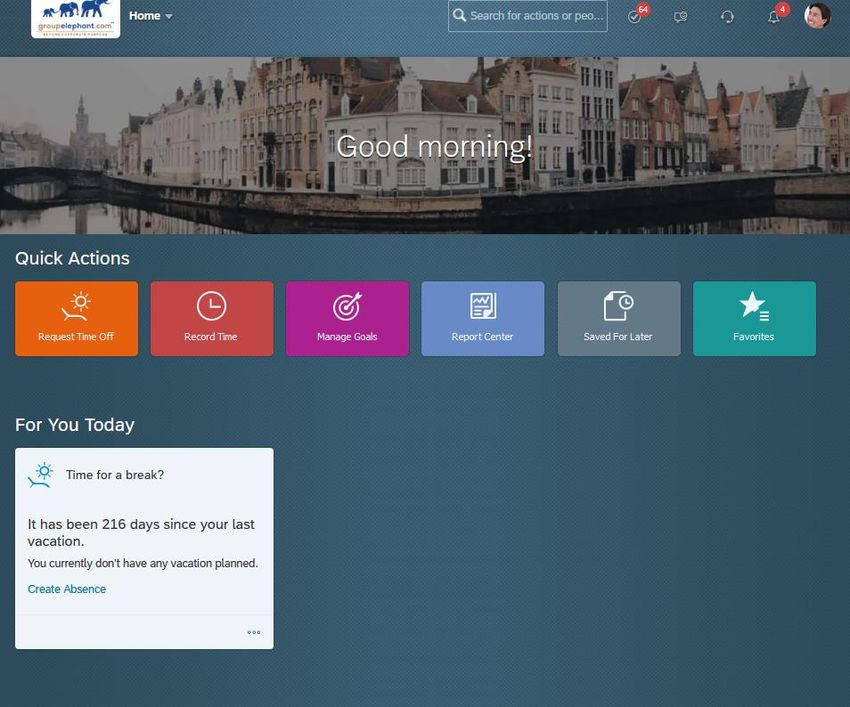
Delta Changes 2021/H1
Platform

                        Auto Data Purge Available in All Types of Instances

                        Role-Based Permission to
                        Perform Batch Operations on Directory Search

                        Ability to Show Or Hide
                        Quick Actions on the Home Page

                        Favorites on the Latest Home Page

                        Time Off Card on the Latest Home Page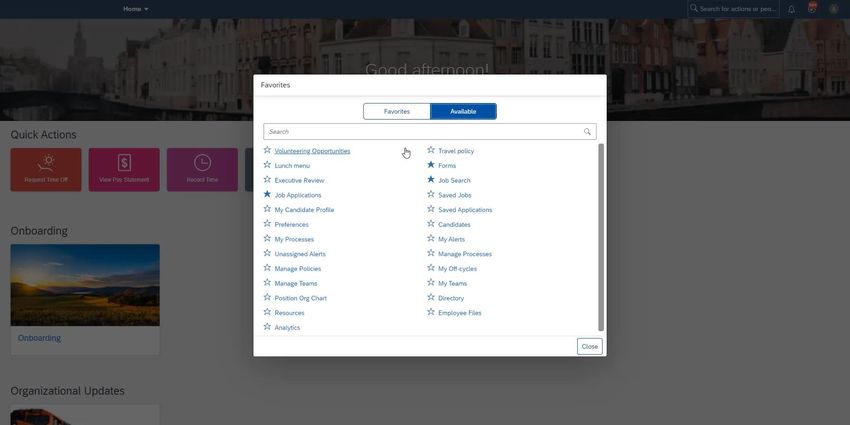
Delta Changes 2021/H1
Platform

                        Object Categories in
                        SAP SuccessFactors Metadata Framework

                        Deep Links to People Profile Blocks

                        Defining Target Populations as Peers or Managers

                        Password Expiration for Long-Time Unused Passwords

                        Time-Based Proxy Assignment on User Settings Page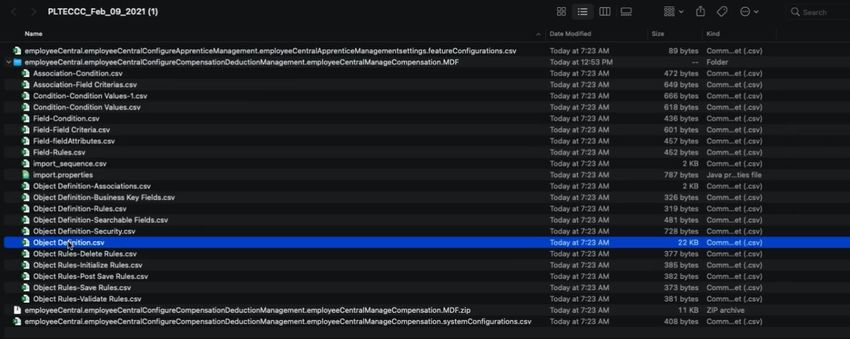
SAP Product Feedback Survey in Page Header

                                             Admin Opt-out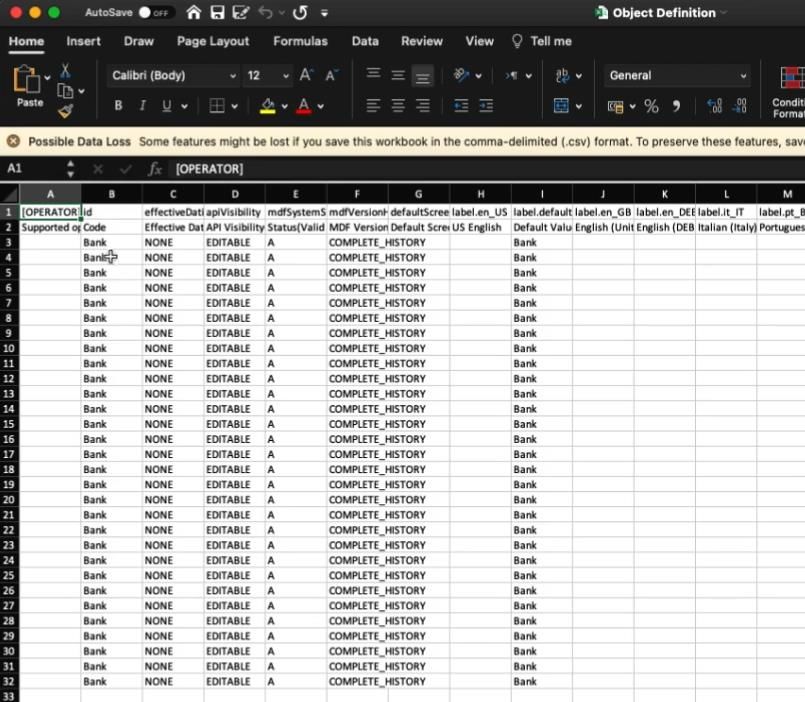
SAP Product Feedback Survey in Page Header

      All users now see an icon in the page header that launches a product feedback survey about SAP
      SuccessFactors.

      Choose      (Give Product Feedback) in the page header to launch the survey.
      Sometimes companies have the feeling that SAP doesn’t listen to them. User feedback enables
      SAP to gather feedback directly from the end users, so they can continually improve the software.

      This is the response of customer feedback.

                                                                                                          before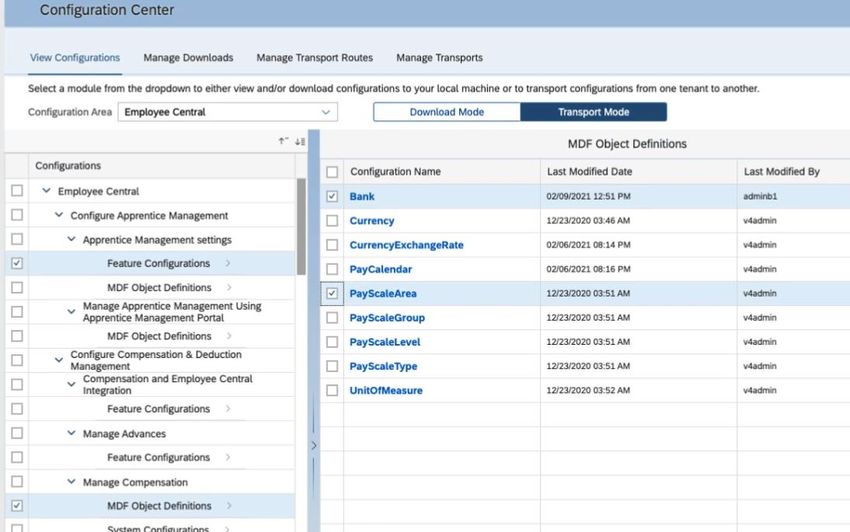
SAP Product Feedback Survey in Page Header

                                             now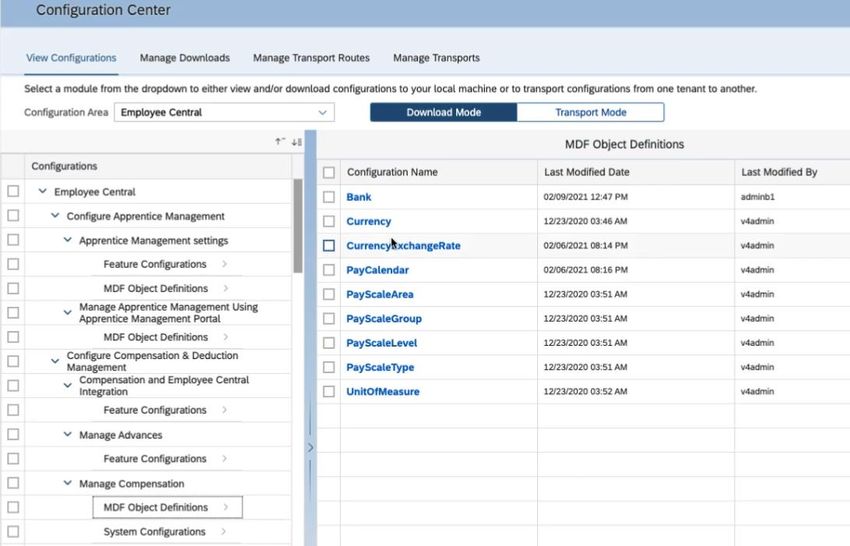
Manage Data Storage

                      Universal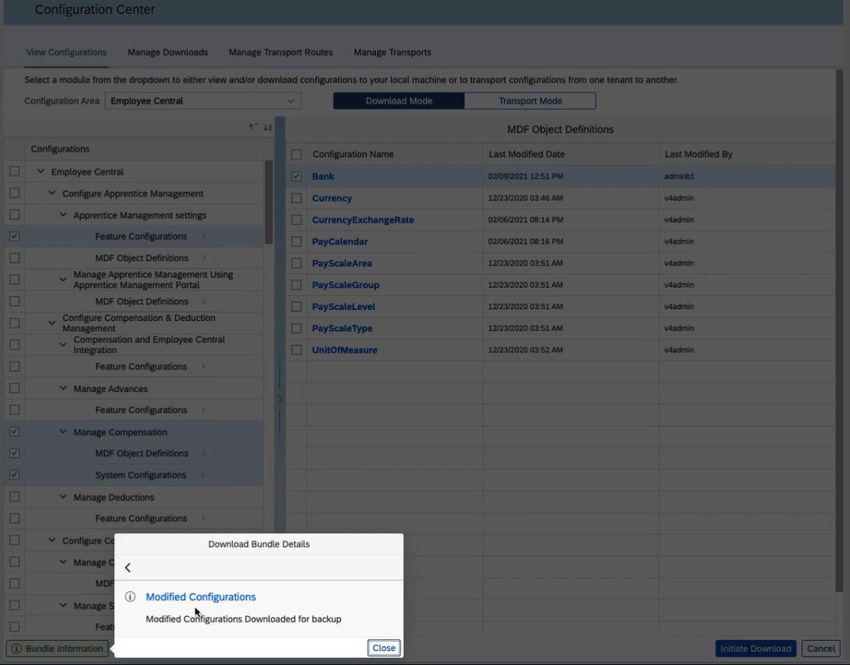
Manage Data Storage

     You can view data usage of your instance and manage storage space in the new Manage Data
     Storage tool.

     Manage Data Storage in Admin Center offers the following functionalities:
        • You get an overview of data usage in your instance.
        • You get detailed breakdowns of data usage by data type and by module.
        • You can purge data to free up storage space via the link provided to the Data Retention
           Management.
        • Data presented in each section is updated weekly on the weekend.

     Manage Data Storage offers you an insight of the storage usage in your instance. You can make
     data retention strategies accordingly.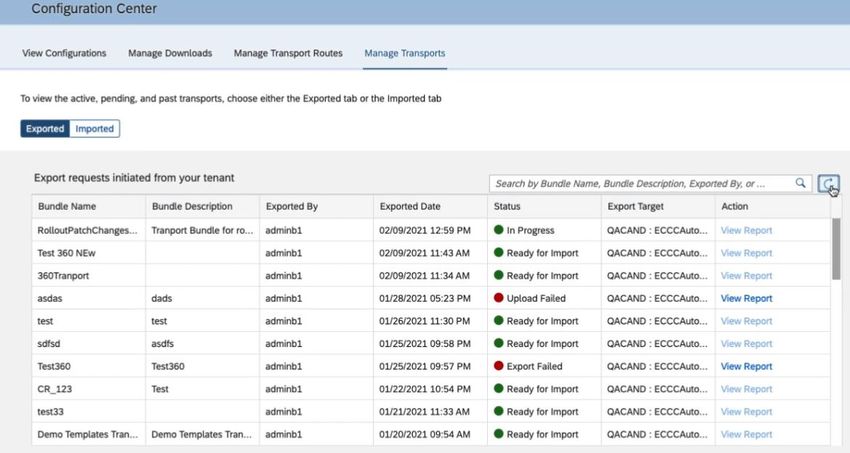
Manage Data Storage
Email Notifications for Admin Alerts 2.0

                                           Universal
Email Notifications for Admin Alerts 2.0
You can set up email notifications for the alert types that are most important to your work.
The default setting for email notifications is set to "none". You can change the frequency to daily
or weekly.
With email notifications, you get the information that is most important to you in the frequency
you need.Email Notifications for Admin Alerts 2.0
Center of Capabilities

                         Universal
Center of Capabilities
Center of Capabilities is a new framework that provides a centralized repository known as
Capabilities Library to capture the capabilities of people in an organization.
Capabilities include competencies, work styles, work values, and other organization-defined
attributes that enable people to achieve desired outcomes. In this release, the supported
capability type is competency.
You can perform the following tasks by using Center of Capabilities:
• Create and manage competencies and the associated behaviors based on organization-
specific requirements.
• Create a library structure to organize competencies under different libraries, categories,
and groups.Center of Capabilities
With Center of Capabilities, SAP plan to change the way capabilities are captured on both people
and experiences across SAP SuccessFactors products. This initiative aims to shift the approach
towards work as being more people focused than job focused. To meet this objective, SAP plan to
make Center of Capabilities the preferred framework to support the following features in future
releases:
• Provide users the ability to create a portfolio of their capabilities.
• Support additional capability types, such as skills and certifications.
• Introduce a proficiency rating scale for users to rate their skills.
• Allow SAP SuccessFactors products to consume capabilities from the centrally maintained
Capabilities Library.
In the current version:
• You can create competencies in Center of Capabilities and not in Job Profile Builder.
• The unique identifiers for competencies are displayed in the External Code field in Center
of Capabilities.
In the previous version:
• You created competencies in Job Profile Builder.
• The unique identifiers or GUIDs for competencies were displayed in the GUID field in Job
Profile Builder.Center of Capabilities
Center of Capabilities
Center of Capabilities
Center of Capabilities
Center of Capabilities
Center of Capabilities
Configuration Center

                       Universal
Configuration Center
Using Configuration Center, you can get a holistic view of all the configurations that are supported
across the SAP SuccessFactors application.
Configuration Center allows you to view or download configurations to your machine, and
transport configurations from one tenant to another.
Configuration Center simplifies the user's experience around configuring change management
process, viewing configurations, and supporting towards logging quality incident when you
encounter any configuration issue. This feature is from a Customer Community Idea.Configuration Center
Source SystemConfiguration Center
Configuration Center
Configuration Center
Configuration Center
Configuration Center
Configuration Center
Configuration Center
Configuration Center
Configuration Center
Configuration Center
Configuration Center
Configuration Center
Configuration Center
Configuration Center
Configuration Center
Configuration Center
Configuration Center
Configuration Center

                       Target System
Configuration Center
Configuration Center
Configuration Center
Configuration Center
Configuration Center
Auto Data Purge Available in All Types of Instances

                                                 Universal
Auto Data Purge Available in All Types of Instances
Auto Data Purge is introduced to all types of instances in addition to preview instances. Documents and
audit data are purged periodically when they’re configured to be purged and exceed the retention period
defined.
The Auto Data Purge process has been used to purge data periodically in preview instances as of the 1H
2020 release. In the 1H 2021 release, SAP has extended the Auto Data Purge process to production, test,
development, and sales demo instances. You can choose which type of data you want to purge and set the
retention period. SAP offer the following updates of Auto Data Purge in this release:
• Default settings of the Auto Data Purge tab are different depending on instance types.
• SAP renamed all the data types to better categorize the target data of Auto Data Purge. The scope of
target data and the impact of purging them remain unchanged.
o Attachments is renamed to Documents.
o Person Related Audit Data is renamed to Audit Data Containing Personal Identifiable Information.
o Non-Person Related Audit Data is renamed to Audit Data Without Personal Identifiable
Information.
Auto Data Purge is introduced to all types of instances to further optimize cloud storage and improve data
storage efficiency.Auto Data Purge Available in All Types of Instances
In the current version, a new tab Auto Data Purge is added in
Data Retention Management in production and sales demo instances.Auto Data Purge Available in All Types of Instances
In the previous version, there was no Auto Data Purge tab in Data
Retention Management in production and sales demo instances.Role-Based Permission to
Perform Batch Operations on Directory Search
Admin Opt-inRole-Based Permission to Perform Batch Operations on Directory Search You can now use the role-based permission Perform Batch Operations on the Results of Directory Search: Export, Print, and Send Email to control who can perform batch operations on the results of Directory Search. You can find the permission through User Permissions → General User Permission → Perform Batch Operations on the Results of Directory Search: Export, Print, and Send Email. Customers want to restrict who can perform batch operations on search results to ensure that this function is only used for administrative purposes. This enhancement is from a Customer Community Idea.
Role-Based Permission to
Perform Batch Operations on Directory Search
Role-Based Permission to
Perform Batch Operations on Directory Search
Ability to Show Or Hide
                 Quick Actions on the Home Page

Early Adoption                                    Admin Opt-in
Ability to Show Or Hide
Quick Actions on the Home Page
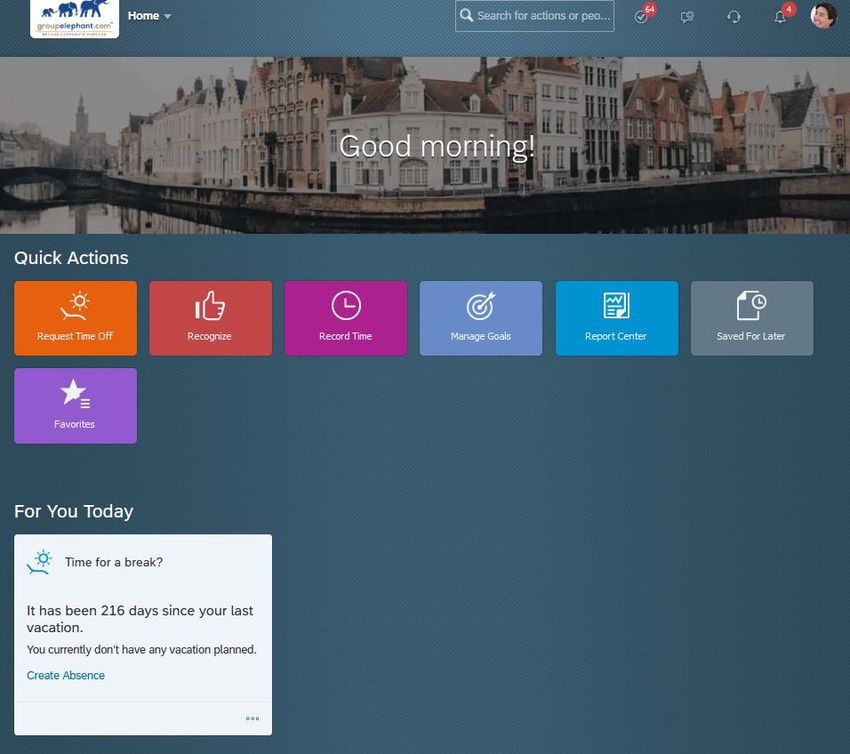
As an administrator, you can now decide which quick actions to show or hide on the latest home
page.
All quick actions available in the system are visible by default. You can deselect the ones you don't
want to use, so that they aren't visible to anyone, in any role, except for the Favorites and Saved
for Later quick actions, which are always visible.Ability to Show Or Hide Quick Actions on the Home Page
Ability to Show Or Hide
Quick Actions on the Home Page
Favorites on the Latest Home Page

Early Adoption                                       Admin Opt-in
Favorites on the Latest Home Page

      You can now use the Favorites quick action to review a list of available links and select your
      favorites, so that you have quick access to them on the home page.

      The Available list includes some common links that SAP provide by default, as well as custom links
      added by administrators. The Favorites list includes only the links you've marked as your personal
      favorites.

      The Favorites quick action on the latest home page provides a similar experience to Quick Links
      on the legacy home page. The addition of Favorites gives customers quick access to important
      pages from the home page.
Favorites on the Latest Home Page
Favorites on the Latest Home Page
Favorites on the Latest Home Page
Favorites on the Latest Home Page
Favorites on the Latest Home Page
Favorites on the Latest Home Page
Time Off Card on the Latest Home Page

Early Adoption                                           Admin Opt-in
Time Off Card on the Latest Home Page

      The latest home page includes a card to remind users of Employee Central Time Off to take
      vacation regularly.

      The home page card shows the following:

          • The amount of time, in days, since the last time the user took vacation.

          • The time when the user next has planned vacation.

          • An invitation to take vacation, with a link to the page where the user can apply for
            vacation.

      The card appears on the landing page when it has been more than 30 days since the user's last
      vacation and he or she has no planned vacation in the next 60 days.

      SAP developed this card to make it easier for users to maintain a good work/life balance.
Object Categories in
SAP SuccessFactors Metadata Framework
UniversalObject Categories in
SAP SuccessFactors Metadata Framework
SAP SuccessFactors Metadata Framework now includes different object categories to determine
the type of data that an object represents.
SAP SuccessFactors Metadata Framework supports, Configuration, User Transactional, Non-User
Transactional, Technical, and Uncategorized object categories. For pre-delivered objects, the
object category is predefined and can't be changed.
In future releases, these object categories will help you define the default behavior and apply
certain restrictions to the objects based on the type of data they represent.
For example:
• Transport of objects from one instance to another instance is restricted if they belong to the
Technical object category.
• Default behavior is defined such that field extensions aren’t supported for objects that belong
to the Configuration object category.Object Categories in SAP SuccessFactors Metadata Framework
Object Categories in
SAP SuccessFactors Metadata Framework
Deep Links to People Profile Blocks

                                      Universal
Deep Links to People Profile Blocks
You can now use a deep link that sends users directly to a specific People Profile block of an
employee.
Deep links are available to all types of blocks and can be used anywhere hyperlinks are possible,
including:
• Email notifications
• SAP SuccessFactors applications
• Offline content
This feature allows users to directly access a specific block in People Profile and saves the effort to
look for relevant information on the profile page. This new feature is from two Customer
Community Ideas.Deep Links to People Profile Blocks
Deep Links to People Profile Blocks
Deep Links to People Profile Blocks
Deep Links to People Profile Blocks
Deep Links to People Profile Blocks

                                You only see the single block in the People Profile, nothing more.
Deep Links to People Profile Blocks
Deep Links to People Profile Blocks
Defining Target Populations as Peers or Managers

                                               Universal
Deep Links to People Profile Blocks
When you assign a permission role to everyone or to a dynamic group, you can define the target
population as peers or managers of the users in the access group. Peers are users who have the
same direct manager as the user in the access group.
In the Grant this role to... page, besides Granted User's Department, Granted User's Division,
Granted User's Location, and Granted User (Self), you can now also see Granted User's Peers and
Granted User's Manager in the Target population of dropdown.
You can now easily define a target population of peers or managers.Deep Links to People Profile Blocks
Password Expiration for Long-Time Unused Passwords

                                            Admin Opt-in
Password Expiration for
Long-Time Unused Passwords
You can now expire passwords that haven't been used to log into the system longer than a
defined period.
You can now see a new admin option, Password Expiration for Long Time Unused Passwords, on
the Password & Login Policy Settings page. To disable this option, choose N/A from the
dropdown.
SAP made the enhancement to comply with Italian laws on password expiration.Time-Based Proxy Assignment on User Settings Page
UniversalTime-Based
Proxy Assignment on User Settings Page
You can now restrict proxy assignments to a specified time range when you assign a proxy to act
on your behalf, using your personal account settings.
You can add a start date, an end date, or both when you assign a proxy on the Settings page. The
assigned proxy can only access your user account during the specified time range.
Many customers require that proxy assignments have an end date, for compliance purposes. This
enhancement is from a Customer Community Idea.Time-Based Proxy Assignment on User Settings Page
Stefan Janke
              i/Con Unternehmensberatung GmbH
                     Sophie-Scholl-Platz 8
                         63452 Hanau

                   Tel.: +49 (0) 6181 189010

                  Web: www.icon-frankfurt.de
            mailto: stefan.janke@groupelephant.com

Thank you
You can also read


