2019 Residential and Commercial Solar Photovoltaic Program Kick-off
←
→
Page content transcription
If your browser does not render page correctly, please read the page content below

2019 Residential and
    Commercial
 Solar Photovoltaic
  Program Kick-off

                       1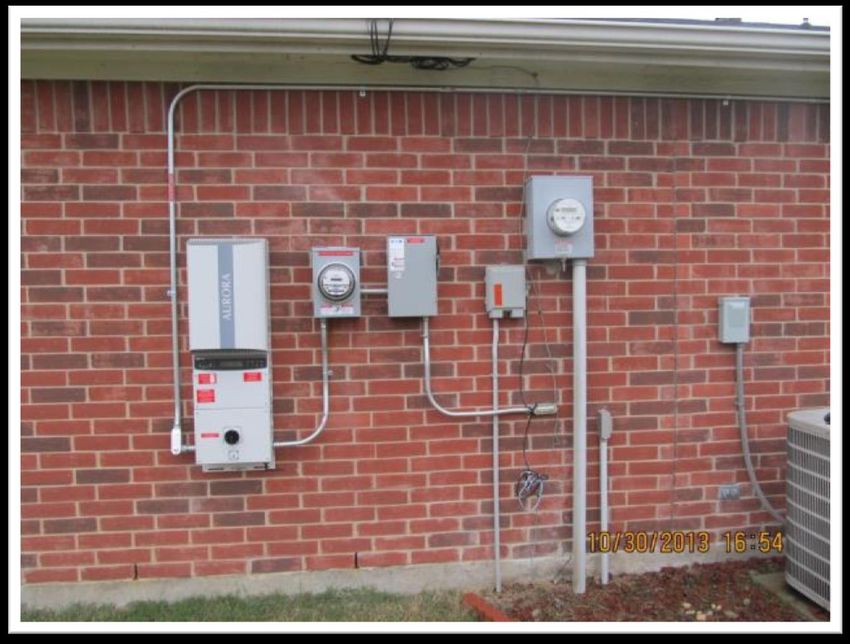
AGENDA

         2019 Dates & Budget

           2019 Requirements &
           Qualifications

             2019 Program Information

            2019 Goals

          Inspection Notes

                                        2
2018 Review

 Residential
 •   Incentives paid = $1,486,726
 •   284 projects completed
 •   Average size = 3.90 kW and 13,111 kWh
 •   Average incentive = $5,200
 Commercial
 •   Incentives paid = $3,175,017
 •   83 projects completed
 •   Average size = 32.2 kW and 104,490 kWh
 •   Average incentive = $40,444
 •   Over $800,000 was added to budget and paid

                                                  3
PROGRAM OPENING AND CLOSING
• 2019 Applications to participate can be submitted starting December
 19th at 10 AM CST (Service Provider sign up); contact Help Desk if you
 have questions about your status and to be associated
 • Returning SP does not need to complete a new Addendum but must
   review all info and submit each program year for each program option
• Residential and Commercial Program opens for projects starting
 January 8th at 10 AM CST
• 2019 Programs you are eligible for will show on sign on to EEPM after
 1/8, 10:00 AM when you sign on. If missing, please contact the Help
 Desk or PM to associate your company
• Service Provider program Applications will not be accepted for the
 2019 program after April 19th
• Program closes November 25th, 2019. All projects must be submitted
 for inspection by the close of business.
                                                                          4
2019 BUDGET AND INCENTIVES
2019 Budget
 • Residential Budget $2,019,810
 • Commercial Budget $2,038,440
2019 Incentives
Commercial and Residential
 • The incentives will vary from project to project due to site data, and all
   projects will use PVWatts. A project incentive calculator is available to
   assist with estimating projects.
Program Budget Caps
• A Service Provider will be limited to no more than 10% of the budget.
    •     Residential cap: $201,981
    •     Commercial cap: $203,844
• This means that no one Service Provider can receive more than 10% of
  the budget for that option.
•       The cap can be raised as needed and will increase if additional funds are added to budget

                                                                                                    5
2019 MINIMUM AND MAXIMUM
Residential (per ESI ID)
 • Minimum 1 kW DC
   • Projects cannot be submitted under the
     minimum
 • Maximum 15 kW DC
   • Projects found over 15 kW DC will be
     cancelled and not eligible for an incentive
Commercial (per ESI ID)
 • Eligible systems must be at least 5 kW DC
   – Less than 200 kW DC or 75% of Peak
   Demand, whichever is less.                         Project Caps
   • Projects can be installed up to 200 kW             • A Service Provider can only
   • Projects found over 200 kW DC of installed           have a limited number of active
     capacity will be cancelled and not eligible          projects
     for an incentive                                   • Residential – 8 projects
 Commercial and Residential                             • Commercial – 5 projects
   • Once a site has a solar array installed, it is
     not eligible for any future incentive whether
     or not it participated in the incentive
     program
                                                                                      6
SERVICE PROVIDER QUALIFICATIONS

Service Provider
 • A service provider is a Solar PV installer, a Self Sponsor in commercial or a
   Retail Electric Provider
 • The entity that signs up in EEPM can only receive the incentive
Requirements
 • Electrical Contractors License or Master Electricians License
 • Identify if affiliated with other service providers
 • Update Profile and sign/submit a 2019 Program Application for each option
 • Demonstrates the ability to successfully meet program requirements and
   meet deadlines
 • Currently eligible to participate in Oncor Energy Efficiency programs

                                                                                   7
SERVICE PROVIDER QUALIFICATIONS

Requirements
• Insurance – same as 2018
  • Workers’ Compensation
  • General Liability
  • Automobile Insurance
  • 2019 Application cannot be approved until insurance is approved/current
 • Know your expiration dates!
 • Check your dashboard for the insurance information
 • Allow at least 1 week for renewals
 • Have your insurance agent email the renewal to eepminsurance@oncor.com
 • Have your agent copy you on the email if you want updates
 • Status will be visible on EEPM project page

                                                                          8
2019 Information

Reminder: Residential areas that are located in
a community that has been classified as a solar
or renewable community will not be eligible
New Service Providers to Oncor program
•     Successfully complete one project successfully,
      residential and commercial. Additional projects will be
      approved when Inspection is passed.

Reservation of Funds Completion Deadline
    Residential
      •   A project must be completed 90 days from the
          day it is submitted
    Commercial
      •   A project must be completed 120 days from the
          day it is submitted
    One extension granted by PM for up to 45 days, any other request
    will need management-level approval. Extension dates will be closely
    tracked in 2019, and projects can be cancelled if status updates are
    not received.

                                                                           9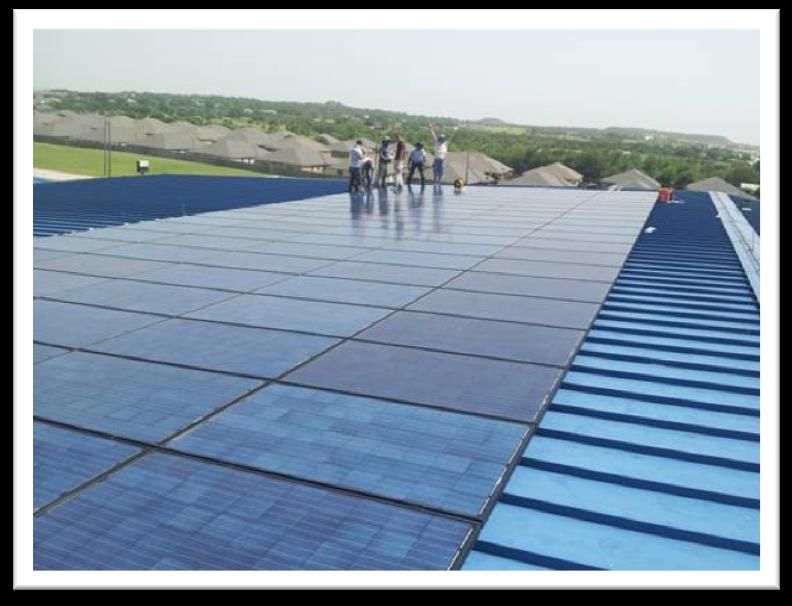
NEW for 2019 – Shading Study Requirements

• Required when project is submitted with the Initial
  Application (IA Open)

• Must show annual percentage of shade/unshade

• Percent required for each azimuth listed in data

• Study will need to be updated if changes (azimuth/tilt)
  are made when submitted for inspection

                                                            10
Shade Study Requirements
112019 Information
Electronic Signatures option on all documents
Required documentation left with customer
• Host Agreement
• Installation Notice
If the customer signs it, give them a copy
Incentive calculations
• All Projects will use PVWatts, resulting in
incentive amounts being unique for each install
• EEPM will calculate savings and incentive
• Updates need to be done before inspection. Make
sure that the EEPM data matches photos and
match what was installed.
New Construction
• Not allowed in either option
• Once permanent meter is set, project can be submitted
if installation has not started
122019 Customer Communication Plan
• Customer Education
• Clear up confusion
• Assist with and explain the Interconnection process
• Make an effort to understand the Oncor Market
• A new meter is not always required – some exceptions
• Oncor reads the meter and passes the readings to the Retailer,
who then bills the customer based on the plan they are enrolled
in
• The Retail Electric Provider (REP) role
• http://www.powertochoose.org/ - Renewable Power
• Realistic expectations – Don’t let your sales force over-
sell project
Minimize Errors
• Panel and Inverter info biggest error; check before
submitting
• Errors and customer complaints can impact continued
and future participation
13Service Provider Awareness
Work toward:
• Limit customer confusion about all things solar
• Limit Oncor confusion – Program Manager, DG, Inspection and Help Desk
• Different company names, incorrect contact info
• Update contact and employee info – use Help Desk
• Not replying to phone calls and emails is not acceptable
Subcontractors emphasis (again)
• Subcontractors have to be listed in EEPM
• Providers that do not keep list up to date are subject to lock-out and possible termination as
warranted; this includes outside sales companies
• If you install for another Provider you must be registered as sub for them; if not listed it
could cause you be both be locked out
• Responsibility of Providers to verify with PM that subcontractors are eligible to work in Oncor’s
programs
• Identify subcontractors – will be locked out until Profile is updated
• What are subs? – any other company doing work for you on projects in EEPM; limit customer
confusion
• Inspection team will spot-check project sites to verify companies installing
• Service Providers responsible for all work at customer’s site, including communicating with
customer and managing any issues caused by subs
14Final Program Notes
Service Provider is responsible for all information in the Program
manual and all parts of the project
Double-check the project before you submit it
• Does EEPM match the attachments and match what was installed?
• Customer contact information is complete and correct
• Inspection contact information is correct
• All documents are attached and signed
Electronic Transfer for payments
• Quicker payments
• Form available under Resources tab in EEPM
Oncor offers an Incentive and not a rebate
• Incentives move the customer to install the measure
• Rebates are done after the product is purchased
15Quick Links
Interconnection Information:
http://www.oncor.com/EN/Pages/Interconnection-Applications.aspx
DG@oncor.com
PUCT Power to Choose:
http://www.powertochoose.org/
PV Watts
http://pvwatts.nrel.gov/index.php
16INSPECTION
Getting it Right the First time
17INSPECTIONS
• Allow 20 calendar days once the project has been sent for
post-inspection
• Make sure the Customer and Inspection Contact phone
numbers are correct before you submit the project for
inspections
• Good, clear photos allow inspectors to process the
projects faster
• Photos should be from each site. Do not use stock
photos or the same photo from other projects.
18INSPECTIONS
• Please only upload pictures requested. Array, panel, inverter, disconnect / Oncor
meter. Helpful if pictures are labelled.
• You must provide both Customer and Provider contact information within EEPM.
Project will be rejected should you list the Provider contact info as the inspection
contact for the Customer.
• Panel Module type, Standard, Premium or Thin Film must be per Texas Technical
Resource Manual for efficiency; contact Inspection Manager or Program Manager
as needed
• Google Earth is used for verifying azimuth reported for all desk review projects
19ARRAY EXAMPLE
20LABEL ARRAY
21ARRAY EXAMPLE
22GROUND MOUNT EXAMPLE
23GROUND MOUNT EXAMPLE
24INVERTER NUMBER EXAMPLE
Must be able to confirm model number and manufacturerINVERTER MODEL NUMBER EXAMPLE
BACK OF PANEL EXAMPLE

                        27
METER AND DISCONNECT EXAMPLE
MODULE TYPE
                 Table Error! No text of specified style in document.-1. Module Type Options
                                         Approximate                         Temperature Coefficient
                   Type                                    Module Cover
                                          Efficiency                               of Power
     Standard (crystalline Silicon)     15%               Glass              -0.47 %/°C
     Premium (crystalline Silicon)      19%               Anti-reflective    -0.35 %/°C
     Thin film                          10%               Glass              -0.20 %/°C
CONTACT INFORMATION
Program Manager Inspection Manager – Solar
Jeff Reed Terry Manning
(214) 486-6966 office (214) 486-4624 office
Jeff.Reed@oncor.com tmanning@oncor.com
EEPM Help Desk
(866) 258-1874
support@oncoreepm.com
Insurance
eepminsurance@oncor.com
30You can also read


